UWACAM is the leading professional app for underwater photo and video, now available in Version 3.0.
Designed for DIVEVOLK Seatouch cases and developed with award-winning underwater cinematographer Matthias Lebo, this app is easy to use, with large, clear controls for effortless, stunning video and photo captures.
Packed with pro features, UWACAM provides automatic UWACOLOR* processing (real-time or postprocessed) to enhance colors, supports LOG format (incl. Apple Log and Apple Log 2 on compatible devices), built-in LUTs, manual mode, user presets, histogram, focus peaking, zebra, configurable overlays and much more.
Integrated Vizalyzer AI analyzes your captures for marine life information (Internet and subscription required).
Highlights:
• UI designed for underwater, action sports and other challenging environments
• Easy to use in DIVEVOLK Seatouch cases or with touchscreen-compatible gloves
• Perfect for scuba diving, snorkelling, watersports and sports action
• Choose AUTO Mode (great for beginners) or PRO Mode with full manual control
• UWACOLOR dynamically adaptive color processing — real-time or postprocessed, also with 4K, high frame rates and HDR/Rec.2020
New in 3.0:
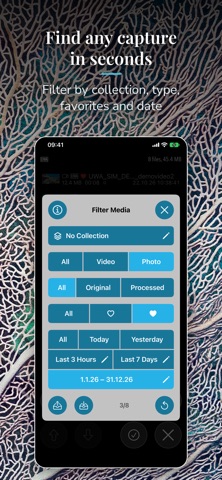
• Favorites, Collections and stored filters to find your best captures fast
• Slideshow with export to an HD or UHD movie
• Trim, slow motion (down to ⅛ speed) and photo crop in playback
• HD and 720p video up to 240 fps on the iPhone 14 Pro, iPhone 15 and later
• Variable aperture on the iPhone 18 Pro, with Aperture Lock for video
• Exposure Blending: fewer clipped highlights in video
• Analyzer with histogram or waveform; presets P1–P6 in quick access
• Interface Size up to X-Large, e.g. for use in a housing
Capture & creative tools:
• Easy zoom with three different speeds
• Video and photo in all device resolutions, frame rates and color spaces
• Focus peaking, zebra, LOG (incl. Apple Log / Log 2), built-in and custom LUTs
• Manual control of exposure, focus, white balance, tint and more
• Magnifier for macro
• Self timer with configurable picture count and interval
• Batch UWACOLOR postprocessing
• Photo Flash and Video Torch in quick access
• Camera Blending for improved macro on compatible devices
• Postprocessing effects (Spotlight, Twist, Sphere), Black & White or Sepia, flip and mirror, photo double exposure, customizable imprints
UI, settings & storage:
• Customizable parameters and easy-to-use menus
• User presets, multi-page quick access, histogram
• Configurable overlays: center point, rule of thirds, safe area, grid, level, aspect ratio and more
• Built-in compass overlay
• Optional GPS coordinates (satellite-derived or manual)
• Rotation lock and upside-down portrait in PRO mode
• Store captures to photo library, files or in-app — grid/list browsing, share, delete
• Media list rebuild from existing files or Photos library
• SMPTE timecode (off, record run, local time or UTC)
• Sleep mode with optional touch guard
• UWACAM Widget for the lock screen
Free download — no capture feature limitations. Subscribe to disable the watermark on subsequent captures (UWACOLOR captures made without subscription carry a permanent watermark) and to enable Vizalyzer AI image analysis.
Feedback or issues? Email support@uwacam.com — we're happy to help!
*No color processing or filter can fully restore colors lost to spectral absorption. For best results we recommend using a video light if available.
End-User License Agreement: https://www.apple.com/legal/internet-services/itunes/dev/stdeula/
Show more
Show less