

V1connection, the app
V1connection, the app is made and published by Valentine Research, Inc. AppBrain is an independent app data site and isn't affiliated with Valentine Research, Inc. The app name, icon, screenshots and description belong to Valentine Research, Inc. and are shown as published on the App Store.
AppBrain's verdict
Established- Rating on App Store
- 3.43
- 72 ratings
- Last updated
- August 10, 2026
It doesn't have enough ratings yet to judge what users think.
Rankings
App Store top chartsApp Store Rankings for V1connection, the app
Competitors
Similar apps and more from Valentine Research, Inc.Alternatives to V1connection, the app


Releases
Updates seen on the App Store- Version
- 1.87
- Launched
- July 2013
No changelog data
User feedback
Ratings and reviews on the App StoreComments on V1connection, the app for iOS
We don't have enough comments to show example comments. Please check back later.
Technology
Found in the app by AppBrain- Price
- Free
- App size
- 40.8 MB
- Content rating
- Everyone
Technologies used by V1connection, the app
About the app and developer
About V1connection, the app
V1connection, the app is a travel app developed by Valentine Research, Inc.
What is the rating of V1connection, the app?
V1connection, the app is rated 3.43 out of 5 stars, based on 72 ratings.
Is V1connection, the app free?
V1connection, the app is free. The app size is 40.78 MB. The latest version available is 1.87. The last update was on August 10, 2026.
What are the requirements for V1connection, the app?
The app has a content rating of Everyone. The app has been available on the App Store since July 2013.
Developer information for Valentine Research, Inc.
Address:
Store listing
By Valentine Research, Inc., from the App Store



Description by Valentine Research, Inc. Written by the developer, not by AppBrain. Click to read.
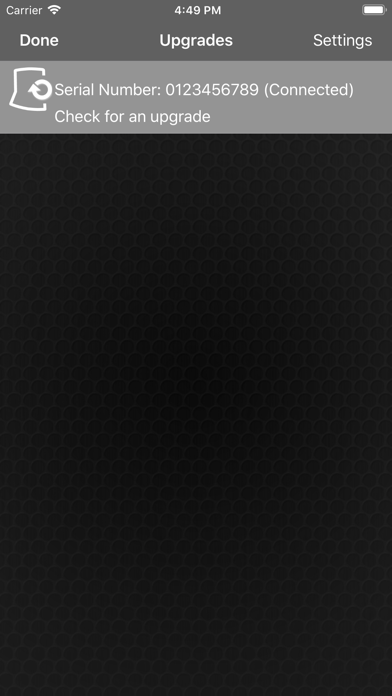
NEW FEATURE—DOWNLOADABLE PERFORMANCE UPGRADES FOR V1 GEN2
V1 Gen2 firmware upgrades are downloadable only through this app; downloadable upgrades are incompatible with V1 Gen1 models.
YOU’LL SEE THE THREAT PICTURE
See our exclusive Radar Locator with its illuminated arrows pointing toward each threat as the Bogey Counter tracks multiple threats. Also shows you a revolutionary new way of analyzing radar threats.
ARROW IN THE BOX
Radar makers, under penalty of law, must certify to the FCC the frequencies used by the equipment they sell. We constantly monitor those certifications so we know exactly where real radar operates on each band. V1 scans the entire width of all radar bands but to draw your attention to the Active Radar Zones, we outline them with a yellow Box. To be in compliance with federal regulations, all radars (except photo) must operate “in the Box.” When you see an arrow outside the Box, that’s probably a false alarm; when it’s in the Box, take it seriously.
ADVANCED SITUATION AWARENESS
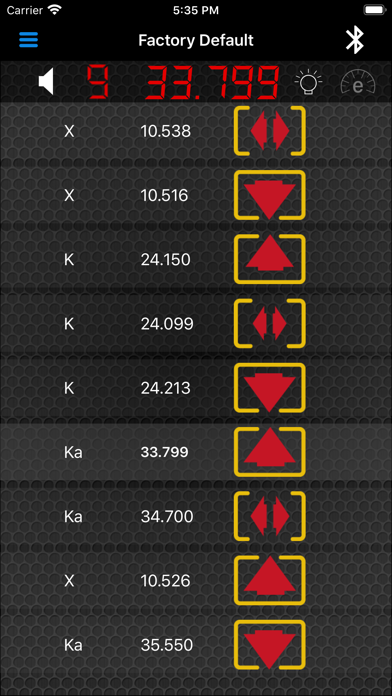
The Threat Picture (aka Picture Screen) displays a separate arrow for every threat within range, pointing ahead, beside or behind, according to its direction from your car. The arrows grow larger as the signal strength increases. Your visual scan of the Threat Picture lets you see which arrows are in the Box, and spot critical trends—which alerts are maturing into threats and which are fading in concern.
SITUATION AWARENESS FOUR WAYS
Choose among four information screens at any time. The Quad Screen emphasizes location with up to four separate arrow sets, one for each enabled radar band, or for laser if fewer bands are active. The V1 Screen reproduces V1’s front-panel warnings including signal strength, Bogey Counter and Radar Locator plus frequency of the Priority Alert. Or you can choose the (Threat) Picture Screen or the Threat List, which shows a list of all signals within range, each with an accompanying arrow to show direction.
BEYOND SITUATION AWARENESS
Think of the app as the Master Controller for your V1 system. You can revise programming, adjust SAVVY settings, change muting, activate dark mode, save custom programming profiles for different trips, and more, all from your handheld. DEMO MODE IS AUTOMATIC.
The audible warnings of your V1 Gen2 and V1 can now be transmitted through your phone to your car's sound system, or to speakers in your helmet if you are a motorcyclist. Any other hook-up that allows you to hear your phone can also bring V1's warnings directly to your ear.
NEW PROGRAMMING OPTIONS
Radar coverage can now be specially tailored to the unique radar bands used outside the U.S. Advanced users may want to modify the sweeps covering frequencies used here in the U.S. according to unique local conditions. The Profiles screen shows a menu of the variables you can modify. For example, you can select "Background Notifications" so that you can run other apps but receive instant notification from V1 whenever a new threat appears.
THE APP IS FREE
Just download this free app. The Demo Mode plays automatically, giving you a look at all four warning screens playing through preloaded on-road scenarios. For further functions with V1 Gen1 w/ESP you’ll need to purchase V1connection LE.