

VariLabel is made and published by VariCut. AppBrain is an independent app data site and isn't affiliated with VariCut. The app name, icon, screenshots and description belong to VariCut and are shown as published on the App Store.
AppBrain's verdict
- Last updated
- April 22, 2026
Rankings
App Store top chartsApp Store Rankings for VariLabel
Competitors
Similar apps and more from VariCutAlternatives to VariLabel


Releases
Updates seen on the App Store- Version
- 1.1.1
- Launched
- April 2025
No changelog data
User feedback
Ratings and reviews on the App StoreComments on VariLabel for iOS
We don't have enough comments to show example comments. Please check back later.
Technology
Found in the app by AppBrain- Price
- Free
- App size
- 72.6 MB
- Content rating
- High
Technologies used by VariLabel
About the app and developer
About VariLabel
VariLabel is an utilities app developed by VariCut.
What is the rating of VariLabel?
VariLabel has no ratings yet.
Is VariLabel free?
VariLabel is free. The app size is 72.61 MB. The latest version available is 1.1.1. The last update was on April 22, 2026.
What are the requirements for VariLabel?
The app has a content rating of High Maturity. The app has been available on the App Store since April 2025.
Developer information for VariCut
Address:
Frequently asked questions about VariLabel
Is VariLabel free?
Yes. VariLabel is free on the App Store.
Is VariLabel still available?
Yes. VariLabel is on the App Store, and the last update we saw was on April 22, 2026.
How large is VariLabel?
VariLabel is 72.61 MB.
Is VariLabel suitable for children?
App Store gives VariLabel a high maturity rating. It is meant for adults.
Who made VariLabel?
VariLabel was developed by VariCut. It is listed in the utilities category on the App Store.
What are the best alternatives to VariLabel?
People looking at VariLabel also look at these utilities apps: 丽标D-50L, Label Editor, 普贴云资产, 硕方云固资, CreatCloud.
Store listing
By VariCut, from the App Store
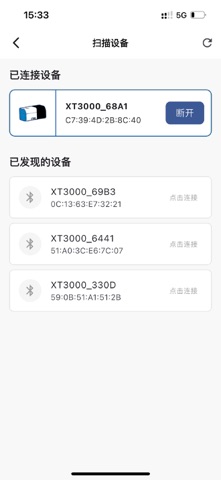


Description by VariCut Written by the developer, not by AppBrain. Click to read.
主要特点
1、 界面简洁易操作
2、 支持云模板及上千种标签款式
3、 支持表格、多标签打印、序列号打印
4、 内容自由编辑,可以随意组合图标、边框、条码、文字、字母数字等
5、 自动保存标签标识文件,模板支持云端同步
6、 自动连接适配打印机,同步检测耗材规格,跳转编辑界面即自动显示已安装耗材。
对应机器型号:XT3000、VT3000
请参阅以下网站了解更多信息
www.varimark.cn