

Vasion Automate Pro
Vasion Automate Pro is made and published by Vasion, Inc. AppBrain is an independent app data site and isn't affiliated with Vasion, Inc. The app name, icon, screenshots and description belong to Vasion, Inc and are shown as published on the App Store.
AppBrain's verdict
- Rating on App Store
- 5.00
- 2 ratings
- Last updated
- September 8, 2026
- Size
- 77.4 MB
It doesn't have enough ratings yet to judge what users think.
User feedback
Ratings and reviews on the App StoreComments on Vasion Automate Pro for iOS
We don't have enough comments to show example comments. Please check back later.
Store listing
By Vasion, Inc, from the App Store



Description by Vasion, Inc Written by the developer, not by AppBrain. Click to read.
Workflows
Automated Workflows are configured to route information to the right people and systems at the right time to collect approvals, assign tasks, and complete documents. The Vasion Mobile app makes these Workflows accessible from a mobile device. For example, an employee needing to check the approval status of a PO Request in their Workflow can view it in a matter of seconds from the Mobile app. Wherever they are at – in a meeting, away from the office – the information they need is accessible at their fingertips.
As an end-user focused application, users can start and complete existing workflows in the Mobile app. When starting a new Workflow, you select an existing automated Workflow and complete the tasks needed to start it. This may be filling out a request form or uploading an expense report for approval. After sending the Workflow, you can view what step is pending in the Requests section of your Workspace. Pending Workflows appear in the user’s Task list in their Workspace dashboard, where they can simply click and complete all necessary tasks.
Scan
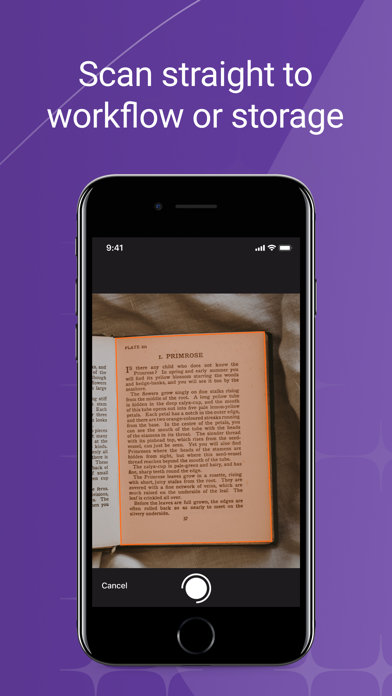
Vasion Mobile users do not need to install a local desktop scanner in order to scan and digitize their documents, like the Capture app in Vasion Suite. The app uses the device’s camera to scan the document, making scanning easier for remote and mobile employees. Scan uses a native iOS PDF scanner with barcode, and full-text optical character recognition (OCR) technology.
Scanning documents is a simple three step process: Use the camera to scan your paper documents, edit, reorder, copy, and modify any of the scanned pages, then send those pages directly to a Workflow or a Storage folder.
Forms
Vasion Mobile lets you access, fill out, sign, and submit existing eForms to start Workflows. You can fill out and submit existing forms directly from the application, rather than from a Workflow every time. To start, you select the type of form you want from the existing Forms list. Some forms require an eSignature or attachments with the form. Attach photos or files, scan new documents, or draw or type your signature when signing forms.
Storage
Just like Vasion Suite, Vasion Mobile gives employees access and control over their data and where it’s stored. After scanning a document, you can choose to send the scanned pages directly to either Workflows or Storage. Mobile users can upload documents to a text message, to Vasion Drive folders, or to cloud storage applications that allow for document uploading, like Google Drive, OneDrive, Box. Storage folders are encrypted by default, and configurable by an admin in Vasion Suite.
Reports
Reports is the only administrative feature available in Vasion Mobile. An administrator can grant a mobile user permission to view and run reports. By running a report, you can see a 360 view of all the activity and actions performed by users in Vasion Suite. There are different types of reports to see specific information like audit, user, document, and workflow reports. You can also customize and save report types, and schedule them to run at a certain time.
Anyone can download and install the Vasion Mobile app, but users need an active Vasion Suite account in order to log into their company's Vasion instance. Contact your Vasion Suite administrator for more information and to set up an account. There is no cost for downloading the Vasion Mobile app.
We invite all businesses to start their digital transformation today!
Safety and technology
Found in the app by AppBrain- Price
- Free
- App size
- 77.4 MB
- Content rating
- Everyone
Technologies used by Vasion Automate Pro
Releases
Updates seen on the App Store- Version
- 2.9.9
- Launched
- February 2023
No changelog data
Alternatives
Similar apps and more from Vasion, IncAlternatives to Vasion Automate Pro





More from Vasion, Inc

Rankings
App Store top chartsApp Store Rankings for Vasion Automate Pro
About the app and developer
About Vasion Automate Pro
Vasion Automate Pro is a business app developed by Vasion, Inc.
User Ratings
Vasion Automate Pro is rated 5.00 out of 5 stars. The rating is based on 2 ratings.
App Information
Vasion Automate Pro is freely available from the App Store. The app size is 77.40 MB. The latest version available is 2.9.9. The last update was on September 8, 2026.
Technical Requirements
The app has a content rating of Everyone. The app has been available on the App Store since February 2023.
Developer information for Vasion, Inc
Address:
Frequently asked questions about Vasion Automate Pro
Is Vasion Automate Pro free?
Yes. Vasion Automate Pro is free on the App Store.
Is Vasion Automate Pro still available?
Yes. Vasion Automate Pro is on the App Store, and the last update we saw was on September 8, 2026.
How large is Vasion Automate Pro?
Vasion Automate Pro is 77.40 MB.
Is Vasion Automate Pro suitable for children?
App Store rates the content of Vasion Automate Pro as suitable for everyone.
How do people rate Vasion Automate Pro?
Vasion Automate Pro scores 5.00 out of 5 stars, from 2 ratings on the App Store.
Who made Vasion Automate Pro?
Vasion Automate Pro was developed by Vasion, Inc. It is listed in the business category on the App Store.
What are the best alternatives to Vasion Automate Pro?
People looking at Vasion Automate Pro also look at these business apps: Phraction, Bailard Vault, FigTree Vault, CMS Connect, Privatise.