




AppBrain's verdict
- Last updated
- September 18, 2026
- Size
- 14.5 MB
User feedback
Ratings and reviews on the App StoreComments on Vaultic: 2FA Authenticator for iOS
We don't have enough comments to show example comments. Please check back later.
Store listing
By Xasanbek Abdullayev, from the App StoreDescription by Xasanbek Abdullayev Written by the developer, not by AppBrain. Click to read.
WHY THIS MATTERS
Your 2FA secrets are the last thing standing between an attacker and your accounts. Vaultic stores them in the iOS Keychain under hardware encryption and never uploads them. There is no Vaultic account and no Vaultic server holding your data, so there is nothing to breach and nothing to leak.
CODES THAT JUST WORK
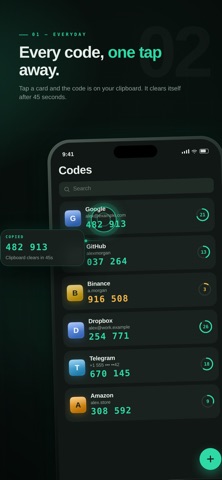
• Standard TOTP and HOTP — compatible with thousands of services that support authenticator apps
• A countdown ring on every card that turns amber before the code expires, so you never submit a code that is about to die
• Tap a code to copy it; the clipboard clears itself afterwards
• Search instantly by service name or login
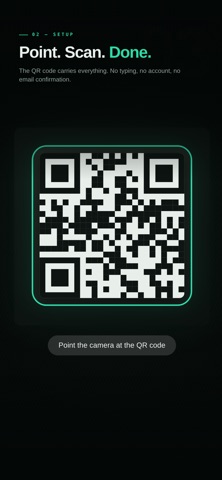
• Add accounts three ways: scan a QR code, pick the service from the built-in catalog, or type the setup key by hand
• Codes are generated from your device clock, so they work in airplane mode, abroad, and with no signal at all
A BROWSER THAT FORGETS
Open a link or sign in to a service without leaving a trail. Cookies, cache and history are held in memory and never written to disk, so ending the session removes them for good. Searches go to DuckDuckGo rather than an advertising network, addresses are upgraded to HTTPS, and the browser sits behind the same Face ID lock as everything else. It is a private browser, not a VPN — the sites you visit still see your connection.
LOCKED DOWN BY DEFAULT
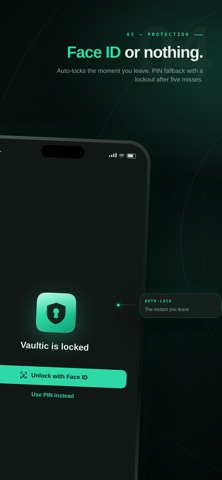
• Face ID or Touch ID, with a PIN as a fallback
• Auto-lock the moment you leave the app
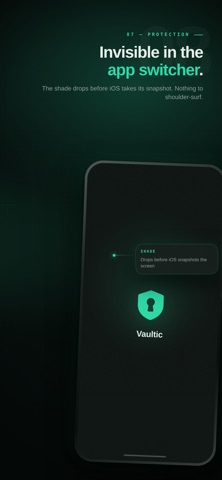
• A privacy shade hides your codes in the app switcher, whether or not you use a lock
• Content is covered while the screen is being recorded, mirrored or shared
• A warning when a screenshot is taken, because iOS lets no app prevent one
• Optionally keep every code hidden until you deliberately tap it
• Five wrong PIN attempts trigger a cooldown
PASSWORDS IN THE SAME VAULT
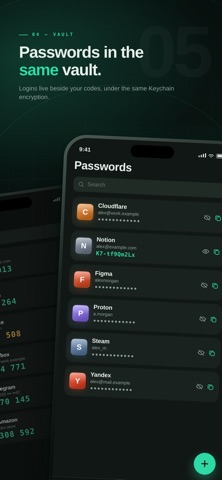
Keep logins next to your codes instead of scattering them across apps. Generate strong passwords from a real cryptographic random source, exclude look-alike characters when you will have to type the password by hand, and see how strong it is before you save.
BACKUPS YOU CONTROL
Export an encrypted backup locked with a password you choose. The file is protected with AES-GCM and a key derived through 210,000 rounds of PBKDF2, so a stolen backup is useless without your password. Restore it on a new iPhone in seconds, or open a backup file straight from the Files app.
IF YOU LOSE YOUR PHONE
Read this before you need it. Because Vaultic keeps nothing on a server, a backup you made earlier is the only way back — along with the recovery codes the services themselves gave you. Nobody, including us, can restore your codes without it. Make a backup today and store its password somewhere safe.
BUILT FOR IPHONE
A calm dark interface, full Dynamic Type support, and complete VoiceOver labelling — codes are read out digit by digit rather than as one large number. Available in English and Russian.
FREE AND PREMIUM
Vaultic is free for up to 3 accounts, with every security feature included. Premium removes the account limit and supports continued development. Restoring a backup is never limited: your own data always comes back, subscription or not.
Premium is an auto-renewable subscription. Payment is charged to your Apple ID at confirmation of purchase. It renews automatically unless cancelled at least 24 hours before the end of the current period, and you can manage or cancel it any time in App Store settings. If a free trial is offered, any unused portion is forfeited when you buy a subscription.
Terms of use: https://fronder.github.io/vaultic-app/terms/
Privacy policy: https://fronder.github.io/vaultic-app/privacy/
Safety and technology
Found in the app by AppBrain- Price
- Free
- App size
- 14.5 MB
- Content rating
- High
Technologies used by Vaultic: 2FA Authenticator
Releases
Updates seen on the App Store- Version
- 1.0.2
- Launched
- September 2026
No changelog data
Alternatives
Similar apps and more from Xasanbek AbdullayevAlternatives to Vaultic: 2FA Authenticator


More from Xasanbek Abdullayev


Rankings
App Store top chartsApp Store Rankings for Vaultic: 2FA Authenticator
About the app and developer
About Vaultic: 2FA Authenticator
Vaultic: 2FA Authenticator is an utilities app developed by Xasanbek Abdullayev.
User Ratings
The app has no ratings yet.
App Information
Vaultic: 2FA Authenticator is freely available from the App Store. The app size is 14.46 MB. The latest version available is 1.0.2. The last update was on September 18, 2026.
Technical Requirements
The app has a content rating of High Maturity. The app has been available on the App Store since September 2026.
Vaultic: 2FA Authenticator is made and published by Xasanbek Abdullayev. AppBrain is an independent app data site and isn't affiliated with Xasanbek Abdullayev. The app name, icon, screenshots and description belong to Xasanbek Abdullayev and are shown as published on the App Store.
Developer information for Xasanbek Abdullayev
Address: