Download Android Apps and Games
AppBrain
  • Apps
  • Apps being viewed right now Trending apps today Most popular apps All-time most downloaded apps Top rated apps iPhone and iPad apps
  • Intelligence ▾
    Intelligence overview → Track any Android app or your whole market
    Track & analyze
    Keyword Tracker & OptimizerTrack & improve Play rankings App Performance ReportOne-off PDF for any app StatisticsFree Android & Play market stats
    Promote your app
    Featured Apps App Links
  • Intelligence
  • Pricing
  • Dashboard
  • Sign up
  • Log in
Last updated on: 2026-09-19
App Store Apps > Graphics & Design > VectorPaint
VectorPaint icon

VectorPaint

1.0.5
Anyi County Bingzhiyi Trading Co., Ltd.
4.00
1 reviews
$2.00

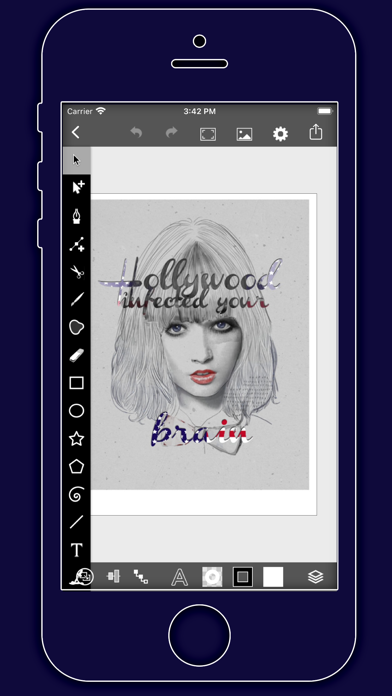
VectorPaint Screenshot 1 of 5
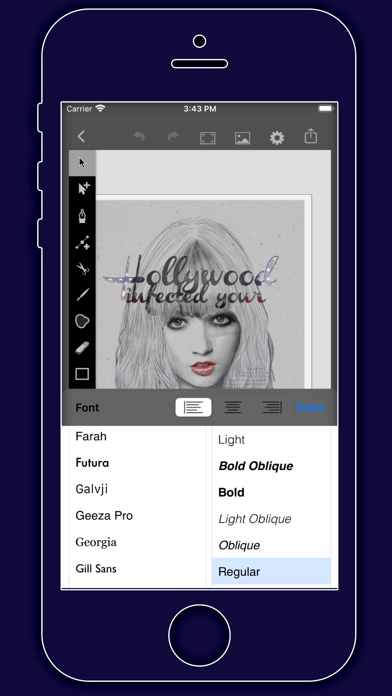
VectorPaint Screenshot 2 of 5
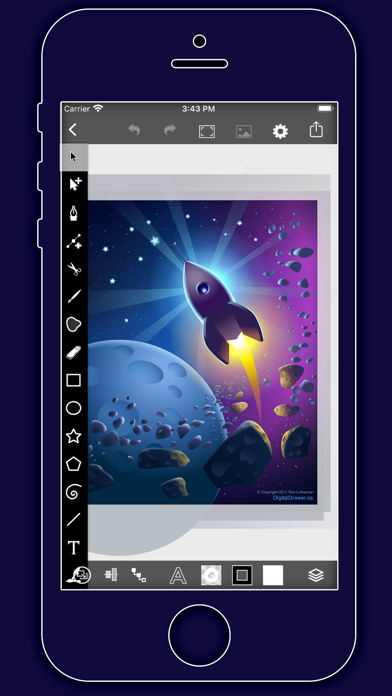
VectorPaint Screenshot 3 of 5
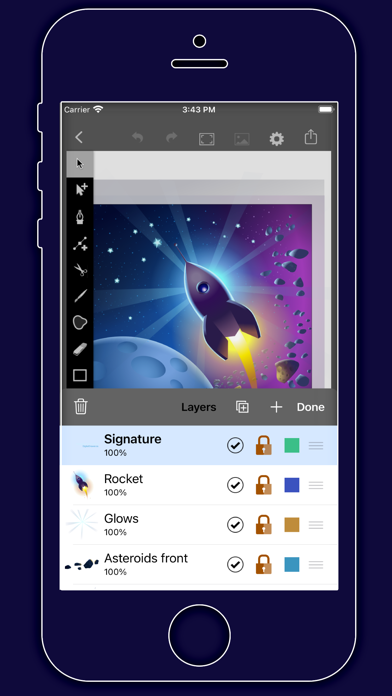
VectorPaint Screenshot 4 of 5
VectorPaint Screenshot 5 of 5
Download from the App Store

About VectorPaint

VectorPaint is a graphics & design app developed by Anyi County Bingzhiyi Trading Co., Ltd..

User Ratings

VectorPaint is rated 4.00 out of 5 stars. The rating is based on one rating ratings.

App Information

VectorPaint costs $2.00 to download. The download size is 6.15 MB. The latest version available is 1.0.5. The last update was on September 19, 2025.

Technical Requirements

The app has a content rating of Everyone. The app has been available on App Store October 2021.

Description
VectorPaint is a vector illustration app designed for IOS inspired by desktop class illustrator programms and powered by Metal, so Render times are up to 10x faster.

[Gallery]

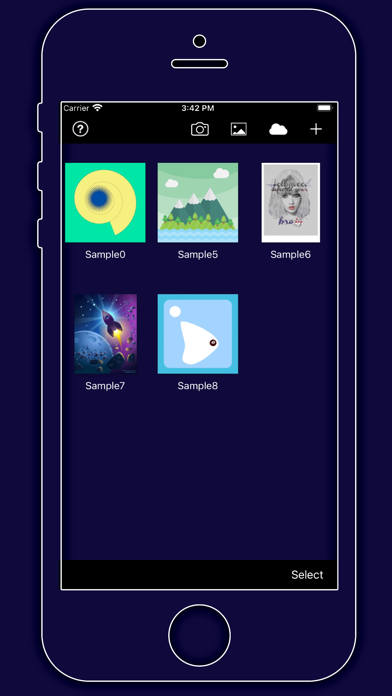
The Gallery displays a thumbnail for each of your drawings. Tap a thumbnail to open it for viewing or editing. Tap the title below the thumbnail to enter a new title.
Tap the + button in the upper right corner of the screen to create a new drawing.

[Exporting]

Tap Select to enter selection mode.
In selection mode, tap on thumbnails to select them (or deselect them). When one or more drawings are selected, tap Email to email them.

Tap the Trash button to delete the selected drawings.

Tap Done to exit selection mode.

[Drawing]

Use the Edit menu to cut, copy, paste, delete, and alter the selection.
Use the Arrange menu to move objects backwards and forwards in the stack, group and ungroup objects, distribute objects, and align objects.

Use the Path menu to add anchors, remove anchors, outline strokes, join paths, combine paths, make masks, and place text on a path.

[Settings]

Use the Settings panel to turn the grid on and off, control the grid spacing, and indicate whether you want drawn objects to snap to the grid, snap to points in existing paths, or snap to the edges of existing paths. You can also turn rulers on and off, change the units of your drawing, and modify the dimensions of your drawing.
When Isolate Active Layer is enabled, you can only edit the active layer. The other layers in your drawing will be partially hidden. This makes it easy to edit the content of one layer without accidentally touching something in another layer.

When Outline Mode is enabled, you can only see the outlines of the objects in your drawing. This makes it easier to select objects that are obscured by other objects. It also significantly reduces rendering time for complex drawings.

[Zooming]
Use the standard iOS pinch gesture to zoom in and out. Once you’ve started a pinch gesture, you can lift one finger to move the canvas around without zooming.
If your drawing units are set to pixels, VectorPaint displays the drawing at actual pixel size when the zoom level is 100% (as indicated in the navigation bar).

If you’re using units that map to a physical measurement (inches, centimeters, etc.), VectorPaint displays the drawing at print size when the zoom level is 100%.

[Tools]

Tool PaletteVectorPaint provides a number of tools for creating and modifying your drawing.
The tool palette floats above the canvas. Drag it to move it around the screen. Flick it out of your way if necessary.

You can modify the behavior of many tools by holding down a second finger on the canvas after you start dragging. If you apply the second touch before you start dragging, you will zoom the canvas.
VectorPaint provides a number of tools for creating and modifying your drawing.
The tool palette floats above the canvas. Drag it to move it around the screen. Flick it out of your way if necessary.


[Layers]

VectorPaint upports an unlimited number of layers. Layers are useful for organizing complex drawings. Each component of the drawing can be on its own layer, making it much easier to edit.
You can delete, duplicate, rearrange, rename, lock, and hide layers. You can also control the transparency of each layer.

Tap the Layers button in the toolbar to view the layers in your drawing.


[Masks]
A mask is a path, compound path, or text object that clips the contents of other drawing elements.
To create a mask, select the objects that you want to mask and the path or text object that you want to use as the mask (the masking object must be the topmost selected object). Choose Mask from the Path menu.

To unmask objects, select the masked object and choose Unmask from the Path menu.

A masking path can have a fill and stroke just like any normal path.
Show more Show less

More data about VectorPaint

Price $2.00
Rating 4.00 based on a single rating
Ranking Not ranked
Version 1.0.5
App download size 6.15 MB
Suitable for Everyone

Alternative downloads for the VectorPaint app

Photo Color Painter icon Photo Color Painter
Heng Jia Liang
0.0
$2.99
Pixel Scaler icon Pixel Scaler
LimeDeck, s. r. o.
3.0
$1.99
2 ratings
Wordsalad - Enterprise Edition icon Wordsalad - Enterprise Edition
Libero Spagnolini
5.0
$19.99
1 ratings
Learn Ps Tools icon Learn Ps Tools
Paulo Narra
0.0
$2.99
Vermeer's Lens: AR Drawing icon Vermeer's Lens: AR Drawing
zhiyang law
2.6
$1.99
5 ratings
Dark Mode Wallpaper icon Dark Mode Wallpaper
Nosakhare Ogbebor
4.7
$1.99
6 ratings
ColorHints Mosaic icon ColorHints Mosaic
Jim Calvin
3.7
$1.99
3 ratings
Guernika icon Guernika
Guillermo Cique
4.2
$1.99
8 ratings

More from Anyi County Bingzhiyi Trading Co., Ltd.

ArtPics icon ArtPics
Anyi County Bingzhiyi Trading Co., Ltd.
3.2
$0.99
10 ratings
ManYue - Manga Reader icon ManYue - Manga Reader
Anyi County Bingzhiyi Trading Co., Ltd.
4.1
$0.99
7 ratings
ShuRead - Nas Novel Reader icon ShuRead - Nas Novel Reader
Anyi County Bingzhiyi Trading Co., Ltd.
5.0
$0.99
5 ratings
iCouldPlay icon iCouldPlay
Anyi County Bingzhiyi Trading Co., Ltd.
3.7
$0.99
3 ratings
Aquarell icon Aquarell
Anyi County Bingzhiyi Trading Co., Ltd.
3.0
$3.99
3 ratings
Book Isle icon Book Isle
Anyi County Bingzhiyi Trading Co., Ltd.
5.0
$0.99
2 ratings
Yearn - Retro Game Emulator icon Yearn - Retro Game Emulator
Anyi County Bingzhiyi Trading Co., Ltd.
5.0
$1.99
2 ratings
素笺-写信新潮流:优雅的手写信纸 icon 素笺-写信新潮流:优雅的手写信纸
Anyi County Bingzhiyi Trading Co., Ltd.
1.0
$0.69
1 ratings

Changelog of VectorPaint

No changelog data

Developer information for Anyi County Bingzhiyi Trading Co., Ltd.

Anyi County Bingzhiyi Trading Co., Ltd.

Address:

Share VectorPaint

Comments on VectorPaint for iOS

We don't have enough comments to show example comments. Please check back later.

App Store Rankings for VectorPaint

This app is not ranked

Technologies used by VectorPaint

Frequently asked questions about VectorPaint

Is VectorPaint free?

No. VectorPaint costs $2.00 on App Store.

Is VectorPaint still available?

Yes. VectorPaint is on App Store, and the last update we saw was on September 19, 2025.

How large is the VectorPaint download?

VectorPaint is 6.15 MB to download.

Is VectorPaint suitable for children?

App Store rates the content of VectorPaint as suitable for everyone.

How do people rate VectorPaint?

VectorPaint has one rating of 4.00 stars on App Store.

Who made VectorPaint?

VectorPaint was developed by Anyi County Bingzhiyi Trading Co., Ltd.. It is listed in the graphics & design category on App Store.

What are the best alternatives to VectorPaint?

People looking at VectorPaint also look at these graphics & design apps: Photo Color Painter, Pixel Scaler, Wordsalad - Enterprise Edition, Learn Ps Tools, Vermeer's Lens: AR Drawing.

Apps on sale Today's trending apps Top new apps Popular Graphics & Design Apps Apps other people are watching
Overview Reviews Alternatives Rankings Technology
Photo Color Painter icon Photo Color Painter
Pixel Scaler icon Pixel Scaler
Wordsalad - Enterprise Edition icon Wordsalad - Enterprise Edition
Learn Ps Tools icon Learn Ps Tools
Vermeer's Lens: AR Drawing icon Vermeer's Lens: AR Drawing
Dark Mode Wallpaper icon Dark Mode Wallpaper
ColorHints Mosaic icon ColorHints Mosaic
Guernika icon Guernika
AppBrain Intelligence premium content

Subscribe now to get full and unlimited access to AppBrain Intelligence. You'll have access to:

  • App Intelligence dashboard (performance timeline, competitor comparison, country rankings, insight cards)
  • Detailed ranking data per app
  • Full timeline per developer
  • Device market shares data per country
  • Unlimited keyword tracking
1 Month

$75/mo
(billed every month)

SAVE 0%
Subscribe
3 Months

$65/mo
($195 billed every 3 months)

SAVE 13%
Subscribe
1 Year

$57.50/mo
($690 billed every year)

SAVE 23%
Subscribe
Each subscription will automatically renew 3 days before the expiration date for the same time period. Subscriptions can be cancelled at any time before the renewal.

AppBrain is a directory focused on discovering great apps and games. We give statistics, rankings and search options that Google Play and the App Store don't have. All trademarks are owned by their respective owners. AppBrain doesn't offer APKs or binaries, and always lets users install the official version from Google Play or the App Store.

More apps

  • Top Android apps being viewed
  • View ProShot
  • Hymn Index
  • Crime Coast: Gang Wars

App statistics

  • Android statistics
  • Google Play Developer stats
  • Trending Android Apps
  • Trending iOS apps
  • Top popular Apps
  • Buy the best Android phone

About AppBrain

  • Contact
  • Privacy
  • Documentation
  • DMCA takedowns
  • Articles
  • Blog
  • Free webpage for your Android app
© 2010-2026 - AppBrain