

VerseAnchor (VerseLock)
VerseAnchor (VerseLock) is made and published by Buzen Technologies Co.Limited. AppBrain is an independent app data site and isn't affiliated with Buzen Technologies Co.Limited. The app name, icon, screenshots and description belong to Buzen Technologies Co.Limited and are shown as published on the App Store.
AppBrain's verdict
- Rating on App Store
- 4.10
- 10 ratings
- Last updated
- July 7, 2026
- Size
- 235.5 MB
It doesn't have enough ratings yet to judge what users think.
User feedback
Ratings and reviews on the App StoreComments on VerseAnchor (VerseLock) for iOS
We don't have enough comments to show example comments. Please check back later.
Store listing
By Buzen Technologies Co.Limited, from the App Store




Description by Buzen Technologies Co.Limited Written by the developer, not by AppBrain. Click to read.
- Easy to use with sleek design.
- Free: Reading, Recording, Listening, Reveal challenge, Type challenge & flashcards are not locked.
- No Ads, No Distractions and we are committed to keeping it that way.
"I have hidden your word in my heart that I might not sin against you. Praise be to you, LORD; teach me your decrees."
— Psalms 119:11-12
Whether a new believer or deepening your faith, VerseAnchor offers an engaging and effective way to remember Scripture. With interactive features, personalized tools and a sleek interface, you can easily keep God's Word in your heart.
⎈ Features: ⎈
◕ Adding a Verse (3 Options)
1. Pick from a Bible translation: Choose a verse from your preferred Bible version.
2. Or copy & paste text from any external source.
3. Or browse suggested verse packs like Most Popular, Spiritual Warfare, Mood Verses & more
◕ Practicing a Verse ⌛
This can either be done in "Sequence Mode" which follows are guided flow to unlock steps upon completion of the previous or "Random Mode" which allows the user to choose the step to practice.
Practice Steps for Effective Memorization:
1. Reading: Either use Writer mode (reading the verse as the app simulates typing each word) or Tapping (Tap to reveal each part of the verse as it’s highlighted).
2. Recording: Record yourself reading the verse aloud.
3. Listening: Listen to your recording to reinforce memorization through hearing and speaking.
4. Reveal Challenge: Test your memory with this unique tool where part of the verse is hidden, and you must tap the correct word from a list of possible answers. Choose from 3 difficulty levels.
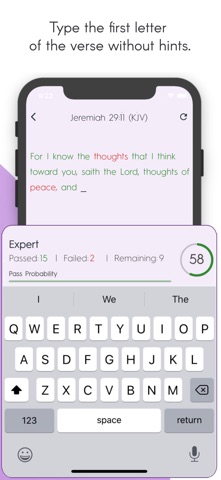
5. Typing Challenge: Challenge yourself by typing the first character of each word in the verse when all words are hidden.
6. Widgets: Keep your memorized verse on your home screen with customizable widgets, ensuring constant engagement, even when the app is closed.
◕ Other Interactive Learning Tools
1. Flashcards: Quickly review verses for fast recall and repetition, helping reinforce your memorization
2. Statistics Tracking: Monitor your performance with detailed progress reports, including streaks, practice frequency, and milestones, keeping you motivated
3. Practice Reminders ⏰: Stay on track with custom notifications that remind you to practice your selected verses consistently
◕ Customizable Features;
1. Verse Categorization: Organize and group your memorized verses into categories for quick and easy access
2. Explore Packs: Discover themed verse packs covering everything from Popular Verses to Spiritual Warfare and Verses for Different Moods
3. Multiple Bible Versions: Select from a wide range of Bible translations such as KJV, NKJV, NIV, ESV, RVR, LSG, NRI, KEH, and more, allowing you to memorize verses in the version that speaks to you most
4. Multi-Language Support: VerseAnchor supports 12 languages, including English, Arabic, German, Spanish, French, Hindi, Italian, Japanese, Korean, Portuguese, Russian, and Chinese, making Scripture memorization accessible to users worldwide
5. Themes & Fonts: Choose from a variety of themes and font styles to create a personalized and comfortable memorization environment
◕ Data Backup & Security:
1. Backup Option: Keep your memorized verses and progress safe with a reliable backup feature, ensuring you can transfer your data to a new device or store it securely.
2. No Sign-ups Required: Enjoy a seamless experience with no need to create an account or register - simply download and start memorizing right away
Subscriptions;
- Monthly & Yearly subscriptions or onetime purchase - Lifetime
• Payment is charged to iTunes Account
• Renewal within 24-hours prior to the end of the current period, and identify the cost of the renewal
• User managed subscriptions in account Settings
• Unused free trial time is forfeited upon subscription purchase
Terms: https://buzentechnologies.com/verselock-terms.php
Safety and technology
Found in the app by AppBrain- Price
- Free
- App size
- 235.5 MB
- Content rating
- Everyone
Technologies used by VerseAnchor (VerseLock)
Releases
Updates seen on the App Store- Version
- 1.0.14
- Launched
- April 2025
No changelog data
Alternatives
Similar apps and more from Buzen Technologies Co.LimitedAlternatives to VerseAnchor (VerseLock)


More from Buzen Technologies Co.Limited


Also available on Google Play

Rankings
App Store top chartsApp Store Rankings for VerseAnchor (VerseLock)
About the app and developer
About VerseAnchor (VerseLock)
VerseAnchor (VerseLock) is a lifestyle app developed by Buzen Technologies Co.Limited.
What is the rating of VerseAnchor (VerseLock)?
VerseAnchor (VerseLock) is rated 4.10 out of 5 stars, based on 10 ratings.
Is VerseAnchor (VerseLock) free?
VerseAnchor (VerseLock) is free. The app size is 235.54 MB. The latest version available is 1.0.14. The last update was on July 7, 2026.
What are the requirements for VerseAnchor (VerseLock)?
The app has a content rating of Everyone. The app has been available on the App Store since April 2025.
Developer information for Buzen Technologies Co.Limited
Address: