Download Android Apps and Games
AppBrain
  • Apps
  • Apps being viewed right now Trending apps today Most popular apps All-time most downloaded apps Top rated apps iPhone and iPad apps
  • Intelligence ▾
    Intelligence overview → Track any Android app or your whole market
    Track & analyze
    Keyword Tracker & OptimizerTrack & improve Play rankings App Performance ReportOne-off PDF for any app StatisticsFree Android & Play market stats
    Promote your app
    Featured Apps App Links
  • Intelligence
  • Pricing
  • Dashboard
  • Sign up
  • Log in
Last updated on: 2026-09-21
App Store Apps > Utilities > Verto — File Converter
Verto — File Converter icon

Verto — File Converter

1.1
ALESSANDRO GAUDIO
0.00
0 reviews
Free

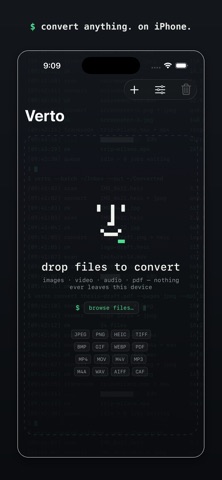
Verto — File Converter Screenshot 1 of 2
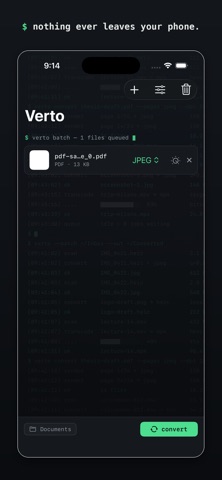
Verto — File Converter Screenshot 2 of 2
Download from the App Store

About Verto — File Converter

Verto — File Converter is an utilities app developed by ALESSANDRO GAUDIO.

User Ratings

The app has no ratings yet.

App Information

Verto — File Converter is FREE to download. The download size is 819.00 kB. The latest version available is 1.1. The last update was on July 30, 2026.

Technical Requirements

The app has a content rating of Everyone. The app has been available on App Store 8 weeks ago.

Description
Verto converts and compresses your files in seconds — entirely on your device.

Add files, choose a format, press Convert. No uploads, no accounts, no file-size limits, no waiting for a server. Verto uses Apple's own media engines, so conversions are fast, private, and true to the original.

IMAGES
- Convert between JPEG, PNG, HEIC, TIFF, BMP and GIF (WebP input supported)
- Turn any image into a PDF
- Compress with an adjustable quality slider, optionally resize
- iPhone HEIC photos handled perfectly, EXIF rotation respected
- Animated GIFs keep their timing

PDF
- Export pages as JPEG, PNG or TIFF at the resolution you choose
- Shrink heavy PDFs with smart per-page JPEG compression

VIDEO
- Convert between MP4, MOV and M4V using hardware acceleration
- H.264 for compatibility or HEVC for smaller files
- Compress with resolution presets, a custom bitrate — or set an exact target file size
- Live size estimate before you convert
- Extract the soundtrack to M4A, WAV, AIFF or CAF

AUDIO
- Convert MP3, M4A, WAV, AIFF and CAF to M4A (AAC), WAV, AIFF or CAF

PRIVATE BY DESIGN
- Batch conversion with live progress
- Fully sandboxed — Verto only touches files you give it
- No network access. Ever.
Show more Show less

More data about Verto — File Converter

Price Free to download
Rating No ratings
Ranking Not ranked
Version 1.1
App download size 819.0 KB
Suitable for Everyone

Alternative downloads for the Verto — File Converter app

Forva: PDF & File Converter icon Forva: PDF & File Converter
Tarandeep singh
0.0
Free
Shiftreel icon Shiftreel
永 张
0.0
Free
Smart File Converter icon Smart File Converter
Amila Rathnayake
0.0
Free
Compress & Convert Videos icon Compress & Convert Videos
巾云 唐
0.0
Free
StatAnvil icon StatAnvil
TOMI JUHANI JOLKKONEN
0.0
Free
ZIP Extractor & Unzip - Archie icon ZIP Extractor & Unzip - Archie
Danila Dundukov
5.0
Free
1 ratings
Phase Media: Pro Converter icon Phase Media: Pro Converter
Ahmad Abdulla hassan
0.0
Free
FormatBox: HEIC, JPG, MP4 icon FormatBox: HEIC, JPG, MP4
ZHENGQIAO JIANG
0.0
Free

Changelog of Verto — File Converter

No changelog data

Developer information for ALESSANDRO GAUDIO

ALESSANDRO GAUDIO

Address:

Share Verto — File Converter

Comments on Verto — File Converter for iOS

We don't have enough comments to show example comments. Please check back later.

App Store Rankings for Verto — File Converter

This app is not ranked

Technologies used by Verto — File Converter

Frequently asked questions about Verto — File Converter

Is Verto — File Converter free?

Yes. Verto — File Converter is free to download from App Store.

Is Verto — File Converter still available?

Yes. Verto — File Converter is on App Store, and the last update we saw was on July 30, 2026.

How large is the Verto — File Converter download?

Verto — File Converter is 819.00 kB to download.

Is Verto — File Converter suitable for children?

App Store rates the content of Verto — File Converter as suitable for everyone.

Who made Verto — File Converter?

Verto — File Converter was developed by ALESSANDRO GAUDIO. It is listed in the utilities category on App Store.

What are the best alternatives to Verto — File Converter?

People looking at Verto — File Converter also look at these utilities apps: Forva: PDF & File Converter, Shiftreel, Smart File Converter, Compress & Convert Videos, StatAnvil.

Today's trending apps Apps on sale Top new apps Popular Utilities Apps Apps other people are watching
Forva: PDF & File Converter icon Forva: PDF & File Converter
Shiftreel icon Shiftreel
Smart File Converter icon Smart File Converter
Compress & Convert Videos icon Compress & Convert Videos
StatAnvil icon StatAnvil
ZIP Extractor & Unzip - Archie icon ZIP Extractor & Unzip - Archie
Phase Media: Pro Converter icon Phase Media: Pro Converter
FormatBox: HEIC, JPG, MP4 icon FormatBox: HEIC, JPG, MP4
Overview Reviews Alternatives Rankings Technology
AppBrain Intelligence premium content

Subscribe now to get full and unlimited access to AppBrain Intelligence. You'll have access to:

  • App Intelligence dashboard (performance timeline, competitor comparison, country rankings, insight cards)
  • Detailed ranking data per app
  • Full timeline per developer
  • Device market shares data per country
  • Unlimited keyword tracking
1 Month

$75/mo
(billed every month)

SAVE 0%
Subscribe
3 Months

$65/mo
($195 billed every 3 months)

SAVE 13%
Subscribe
1 Year

$57.50/mo
($690 billed every year)

SAVE 23%
Subscribe
Each subscription will automatically renew 3 days before the expiration date for the same time period. Subscriptions can be cancelled at any time before the renewal.

AppBrain is a directory focused on discovering great apps and games. We give statistics, rankings and search options that Google Play and the App Store don't have. All trademarks are owned by their respective owners. AppBrain doesn't offer APKs or binaries, and always lets users install the official version from Google Play or the App Store.

More apps

  • Top Android apps being viewed
  • Type, Style And Copy
  • Fashion Show - Stylist Makeup
  • Sniper Strike FPS 3D Shooting

App statistics

  • Android statistics
  • Google Play Developer stats
  • Trending Android Apps
  • Trending iOS apps
  • Top popular Apps
  • Buy the best Android phone

About AppBrain

  • Contact
  • Privacy
  • Documentation
  • DMCA takedowns
  • Articles
  • Blog
  • Free webpage for your Android app
© 2010-2026 - AppBrain