

Very Long Screenshot Maker
Very Long Screenshot Maker is made and published by Dehui Chengzhen. AppBrain is an independent app data site and isn't affiliated with Dehui Chengzhen. The app name, icon, screenshots and description belong to Dehui Chengzhen and are shown as published on the App Store.
AppBrain's verdict
- Rating on App Store
- 4.52
- 25 ratings
- Last updated
- October 14, 2026
It doesn't have enough ratings yet to judge what users think.
Rankings
App Store top chartsApp Store Rankings for Very Long Screenshot Maker
Competitors
Similar apps and more from Dehui ChengzhenMore from Dehui Chengzhen


Releases
Updates seen on the App Store- Version
- 2.4.0
- Launched
- January 2024
No changelog data
User feedback
Ratings and reviews on the App StoreComments on Very Long Screenshot Maker for iOS
We don't have enough comments to show example comments. Please check back later.
Technology
Found in the app by AppBrain- Price
- $6.99
- App size
- 29.8 MB
- Content rating
- Everyone
Technologies used by Very Long Screenshot Maker
About the app and developer
About Very Long Screenshot Maker
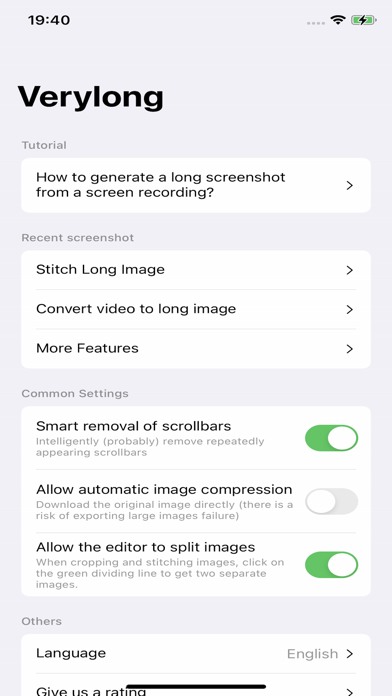
Very Long Screenshot Maker is an utilities app developed by Dehui Chengzhen.
What is the rating of Very Long Screenshot Maker?
Very Long Screenshot Maker is rated 4.52 out of 5 stars, based on 25 ratings.
Is Very Long Screenshot Maker free?
Very Long Screenshot Maker costs $6.99. The app size is 29.75 MB. The latest version available is 2.4.0. The last update was on October 14, 2026.
What are the requirements for Very Long Screenshot Maker?
The app has a content rating of Everyone. The app has been available on the App Store since January 2024.
Developer information for Dehui Chengzhen
Address:
Store listing
By Dehui Chengzhen, from the App Store

Description by Dehui Chengzhen Written by the developer, not by AppBrain. Click to read.
**Preparation:**
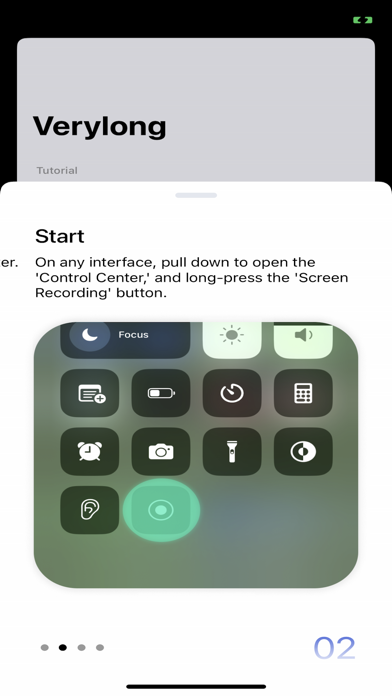
OPEN Settings; select Control Center; ensure the Screen Recording option has been added:
**Steps:**
1. Prepare the content you want to capture, ensuring that dynamically loaded content is fully loaded.
2. Pull down the control center, long-press the screen recording button.
3. Choose the "Verylong" option, then click on start recording.
4. Return to the content page you want to capture before the countdown ends.
5. When the recording button is illuminated, start scrolling through the page.
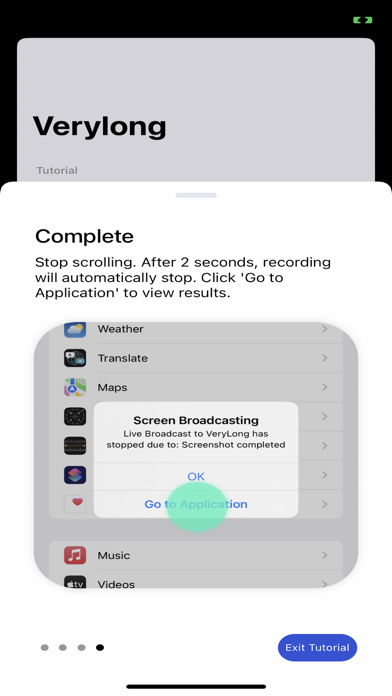
6. Lift your finger from the screen at the desired endpoint for recording and wait for 3 seconds.
7. After 3 seconds, a pop-up window will appear, click on "Go to the app."
Congratulations, you have completed the screenshot operation!
User Agreement:https://metal-basin-5f3.notion.site/Pro-Verylong-Terms-of-Use-7adc43bede7846f9996541e8def24566?pvs=4
Privacy Policy: https://metal-basin-5f3.notion.site/Pro-Very-long-Privacy-Policy-c43443aaa77049f5a33bf97a985f0bdf?pvs=4