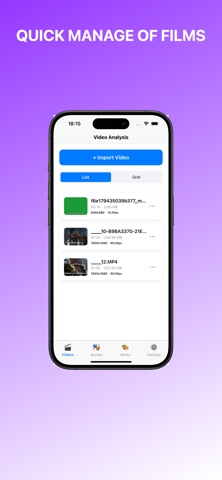
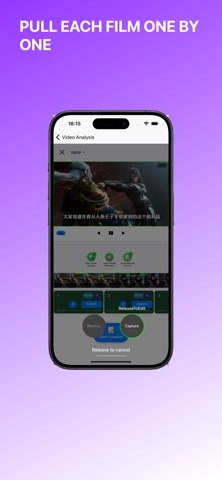
Video Analysis: Rough Cut is an utilities app developed by 南星 廖.
User Ratings
The app has no ratings yet.
App Information
Video Analysis: Rough Cut is freely available from the App Store. The app size is 36.32 MB. The latest version available is 1.1.4. The last update was on April 10, 2026.
Technical Requirements
The app has a content rating of Medium Maturity. The app has been available on the App Store since March 2026.
Video Analysis: Rough Cut is made and published by
南星 廖.
AppBrain is an independent app data site and isn't affiliated with 南星 廖.
The app name, icon, screenshots and description belong to 南星 廖 and are shown as published on the App Store.
Description by 南星 廖(from the App Store)
Video analysis assistant - make every frame count
The "Video Analysis Assistant" is specifically designed for film and television creators, secondary creators, commentators, and teaching researchers, offering a comprehensive solution for managing video clips. Whether you need to repeatedly analyze film details or quickly organize materials for rough cuts, this tool can significantly enhance your work efficiency.
Overview of core functions
1. Intelligent scene management
Precise frame-by-frame timeline control: Play frame by frame, easily mark key frames, and never miss any details. Intelligent Scenario and Manual Segmentation: Quickly establish logical scenarios based on time ranges, breaking down long videos into manageable segments. Scene description and tagging: Add textual descriptions to each scene, establish a structured video content library, and simplify retrieval.
II. Smart subtitle association
SRT subtitle import: Supports the simultaneous management of multiple subtitle files, suitable for multiple versions of commentary scripts. Automatic time matching: Intelligently associate subtitles with video scenes according to time segments, eliminating the need for manual alignment. Association editing: Flexibly adjust the correspondence between subtitles and scenes, supporting deletion of associations and re-matching.
III. Multi-scene stitching output
WYSIWYG (What You See Is What You Get) stitching preview: Combine multiple scenes in sequence and preview the effect in real time. Flexible sequencing: Drag and adjust the order of scenes to quickly build the storyline. One-click export: Output the splicing result as a complete video, supporting multiple parameter settings.
IV. Professional-level export control for scene clips
Custom resolution: 1080P, 720P, 480P, freely selectable. Fine parameter adjustment: Customize frame rate and bit rate to meet the upload requirements of different platforms. Local quick save: You can choose to directly store the exported video in the device's photo album for easy sharing at any time.
V. Fully localized, safeguarding privacy
Offline work: All processing is completed locally on the device, without requiring a network connection. Data security: Video and subtitle files are exclusively stored on your device, eliminating the risk of privacy leakage. No advertising interference: A pure working environment allows you to focus on creation.
VI. Applicable population
Video and film secondary creation commentator: Quickly review the film, mark the highlights, match the subtitles, and accelerate the rough cutting process. Video teaching staff: When creating courses, it is easy to break down knowledge points, facilitating students' segmented learning. Video analysis researchers: Conduct in-depth analysis of videos, recording details frame by frame. Content creator: Efficiently manage the material library and access the required clips at any time.
Why choose Video Analysis Assistant?
1. Frame-accurate clip management surpasses the coarse cutting capabilities of general-purpose editors. 2. Localized processing is safer and more stable than cloud-based tools. 3. Focus on fragment management and association, address core pain points, and avoid mere accumulation of functions.
Download now and experience unprecedented efficiency in video analysis!
Each subscription will automatically renew 3 days before the expiration date for
the same time period. Subscriptions can be cancelled at any time before the renewal.