AppBrain
AppBrain
  • Apps
  • Apps being viewed right now Trending apps today Most popular apps All-time most installed apps Top rated apps iPhone and iPad apps
  • Intelligence ▾
    Intelligence overview → Track any Android app or your whole market
    Track & analyze
    Keyword Tracker & OptimizerTrack & improve Play rankings App Performance ReportOne-off PDF for any app StatisticsFree Android & Play market stats
    Promote your app
    Featured Apps App Links
  • Intelligence
  • Pricing
  • Dashboard
  • Sign up
  • Log in
App Store Apps > Photo & Video > Video Blur Editor - Pixelate
App profile & analytics · Photo & Video · Data updated 2026-10-02
Video Blur Editor - Pixelate icon

Video Blur Editor - Pixelate

by Yoshinobu Ikeda · Free · Version 1.0.14
Availability On the App Store since April 2026 ↗
Rating on App Store
4.50/5
8 ratings
Rating
4.50
8 reviews
Best rank
–
not in the top lists
Last updated
June 26, 2026
1.0.14
AppBrain's verdict

It doesn't have enough ratings yet to judge what users think.

Video Blur Editor - Pixelate is made and published by Yoshinobu Ikeda. AppBrain is an independent app data site and isn't affiliated with Yoshinobu Ikeda. The app name, icon, screenshots and description belong to Yoshinobu Ikeda and are shown as published on the App Store.

About Video Blur Editor - Pixelate

Video Blur Editor - Pixelate is a photo & video app developed by Yoshinobu Ikeda.

What is the rating of Video Blur Editor - Pixelate?

Video Blur Editor - Pixelate is rated 4.50 out of 5 stars, based on 8 ratings.

Is Video Blur Editor - Pixelate free?

Video Blur Editor - Pixelate is free. The app size is 48.24 MB. The latest version available is 1.0.14. The last update was on June 26, 2026.

What are the requirements for Video Blur Editor - Pixelate?

The app has a content rating of Everyone. The app has been available on the App Store since April 2026.

Description by Yoshinobu Ikeda (from the App Store)
Easy video blur and pixelation—draw to edit with timeline & keyframes.
Hide faces, license plates, and other private details naturally, then share with confidence.

Edit only what you want
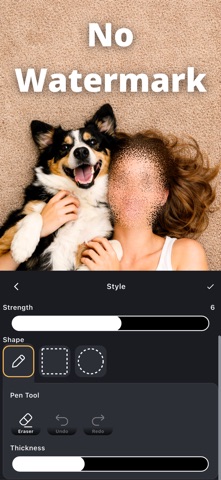
Trace with your finger for freehand edits, or select areas using rectangle, circle, and freehand shapes.
Quick, intuitive controls let you cover exactly what you need in seconds.

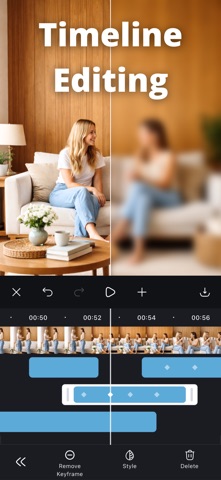
Timeline controls for moving subjects
Use the timeline to adjust effect timing precisely.
With keyframes, fine-tune the position as your subject moves—great for faces and cars.

No watermark. Export and share instantly
Save videos with no watermark.
After exporting, share right away to your favorite apps.
You can also save the current frame as an image.

Perfect for
• Blurring faces before posting to social media
• Hiding license plates in dashcam videos
• Protecting privacy (kids, bystanders, addresses, personal details)
• Fast edits when you still want fine control for moving subjects

Key features
• Easily blur or pixelate faces, license plates, and privacy-sensitive areas
• Finger-draw freehand editing
• Rectangle, circle, and freehand area selection
• Timeline control to adjust effect duration
• Keyframes to fine-tune position with motion
• Multiple blur and pixelation effects
• No watermark
• Undo/redo for quick fixes
• Restore your edit session and continue later
• Export video and save the current frame as an image
• Share immediately after saving
Show more Show less

More data about Video Blur Editor - Pixelate

Price Free
Rating 4.50 based on 8 ratings
Ranking Not ranked
Version 1.0.14
App size 48.2 MB
Suitable for Everyone

Screenshots

Video Blur Editor - Pixelate Screenshot 1 of 5
Video Blur Editor - Pixelate Screenshot 2 of 5
Video Blur Editor - Pixelate Screenshot 3 of 5
Video Blur Editor - Pixelate Screenshot 4 of 5
Video Blur Editor - Pixelate Screenshot 5 of 5
Screenshots by Yoshinobu Ikeda, from the the App Store listing
Official page on the App Store

Alternatives to Video Blur Editor - Pixelate

AI Photo Restore & Enhance icon AI Photo Restore & Enhance
Duc Duong
3.7
Free
9 ratings
Media Editor: by NS Apps icon Media Editor: by NS Apps
Xeniya Bykhova
0.0
Free
Dual Camera Recorder: DualX icon Dual Camera Recorder: DualX
Unsal Oner
0.0
Free
Dual Camera Recorder icon Dual Camera Recorder
Giang Le
3.4
Free
5 ratings
Pixel – 90s 8Bit Retro Camera icon Pixel – 90s 8Bit Retro Camera
John Friday
5.0
Free
9 ratings
Endless Lens: Dual Recorder icon Endless Lens: Dual Recorder
Y Phic Hdok
5.0
Free
5 ratings
Ocean: Video Editor icon Ocean: Video Editor
Milin Patel
5.0
Free
1 ratings
IHorizonLock Camera icon IHorizonLock Camera
Luis Filipe Fontinelles Bezerra
4.5
Free
8 ratings

More from Yoshinobu Ikeda

Flashcards maker - Easy to use icon Flashcards maker - Easy to use
Yoshinobu Ikeda
4.7
Free
885 ratings
Blur & Mosaic Photo editor icon Blur & Mosaic Photo editor
Yoshinobu Ikeda
4.6
Free
285 ratings
Add text on photos icon Add text on photos
Yoshinobu Ikeda
4.7
Free
101 ratings
ClipMerger Camera icon ClipMerger Camera
Yoshinobu Ikeda
4.4
Free
87 ratings
Pedometer: Walk & Step Counter icon Pedometer: Walk & Step Counter
Yoshinobu Ikeda
4.6
Free
84 ratings
Mic Test - Instant Audio Check icon Mic Test - Instant Audio Check
Yoshinobu Ikeda
4.3
Free
76 ratings
Forex Backtesting icon Forex Backtesting
Yoshinobu Ikeda
4.7
Free
60 ratings
Image converter - Batch & Easy icon Image converter - Batch & Easy
Yoshinobu Ikeda
4.6
Free
29 ratings

Changelog of Video Blur Editor - Pixelate

No changelog data

Developer information for Yoshinobu Ikeda

Yoshinobu Ikeda

Address:

Share Video Blur Editor - Pixelate

Comments on Video Blur Editor - Pixelate for iOS

We don't have enough comments to show example comments. Please check back later.

App Store Rankings for Video Blur Editor - Pixelate

This app is not ranked

Technologies used by Video Blur Editor - Pixelate

Frequently asked questions about Video Blur Editor - Pixelate

Is Video Blur Editor - Pixelate free?

Yes. Video Blur Editor - Pixelate is free on the App Store.

Is Video Blur Editor - Pixelate still available?

Yes. Video Blur Editor - Pixelate is on the App Store, and the last update we saw was on June 26, 2026.

How large is Video Blur Editor - Pixelate?

Video Blur Editor - Pixelate is 48.24 MB.

Is Video Blur Editor - Pixelate suitable for children?

App Store rates the content of Video Blur Editor - Pixelate as suitable for everyone.

How do people rate Video Blur Editor - Pixelate?

Video Blur Editor - Pixelate scores 4.50 out of 5 stars, from 8 ratings on the App Store.

Who made Video Blur Editor - Pixelate?

Video Blur Editor - Pixelate was developed by Yoshinobu Ikeda. It is listed in the photo & video category on the App Store.

What are the best alternatives to Video Blur Editor - Pixelate?

People looking at Video Blur Editor - Pixelate also look at these photo & video apps: AI Photo Restore & Enhance, Media Editor: by NS Apps, Dual Camera Recorder: DualX, Dual Camera Recorder, Pixel – 90s 8Bit Retro Camera.

Apps other people are watching Price drops on Google Play Popular Photo & Video Apps Top new apps Today's trending apps
AI Photo Restore & Enhance icon AI Photo Restore & Enhance
Media Editor: by NS Apps icon Media Editor: by NS Apps
Dual Camera Recorder: DualX icon Dual Camera Recorder: DualX
Dual Camera Recorder icon Dual Camera Recorder
Pixel – 90s 8Bit Retro Camera icon Pixel – 90s 8Bit Retro Camera
Endless Lens: Dual Recorder icon Endless Lens: Dual Recorder
Ocean: Video Editor icon Ocean: Video Editor
IHorizonLock Camera icon IHorizonLock Camera
Overview Alternatives Reviews Rankings Technology
AppBrain Intelligence premium content

Subscribe now to get full and unlimited access to AppBrain Intelligence. You'll have access to:

  • App Intelligence dashboard (performance timeline, competitor comparison, country rankings, insight cards)
  • Detailed ranking data per app
  • Full timeline per developer
  • Device market shares data per country
  • Unlimited keyword tracking
1 Month

$75/mo
(billed every month)

SAVE 0%
Subscribe
3 Months

$65/mo
($195 billed every 3 months)

SAVE 13%
Subscribe
1 Year

$57.50/mo
($690 billed every year)

SAVE 23%
Subscribe
Each subscription will automatically renew 3 days before the expiration date for the same time period. Subscriptions can be cancelled at any time before the renewal.

AppBrain is an app data site, we track rankings, ratings, installs for all apps and games on Google Play and the App Store. AppBrain doesn't host app files or APKs, all install links go directly to the official store. All trademarks are owned by their respective owners.

More apps

  • Top Android apps being viewed
  • SURFnet VPN
  • Vimetra: Health Tracker & Scan
  • SubX Player: AI Dual Subtitles

App statistics

  • Android statistics
  • Google Play Developer stats
  • Trending Android Apps
  • Trending iOS apps
  • Top popular Apps
  • Buy the best Android phone
  • Buy & sell app businesses

About AppBrain

  • Contact
  • Privacy
  • Documentation
  • DMCA takedowns
  • Articles
  • Blog
  • How to improve the earnings of your ad units
© 2010-2026 - AppBrain