It doesn't have enough ratings yet to judge what users think.
Video Captions: Auto Subtitles is made and published by
Gustavo Severo.
AppBrain is an independent app data site and isn't affiliated with Gustavo Severo.
The app name, icon, screenshots and description belong to Gustavo Severo and are shown as
published on the App Store.
About Video Captions: Auto Subtitles
Video Captions: Auto Subtitles is a photo & video app developed by Gustavo Severo.
What is the rating of Video Captions: Auto Subtitles?
Video Captions: Auto Subtitles is rated 4.20 out of 5 stars, based on 10 ratings.
Is Video Captions: Auto Subtitles free?
Video Captions: Auto Subtitles is free. The app size is 77.96 MB. The latest version available is 26.15. The last update was on August 12, 2026.
What are the requirements for Video Captions: Auto Subtitles?
The app has a content rating of Everyone. The app has been available on the App Store since March 2026.
Description by Gustavo Severo(from the App Store)
Video Captions automatically generates, styles, and burns subtitles into your videos — right on your device or with cloud models.
WHETHER YOU'RE A CREATOR, EDUCATOR, OR ACCESSIBILITY ADVOCATE – Reach wider audiences with accurate captions in their language – Make your Reels, Shorts, and TikToks more engaging and inclusive – Create accessible content without breaking the bank
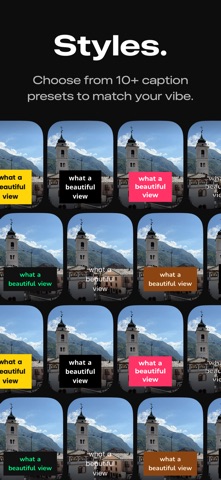
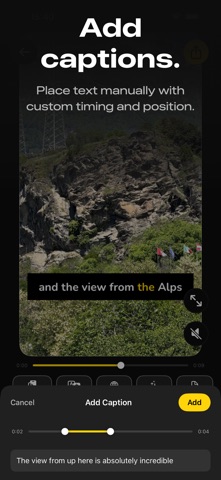
80+ CAPTION STYLE PRESETS – Choose from carefully designed presets across 8 curated collections — Bold, Soft & Wellness, Handwritten, Lifestyle, Editorial, Retro, and more – Highlight the active spoken word with karaoke effects, keyword boxes, color swaps, or underlines – Smooth entry animations: fade, slide, scale-bounce, blur in, and overshoot – Full control over font, size, text color, background, and position — with transparency support on every color – Place captions anywhere on the frame — top, center, or bottom
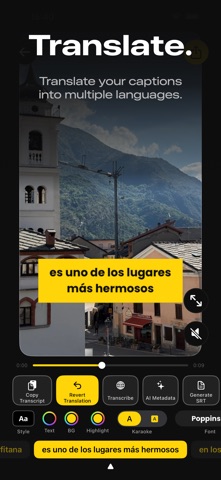
TRANSLATE INTO MULTIPLE LANGUAGES – Translate your captions into multiple languages with a single tap – Easily revert back to the original captions at any time
AI-POWERED METADATA – Generate video titles, descriptions, and hashtags with on-device AI – Choose a tone — Professional, Casual, or Fun — to match your style – Copy and share instantly to any platform
PROJECTS & AUTO-SAVE – Your work is automatically saved as a project so you can pick up where you left off – Browse your projects in a visual grid with video thumbnails – Filter projects by transcription language to quickly find what you need
HOME FEED – Discover caption styles through curated collections on your home feed – Preview how each style looks before you start editing – Jump straight into transcription with a single tap
SRT EXPORT – Export captions as standard SRT files for use in any video editor or platform – Smart sentence detection for clean, readable subtitle formatting
PROFESSIONAL EXPORT – Captions rendered permanently into the video file – HDR support preserves the full dynamic range of your footage – Background export lets you keep using your phone while your video renders – Original audio preserved with no quality loss – Ready to share on any platform or social media
MULTILINGUAL TRANSCRIPTION – Supports 30+ languages with accurate speech recognition – Choose on-device transcription, or optional cloud models for even more accurate results on fast speech, accents, and noisy audio – Switch languages and re-transcribe without losing your edits
Terms of Use (EULA): https://www.apple.com/legal/internet-services/itunes/dev/stdeula/
Each subscription will automatically renew 3 days before the expiration date for
the same time period. Subscriptions can be cancelled at any time before the renewal.