Video Compressor - Converter is an overall app developed by 双平 卿.
Download Statistics
User Ratings
Video Compressor - Converter is rated 5.00 out of 5 stars. The rating is based on 2 ratings.
App Information
Video Compressor - Converter is FREE to download. The APK download size is 60.02 MB. The latest version available is 1.1.5. The last update was on April 23, 2026.
Technical Requirements
The app has a content rating of Everyone. The app has been available on Google Play June 2025.
Description
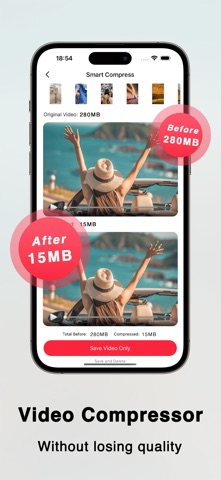
Welcome to our app, Meet your go-to tool for smart video compression, quick editing, and efficient format conversion—all wrapped in a clean, intuitive interface that lets you dive in without a learning curve.
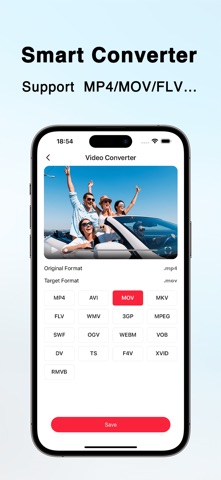
Key Features That Simplify Your Workflow - Smart Compression, Zero Quality Loss: Automatically optimizes video file size while preserving every detail—no more choosing between smaller files and clear 画质. - Batch Compression for Efficiency: Process multiple videos in one go with a single tap. Cut down on repetitive tasks and save precious time. - Customizable Settings: Tailor your output to fit your needs—adjust resolution, bitrate, frame rate, and more for full control. - Image Compression, Too: Shrink photo sizes effortlessly, keeping visual clarity intact. One app for all your media compression needs. - Versatile Format Converter: Seamlessly switch between MP4, MOV, AVI, WMV, and other popular formats. Make your videos compatible with any device or platform. - All-In-One Video Tools: Edit on the fly with essential features—trim unwanted clips, mute audio, adjust playback speed, or flip videos (mirror mode included). - ZIP Packing for Easy Sharing: Bundle multiple videos, photos, or files into a single ZIP archive. Simplify storage and sharing in one step.
Save space on your device, speed up your media workflow, and keep your content looking sharp—all without the hassle. Download now and turn complicated video processing into a breeze!
Subscription Instructions • Premium VIP Member: Upgrade and unlock all our features. • Subscription period: 1 week (members renew products weekly), 1 month (members renew products monthly). • Subscription price: subject to IAP application and display information, such as $2.99 for weekly subscription. • Payment: After the user confirms the purchase and payment, it will be credited to the iTunes account • Renewal: For members who purchase a monthly subscription, Apple iTunes will deduct the fee within 24 hours before the expiration date. After the deduction is successful, the subscription period will be extended. • Cancel renewal: To cancel the renewal, please go to "iTunes Store and App Store" 24 hours before the expiration of the current subscription period, click "Apple ID", and select "View Apple ID". Go to the "Account Settings" page, click "Subscription", and select the corresponding subscription item to cancel.
Privacy Policy: https://docs.qq.com/doc/p/87bec6264721ab013c787dda3769518843731ece User Agreement: https://docs.qq.com/doc/p/469c89889e622046b26e6c40b7331b94f4e5509b
Each subscription will automatically renew 3 days before the expiration date for
the same time period. Subscriptions can be cancelled at any time before the renewal.