

Video Compressor: ShrinkFile
Video Compressor: ShrinkFile is made and published by 金标 李. AppBrain is an independent app data site and isn't affiliated with 金标 李. The app name, icon, screenshots and description belong to 金标 李 and are shown as published on the App Store.
AppBrain's verdict
- Rating on App Store
- 4.56
- 9 ratings
- Last updated
- October 2, 2026
- Size
- 53.3 MB
It doesn't have enough ratings yet to judge what users think.
User feedback
Ratings and reviews on the App StoreComments on Video Compressor: ShrinkFile for iOS
We don't have enough comments to show example comments. Please check back later.
Store listing
By 金标 李, from the App Store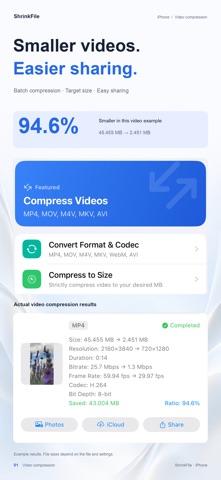

Description by 金标 李 Written by the developer, not by AppBrain. Click to read.
Whether you're a professional creator, developer, or just looking to free up storage space, this all-in-one video compressor provides a comprehensive, offline-first suite to handle all your daily media tasks.
WHY CHOOSE OUR APP?
Everything happens on your device! Harnessing the power of your device's hardware acceleration (VideoToolbox), your files are processed lightning fast. Best of all? No internet connection is required, meaning your data never leaves your device. 100% privacy guaranteed.
PRO VIDEO TOOLS
• Video Compression: A powerful video compressor to shrink MOV, MP4, M4V, and MKV files. We preserve the original video codec (H.264, HEVC, VP9, AV1) ensuring no unnecessary transcoding. Features smart bitrate control (Auto/Custom) and adjustable resolutions up to 4K.
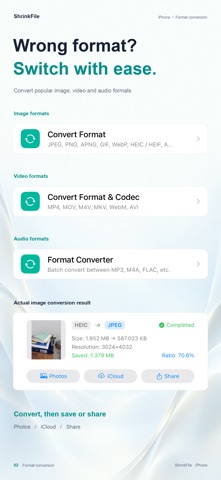
• Format Conversion: Batch convert MP4 ↔ MOV ↔ M4V ↔ WebM ↔ MKV ↔ AVI with lossless options, smart audio copying, and bitrate preservation.
• Video to Animation: Turn your videos into high-quality animated WebP, AVIF, or GIFs.
• Audio Extraction: Rip audio tracks from any video to MP3, M4A, AAC, FLAC, WAV, or OGG.
POWERFUL IMAGE TOOLS
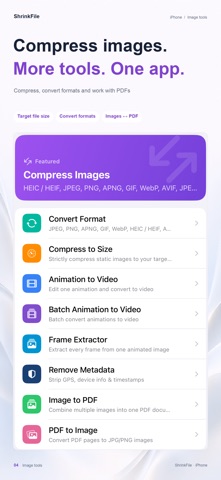
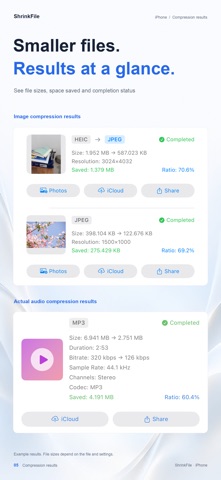
• Smart Compression: Support for JPEG, JPEG XL, PNG, HEIC, WebP, AVIF, and GIF. Powered by MozJPEG and Zopfli for the highest quality compressions. Adjustable quality and resolution.
• Animated Image Support: Intelligently auto-detects animated images (WebP/AVIF/GIF) with frame-by-frame compression while preserving timeline information.
• Format Conversion: Batch convert instantly: JPEG ↔ JPEG XL ↔ PNG ↔ WebP ↔ HEIC ↔ AVIF ↔ GIF ↔ APNG.
COMPREHENSIVE AUDIO TOOLS
• Audio Compression: Reduce file sizes for MP3, M4A, FLAC, OGG, and WAV. Full control over bitrates (32-320 kbps), sample rates, and mono/stereo channels.
• Format Conversion: Batch convert MP3 ↔ M4A ↔ FLAC ↔ WAV ↔ WebM ↔ CAF ↔ OGG ↔ M4R effortlessly.
ENHANCED SMART FEATURES
• Smart Decision Making: Automatically preserves the original file if the compressed version happens to be larger.
• ETA Display: View accurate estimated time remaining for heavy, long-running tasks.
• Batch Processing: Save time by converting or compressing multiple files simultaneously.
Terms of Use (EULA): https://www.apple.com/legal/internet-services/itunes/dev/stdeula/
Safety and technology
Found in the app by AppBrain- Price
- Free
- App size
- 53.3 MB
- Content rating
- Everyone
Technologies used by Video Compressor: ShrinkFile
Releases
Updates seen on the App Store- Version
- 2.12.0
- Launched
- November 2025
No changelog data
Alternatives
Similar apps and more from 金标 李More from 金标 李


Rankings
App Store top chartsApp Store Rankings for Video Compressor: ShrinkFile
About the app and developer
About Video Compressor: ShrinkFile
Video Compressor: ShrinkFile is a photo & video app developed by 金标 李.
User Ratings
Video Compressor: ShrinkFile is rated 4.56 out of 5 stars. The rating is based on 9 ratings.
App Information
Video Compressor: ShrinkFile is freely available from the App Store. The app size is 53.30 MB. The latest version available is 2.12.0. The last update was on October 2, 2026.
Technical Requirements
The app has a content rating of Everyone. The app has been available on the App Store since November 2025.
Developer information for 金标 李
Address: