Video Compressor: Size Down came out 68 days ago. It doesn't have enough ratings yet to judge what users think.
Video Compressor: Size Down is made and published by
Zhe Wu.
AppBrain is an independent app data site and isn't affiliated with Zhe Wu.
The app name, icon, screenshots and description belong to Zhe Wu and are shown as
published on the App Store.
About Video Compressor: Size Down
Video Compressor: Size Down is a photo & video app developed by Zhe Wu.
What is the rating of Video Compressor: Size Down?
Video Compressor: Size Down is rated 5.00 out of 5 stars, based on one rating ratings.
Is Video Compressor: Size Down free?
Video Compressor: Size Down is free. The app size is 2.67 MB. The latest version available is 1.1. The last update was on October 3, 2026.
What are the requirements for Video Compressor: Size Down?
The app has a content rating of Everyone. The app has been available on the App Store since August 2026.
Description by Zhe Wu(from the App Store)
Make large videos smaller while keeping control of quality and output size.
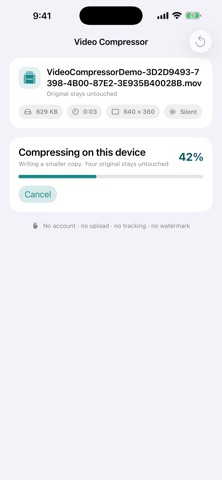
Video Compressor works entirely on your iPhone. Your videos are not uploaded to a server, the original stays untouched, and the finished copy is ready to save or share.
Every compression feature is included. There are no ads, subscriptions, in-app purchases, accounts, or watermarks.
CHOOSE VIDEOS QUICKLY
• Browse your library in a uniform grid with file size and duration on every video • Sort by Newest or Largest to find the videos worth compressing first • Manage the videos available when using limited Photos access • Use Apple’s private picker when you prefer to share access to only one video • Import compatible videos from Files
CONTROL THE RESULT
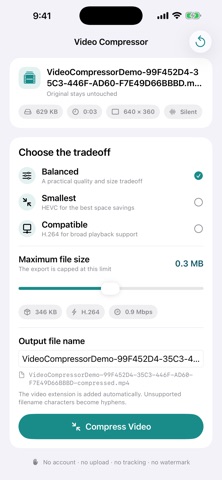
• Balanced mode for a practical quality and size tradeoff • Smallest mode using HEVC for stronger space savings • Compatible mode using H.264 for broad playback support • Set a maximum output file size with precise MB entry or the slider • Rename the output file before compressing
SEE WHAT IS HAPPENING
• Loading and import progress for videos that need preparation • Live compression progress • Clear before-and-after file sizes and percentage saved • Preview the original and compressed videos to compare the result • Checks for the expected duration, audio track, and picture shape
SAVE OR SHARE
• Save the compressed copy to Photos, with confirmation to avoid duplicate saves • Share it to Files, Messages, Mail, or another compatible app • Keep the original unchanged
PRIVATE BY DESIGN
Compression happens on your device. Video Compressor includes no account system, developer analytics, advertising SDK, or tracking.
Each subscription will automatically renew 3 days before the expiration date for
the same time period. Subscriptions can be cancelled at any time before the renewal.