Video Frame Capture: SnapFrame is a photo & video app developed by Jaden K.
User Ratings
The app has no ratings yet.
App Information
Video Frame Capture: SnapFrame is freely available from the App Store. The app size is 9.21 MB. The latest version available is 1.0.1. The last update was on April 26, 2026.
Technical Requirements
The app has a content rating of Everyone. The app has been available on the App Store since April 2026.
Description by Jaden K(from the App Store)
SnapFrame is a fast video frame capture app for turning videos into clear still photos.
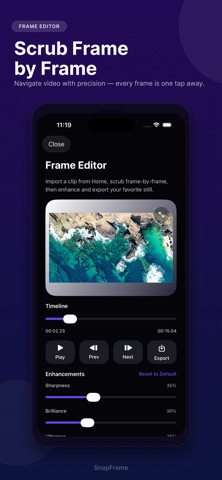
Import a clip from Photos or Files, scrub the video frame by frame, preview the exact moment, and save high-quality snapped frames to Photos or Files. Whether you need a frame grabber, video-to-photo extractor, or a simple way to export still images from a clip, SnapFrame keeps the workflow focused and quick.
Use it for sports moments, travel videos, family clips, product shots, tutorials, school projects, social content, thumbnails, and any scene where the best photo is hidden inside a video.
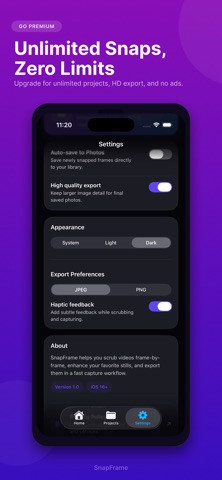
Key features: - Import videos from Photos or Files - Record and capture with the camera - Scrub precisely through the timeline - Snap multiple frames from one video - View snapped photos in a swipeable gallery - Save individual frames or export all snapped photos - Continue recent projects - Rename and delete projects - Use fullscreen capture mode for better focus - Adjust sharpness, brilliance, and vibrance before export - Dark mode support
Free users can create up to 2 projects and snap up to 10 photos. SnapFrame Pro unlocks unlimited projects, unlimited frame exports, and an ad-free experience.
These prices are for United States customers. Pricing in other countries may vary and actual charges may be converted to your local currency depending on your country of residence.
- Subscription automatically renews unless auto-renew is turned off at least 24 hours before the end of the current period. - Your account will be charged for renewal within 24 hours prior to the end of the current period, and the renewal cost will be identified. - Subscriptions may be managed by the user, and auto-renewal may be turned off by going to the user's Account Settings after purchase.
Privacy Policy: https://sites.google.com/view/appsettings/prviacy-policy Terms of Service: https://sites.google.com/view/appsettings/terms-of-use
Each subscription will automatically renew 3 days before the expiration date for
the same time period. Subscriptions can be cancelled at any time before the renewal.