Download Android Apps and Games
AppBrain
  • Apps
  • Apps being viewed right now Trending apps today Most popular apps All-time most downloaded apps Top rated apps
  • Intelligence ▾
    Intelligence overview → Track any Android app or your whole market
    Track & analyze
    Keyword Tracker & OptimizerTrack & improve Play rankings App Performance ReportOne-off PDF for any app StatisticsFree Android & Play market stats
    Promote your app
    Featured Apps App Links
  • Intelligence
  • Pricing
  • Dashboard
  • Sign up
  • Log in
Last updated on: 2026-08-05
App Store Apps > Photo & Video > Video Speed Control Vmotion
Video Speed Control Vmotion icon

Video Speed Control Vmotion

4.01
Philip Kohn
0.00
0 reviews
Free

Video Speed Control Vmotion Screenshot 1 of 5
Video Speed Control Vmotion Screenshot 2 of 5
Video Speed Control Vmotion Screenshot 3 of 5
Video Speed Control Vmotion Screenshot 4 of 5
Video Speed Control Vmotion Screenshot 5 of 5
Download from the App Store

About Video Speed Control Vmotion

Video Speed Control Vmotion is an overall app developed by Philip Kohn.

How many times has Video Speed Control Vmotion been downloaded?

What is the rating of Video Speed Control Vmotion?

Video Speed Control Vmotion has no ratings yet.

Is Video Speed Control Vmotion free?

Video Speed Control Vmotion is free to download. The APK download size is 37.44 MB. The latest version available is 4.01. The last update was on February 27, 2024.

What are the requirements for Video Speed Control Vmotion?

The app has a content rating of High Maturity. The app has been available on Google Play November 2016.

Description
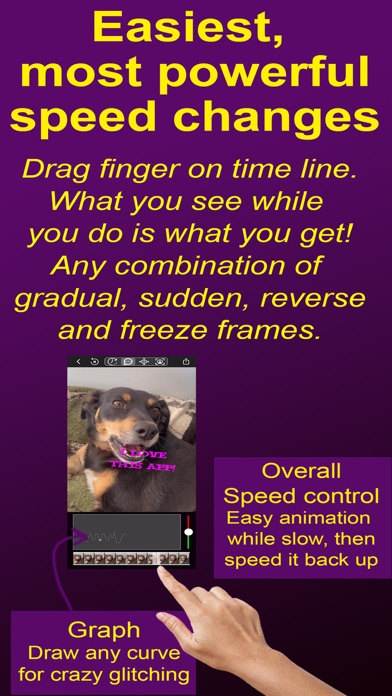
Create outstanding original transformations of your video, live photos or popular GIF memes. Change speed continuously to slow down or freeze frame on the best parts, then reverse over it a few times to make it even funnier! You can do any time warp that you can imagine, even make animals look like they are talking. And it is SUPER EASY! As you move your finger along the time line you will see the video animate at the speed and direction you move your finger. What you see while you do this is what you will get! If you don't like it, just do it again until you get it perfect. There is also a graph that you can directly draw directly on to make unique glitch effects.

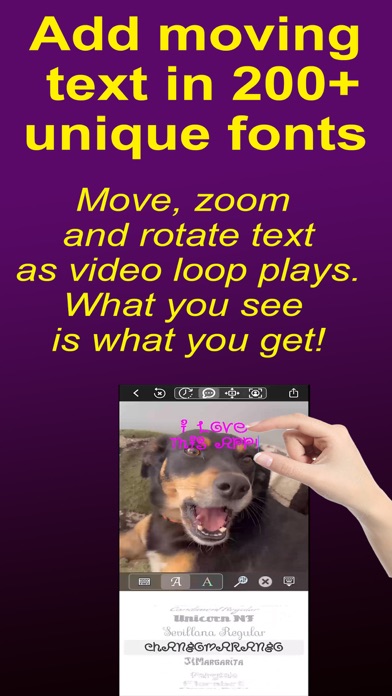
Express your feelings by adding text in over 200 unusual fonts. Then make your text dance around in sync with your video. Just drag the text the way you want it to move. Pinch to make it grow, shrink or rotate.

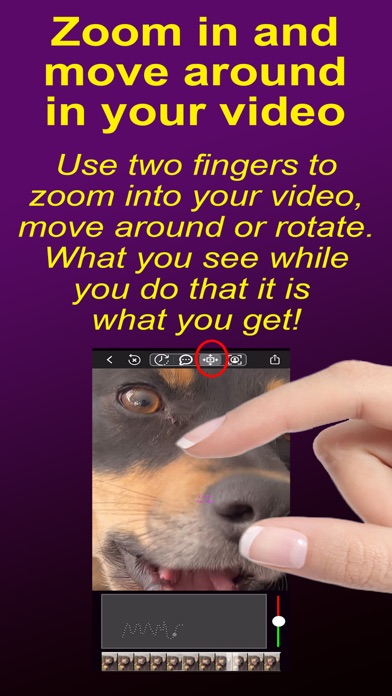
Tell your story by zooming into the video and moving or rotating within the part you want to focus on. Zoom in on your friend's reactions and move between their faces. All you have to do is use 2 fingers to zoom, rotate or pan within the video as it plays.

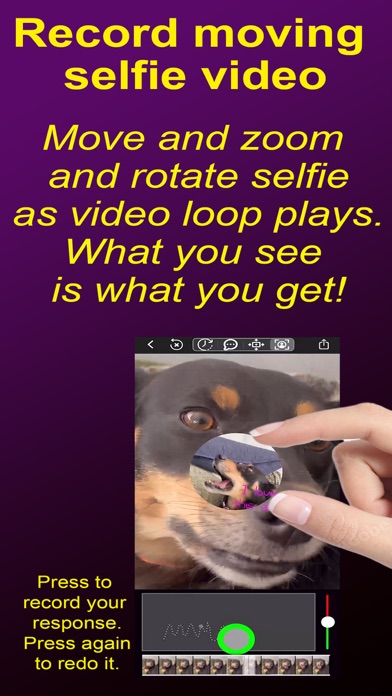
You can even record a video selfie bubble showing your own reaction as the video plays. Make your video bubble move around, expand, contract, and rotate by simply dragging or pinching it the way you'd like it to move.

To make really fancy changes, you can slow down the whole video loop with the speed slider to the right of the graph. Then you can make your animation while everything is playing slowly. Then simply speed it up again before sharing. Your friends will wonder how you did it!

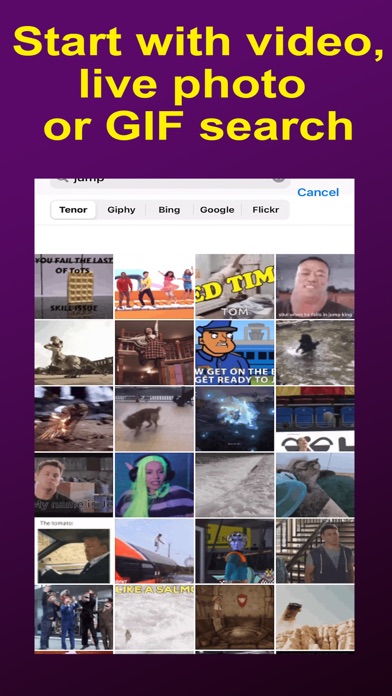
- Start with any video, live photo, regular photo, or GIF search on popular websites.

- Change speed in literally any combination of ways: gradual, sudden, glitch, freeze, reverse.
- Scrub time slider, what you see while you do that is what you'll get..
- Scrub again until you get it right.

- Get fine time control on longer videos by dragging up and away from the time slider.

- Draw directly on graph to change transformation of output video time on x-axis to original video time on y-axis.
- Touch anywhere on graph to change that part, creating unique glitch effects.
- Touch right end of graph and drag to the left to erase from end of the graph.

- Use speed slider to the right of graph to slow down the video loop allowing even easier control of effects you are drawing. Then speed it back up again before sharing it.

- Add text in crazy (and normal) fonts. As the video plays, make it move around by dragging it or make it expand, contract and rotate by pinching it.

- Zoom into the video and move the cropping frame around to focus on different parts of the video. Pinch to zoom in and out or rotate and shake the whole video to create earthquake effects.

- Record a selfie video circle that shows your reaction as the video plays. Then make that video circle move, expand, contract or rotate in the video simply by dragging or pinching it.

- Copy any video or GIF from your social media and autopaste to add new text, selfie, time effects or whole video zoom and pans. VideoSpeed will ask if you'd like to paste it automatically.

- Share or save as video, or as high quality GIF.
- GIFs are optimized using the best desktop level algorithms to reduce data costs and pop up faster when received.

- NOTE: a watermark will appear on the video. You can pay a small amount to make unwatermarked video.

Terms of Use: https://www.apple.com/legal/internet-services/itunes/dev/stdeula
Show more Show less

More data about Video Speed Control Vmotion

Price Free to download
Rating No ratings
Ranking Not ranked
Version 4.01
App download size 37.4 MB
Maturity High Maturity

Alternative downloads for the Video Speed Control Vmotion app

Higher rated
Slow Motion Video & Speed Up icon Slow Motion Video & Speed Up
out thinking limited
3.7
Free
239 ratings
Higher rated
Video Speed slow motion editor icon Video Speed slow motion editor
Arthur Eduardo Skaetta Alvarez Desenvolvimento de Software LTDA.
4.6
Free
97 ratings
Higher rated
One Video Editor Text Speed FX icon One Video Editor Text Speed FX
VendiApps
4.5
Free
5.3K ratings
Higher rated
Slow Fast Reverse Motion Video icon Slow Fast Reverse Motion Video
Rajneesh Mishra
3.8
Free
11 ratings
Higher rated
Video Speed Editor Slow & Fast icon Video Speed Editor Slow & Fast
VendiApps
3.9
Free
1.2K ratings
Higher rated
Slow Motion Video Speed Editor icon Slow Motion Video Speed Editor
Saturday Technologies, Inc
4.6
Free
62 ratings
Higher rated
Slow and Fast Motion Camera icon Slow and Fast Motion Camera
Mobisoft Labs
4.2
Free
14 ratings
Higher rated
Video Editor : Cutter & Joiner icon Video Editor : Cutter & Joiner
Jogani Bhavesh Keshubhai
2.5
Free
4 ratings

More from Philip Kohn

Insanimate stunning abstract art pattern mandala icon Insanimate stunning abstract art pattern mandala
Philip Kohn
5.0
$0.99
1 ratings

Changelog of Video Speed Control Vmotion

No changelog data

Developer information for Philip Kohn

Philip Kohn

Address:

Share Video Speed Control Vmotion

Comments on Video Speed Control Vmotion for iOS

We don't have enough comments to show example comments. Please check back later.

App Store Rankings for Video Speed Control Vmotion

This app is not ranked

Technologies used by Video Speed Control Vmotion

Slow Motion Video & Speed Up icon Slow Motion Video & Speed Up
Video Speed slow motion editor icon Video Speed slow motion editor
One Video Editor Text Speed FX icon One Video Editor Text Speed FX
Slow Fast Reverse Motion Video icon Slow Fast Reverse Motion Video
Video Speed Editor Slow & Fast icon Video Speed Editor Slow & Fast
Slow Motion Video Speed Editor icon Slow Motion Video Speed Editor
Slow and Fast Motion Camera icon Slow and Fast Motion Camera
Video Editor : Cutter & Joiner icon Video Editor : Cutter & Joiner

Back to top
AppBrain Intelligence premium content

Subscribe now to get full and unlimited access to AppBrain Intelligence. You'll have access to:

  • App Intelligence dashboard (performance timeline, competitor comparison, country rankings, insight cards)
  • Detailed ranking data per app
  • Full timeline per developer
  • Device market shares data per country
  • Unlimited keyword tracking
1 Month

$75/mo
(billed every month)

SAVE 0%
Subscribe
3 Months

$65/mo
($195 billed every 3 months)

SAVE 13%
Subscribe
1 Year

$57.50/mo
($690 billed every year)

SAVE 23%
Subscribe
Each subscription will automatically renew 3 days before the expiration date for the same time period. Subscriptions can be cancelled at any time before the renewal.

AppBrain is a directory focused on discovering great apps and games. We give statistics, rankings and search options that Google Play and the App Store don't have. All trademarks are owned by their respective owners. AppBrain doesn't offer APKs or binaries, and always lets users install the official version from Google Play or the App Store.

More apps

  • Top Android apps being viewed
  • View Pocket Signals
  • My Vodacom SA for Android
  • View Fossify Voice Recorder Beta

Android Statistics

  • Android statistics
  • Google Play Developer stats
  • Trending Android Apps
  • Top popular Apps
  • Buy the best Android phone

About AppBrain

  • Contact
  • Privacy
  • Documentation
  • DMCA takedowns
  • Articles
  • Blog
  • How to improve the earnings of your ad units
© 2010-2026 - AppBrain