It doesn't have enough ratings yet to judge what users think.
Video to MP3: Extract Audio is made and published by
一文 陈.
AppBrain is an independent app data site and isn't affiliated with 一文 陈.
The app name, icon, screenshots and description belong to 一文 陈 and are shown as
published on the App Store.
About Video to MP3: Extract Audio
Video to MP3: Extract Audio is an utilities app developed by 一文 陈.
What is the rating of Video to MP3: Extract Audio?
Video to MP3: Extract Audio is rated 5.00 out of 5 stars, based on 2 ratings.
Is Video to MP3: Extract Audio free?
Video to MP3: Extract Audio is free. The app size is 44.66 MB. The latest version available is 1.1.2. The last update was on October 14, 2026.
What are the requirements for Video to MP3: Extract Audio?
The app has a content rating of Everyone. The app has been available on the App Store since November 2025.
Description by 一文 陈(from the App Store)
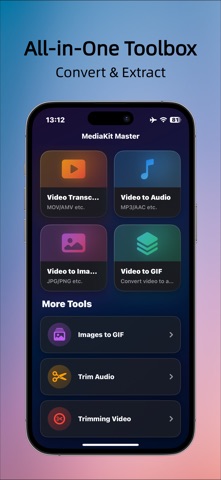
A professional, full-featured video conversion tool built with SwiftUI. Convert, extract, cut, and transform videos, audio, and images with fast, high-quality processing powered by FFmpeg.
【Key Features】 • Video to Image Extract frames from any part of a video or convert the entire video into a sequence of images. Perfect for visual analysis, content creation, and frame-by-frame inspection.
• Video to Audio Convert any video into MP3, WAV, M4A, AAC, OGG, and more. MP3 extraction is powered by AVFoundation for speed, while other formats use FFmpeg for high-quality output.
• Video to GIF Select a custom video segment and turn it into a smooth, high-quality GIF. Adjust start/end time, frame rate, size, and more.
• Images to GIF Pick multiple images and instantly create a GIF. Customize playback speed, order, and dimensions.
• Video Format Conversion Convert videos to MP4, AVI, WMV, MPG, TS, and many other formats. Ideal for compatibility, uploading, editing, or sharing across different platforms.
• Audio Cutting Precisely cut any segment from an audio file and export it in seconds.
• Video Cutting Trim videos with accuracy and keep only the parts you want.
【Why Choose This App?】 • All-in-one solution for video, audio, and GIF tools • High-quality output using FFmpeg’s professional-grade conversion engine • Modern and intuitive interface designed with SwiftUI • Fully offline processing — all conversions happen on your device for privacy and security
【Perfect For】 • Extracting background music or voice tracks • Making GIFs, memes, and animated content • Preparing clips before video editing • Converting formats for upload, sharing, or archiving • Generating frame sequences from videos
Terms of Use: https://www.apple.com/legal/internet-services/itunes/dev/stdeula/
Each subscription will automatically renew 3 days before the expiration date for
the same time period. Subscriptions can be cancelled at any time before the renewal.