





AppBrain's verdict
- Last updated
- May 27, 2026
- Size
- 39.4 MB
User feedback
Ratings and reviews on the App StoreComments on Video to PDF Converter Pro for iOS
We don't have enough comments to show example comments. Please check back later.
Store listing
By Sreenu Kistapuneni, from the App StoreDescription by Sreenu Kistapuneni Written by the developer, not by AppBrain. Click to read.
Make pdf from video without uploading files to the cloud. Processing runs on your device for privacy, speed, and reliable results when you need a video pdf maker on the go. Turn video into pdf from screen recordings, lectures, tutorials, presentations, or any clip you want saved as a document from video.
THREE WAYS TO BUILD PDF PAGES
• Time interval — extract frames from video to pdf on a schedule across the clip
• Frame count — spread captures evenly to create a multi page pdf from video
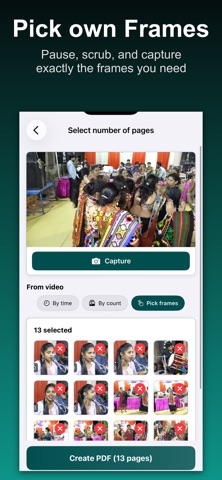
• Manual capture — pause, scrub, and screenshot video to pdf at exact frames
Each mode is a practical video page extractor: capture stills from video to pdf pages you care about, then refine the story before you create pdf from video.
REVIEW, REORDER, AND CREATE
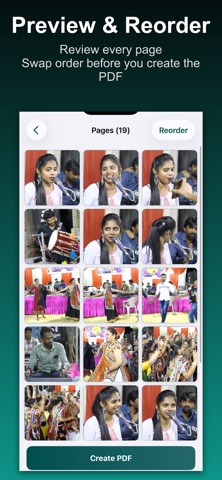
After extraction, preview every frame in the pages grid. Reorder pdf pages with a simple swap flow so your final file reads in the right sequence. Set PDF options and build one polished pdf from video file output.
PDF SETTINGS YOU CONTROL
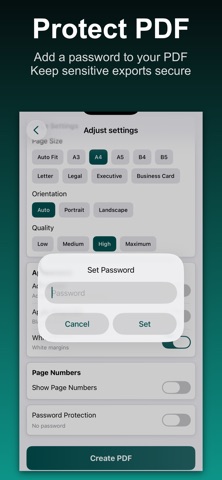
• Page sizes including A4, Letter, Legal, A3, A5, and more
• Portrait, landscape, or auto orientation
• Fit, fill, or stretch scaling for each page image
• Image quality from efficient to maximum detail
• White margins, optional borders, and black and white mode
• Page numbers with left, center, or right placement
• Password protection for sensitive exports
• Custom file names for easy organization
MY PDFS LIBRARY
Every export lands in My PDFs with date grouping, preview, share, rename, and delete. Open password protected files with the unlock prompt. Multi select helps you clean up older lecture video to pdf or tutorial video to pdf projects.
PERFECT FOR
• Students turning lecture video to pdf notes they can read and annotate
• Professionals saving presentation video to pdf handouts for meetings
• Creators documenting tutorial video to pdf walkthroughs
• Anyone who needs video frames to pdf instead of dozens of loose photos
• Teams sharing mp4 to pdf or mov to pdf exports from recorded demos
• Users who want save video frames as pdf on mobile without desktop tools
WHY CHOOSE THIS APP
A focused video to pdf converter without extra complexity. No account is required for core conversion. Select video, extract pages, adjust order, set PDF options, and save. Whether your goal is export video as pdf for archiving or a quick convert mp4 to pdf iphone workflow, you get one shareable document.
Unlike a basic images to pdf tool, you start from motion. Video file to pdf work begins with choosing the right frames, which makes this a stronger video to pdf pages solution for timelines, how to content, and long recordings.
PRIVACY AND PERFORMANCE
Your media stays on device during extraction and PDF generation. No cloud queue and no remote upload. Fast processing helps when you batch many frames from longer clips.
SUBSCRIPTION
Go Premium to remove ads and enjoy uninterrupted sessions. Free users keep full access to core extraction modes, PDF creation, and the My PDFs library.
HOW IT WORKS
1. Select a video from your library
2. Choose interval, frame count, or manual frame capture
3. Extract and review pages in the grid
4. Reorder pdf pages if needed
5. Set page size, quality, margins, and optional password
6. Create PDF and manage it in My PDFs
Download Video to PDF Converter today to convert video to pdf, build video frames to pdf documents, and keep exports organized on iOS.
Terms of Use: https://www.apple.com/legal/internet-services/itunes/dev/stdeula/
Privacy Policy: https://modern-tools-privacy.netlify.app/?id=a4e8f2c7
Safety and technology
Found in the app by AppBrain- Price
- Free
- App size
- 39.4 MB
- Content rating
- Everyone
Technologies used by Video to PDF Converter Pro
Releases
Updates seen on the App Store- Version
- 1.0
- Launched
- May 2026
No changelog data
Alternatives
Similar apps and more from Sreenu KistapuneniAlternatives to Video to PDF Converter Pro


More from Sreenu Kistapuneni





Also available on Google Play

Rankings
App Store top chartsApp Store Rankings for Video to PDF Converter Pro
About the app and developer
About Video to PDF Converter Pro
Video to PDF Converter Pro is a photo & video app developed by Sreenu Kistapuneni.
User Ratings
The app has no ratings yet.
App Information
Video to PDF Converter Pro is freely available from the App Store. The app size is 39.36 MB. The latest version available is 1.0. The last update was on May 27, 2026.
Technical Requirements
The app has a content rating of Everyone. The app has been available on the App Store since May 2026.
Video to PDF Converter Pro is made and published by Sreenu Kistapuneni. AppBrain is an independent app data site and isn't affiliated with Sreenu Kistapuneni. The app name, icon, screenshots and description belong to Sreenu Kistapuneni and are shown as published on the App Store.
Developer information for Sreenu Kistapuneni
Address: