

Videocraft: Video Maker
Videocraft: Video Maker is made and published by Gamelarious. AppBrain is an independent app data site and isn't affiliated with Gamelarious. The app name, icon, screenshots and description belong to Gamelarious and are shown as published on the App Store.
AppBrain's verdict
EstablishedLoved by users- Best rank
- #97
- Top Paid, Indonesia
- Rating on App Store
- 4.60
- 405 ratings
- Last updated
- April 5, 2026
Users love it: 4.6 stars from 405 ratings. Its best ranking is #97 in Top Paid, Photo & Video in Indonesia.
Rankings
App Store top charts- Highest rank
- #97
- Chart
- Top Paid
- Photo & Video
- Country
- Indonesia
App Store Rankings for Videocraft: Video Maker
Top rankings
| Rank | Country | Category | List |
|---|---|---|---|
| 97 | Indonesia | Photo & Video | Top Paid |
Ranking history in Indonesia
Competitors
Similar apps and more from GamelariousAlternatives to Videocraft: Video Maker





Releases
Updates seen on the App Store- Version
- 6.0.2
- Launched
- November 2013
No changelog data
User feedback
Ratings and reviews on the App StoreComments on Videocraft: Video Maker for iOS
We don't have enough comments to show example comments. Please check back later.
Technology
Found in the app by AppBrain- Price
- $0.99
- App size
- 21.4 MB
- Content rating
- Everyone
Technologies used by Videocraft: Video Maker
About the app and developer
About Videocraft: Video Maker
Videocraft: Video Maker is a photo & video app developed by Gamelarious.
User Ratings
Videocraft: Video Maker is rated 4.60 out of 5 stars. The rating is based on 410 ratings.
App Information
Videocraft: Video Maker costs $0.99. The app size is 21.44 MB. The latest version available is 6.0.2. The last update was on April 5, 2026.
Technical Requirements
The app has a content rating of Everyone. The app has been available on the App Store since November 2013.
Developer information for Gamelarious
Address:
Store listing
By Gamelarious, from the App Store


Description by Gamelarious Written by the developer, not by AppBrain. Click to read.
All features are available with no subscription and no watermarks.
Feature Highlights
Files Integration
• Use videos, photos, images, GIFs, and music stored in iCloud Files.
Project Aspect Ratio, Resolution, and Frame Rate
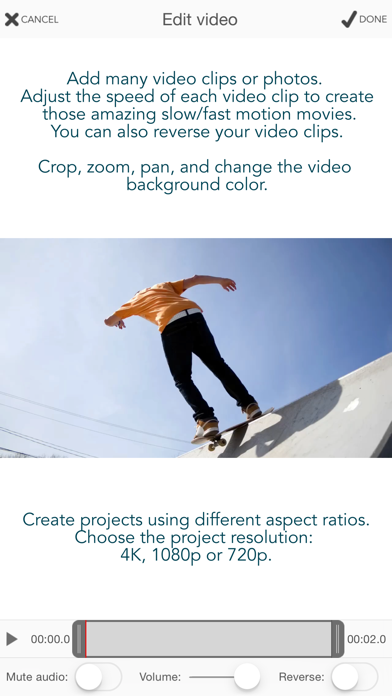
• Create square (1:1), standard (4:3), wide (16:9), or extra-wide (2:1) projects.
• Choose landscape or portrait orientation.
• Export in 4K, 1080p, or 720p.
• Choose 30fps or 60fps.
Add Multiple Video Clips and Photos
• Add videos and photos from Photos or Files.
• Trim video clips to use only the segment you need.
• Crop, pan, and zoom video clips and photos to fill or fit your project aspect ratio.
• Mute video clip audio or adjust its volume.
• Add fade in, fade out, and crossfade transitions.
• Set the duration of each photo.
• Change the video background color.
Ken Burns Effect
• Create beautiful photo stories with smooth pan and zoom motion.
Reverse Video
Slow / Fast Motion
Stop Motion
• Convert long videos into stop motion videos.
• Import multiple photos and play them in sequence to create stop motion movies.
Video Over Video (PIP, B-Roll)
• Add multiple videos over the main video track.
• Resize and position them however you like.
• Play them side by side.
Create Audio Tracks from Video Clips
• Extract audio from videos to use in your project.
• Play the audio of a video before the video appears for more creative transitions.
Blur Effect
• Apply blur to censored parts of your video.
Add Music Tracks
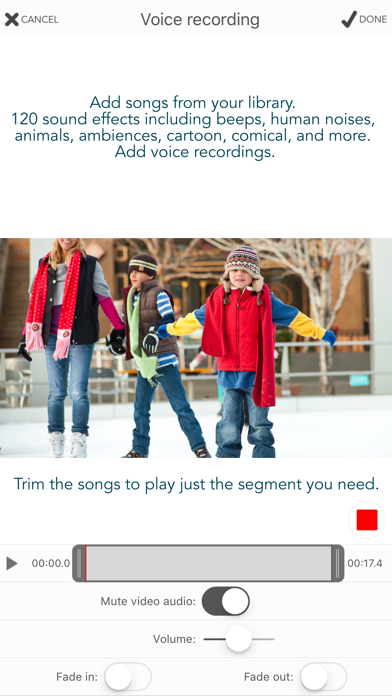
• Add songs from Music or Files.
• Trim songs to use only the segment you want.
• Auto-Sync music with the main video track.
• Adjust volume levels.
• Mute the main video audio track while the song plays.
• Add fade in and fade out for smooth transitions.
Add Sound Effects
• Add sound effects from the included sound effects library.
• Includes 120 sound effects such as beeps, human noises, animals, ambiences, cartoon sounds, comical effects, vehicles, weapons, explosions, and more.
Add Voice-Over
• Easily record narration for your video.
• Adjust the volume level.
• Mute the main video audio track while the recording plays.
Add Images Over Video
• Add images, GIFs, and animated stickers from Photos or Files on top of the video.
• Add your own watermarks, borders, and overlays.
• Combine text with included images to create callouts.
• Includes transitions such as wipe, move, scale, and fade.
Add Text Over Video
• Add text with any font, color, size, and position.
• Includes all fonts installed on the device.
• Change text color, shadow color, and background color.
• Includes transitions such as wipe, move, scale, and fade.
Easy-to-Use Video Editing Tools
• Add tracks using the toolbar buttons.
• Each track is represented by a bar in the timeline.
• Access track options by tapping its icon on the left.
• Drag the bar to change its position.
• Drag the bar handles to change its duration.
• Duplicate bars for easy reuse.
• Pinch the timeline to zoom in or out.
• Reorder video clips by dragging their purple bar.
• Includes undo and redo.
Gallery
• Projects are saved in the gallery so you can continue your work at any time.
• Rename projects and make copies to try different ideas.
Export Your Creation
• Export your project as a new video in Photos.
• Export the current frame as a new photo in your Photo Library.
• Perfect for creating memes, combining photos and text, or extracting a frame from your video.
For questions, feedback, and support:
Gamelarious: https://gamelarious.com
Support: support@gamelarious.com
X: @gamelarious