VideoSorter is made and published by 杰 李. AppBrain is an independent app data site and isn't affiliated with 杰 李. The app name, icon, screenshots and description belong to 杰 李 and are shown as published on the App Store.
AppBrain's verdict
- Last updated
- September 5, 2026
Rankings
App Store top chartsApp Store Rankings for VideoSorter
This app is not ranked
Competitors
Similar apps and more from 杰 李More from 杰 李
Releases
Updates seen on the App Store- Version
- 1.1.0
- Launched
- April 2026
No changelog data
User feedback
Ratings and reviews on the App StoreComments on VideoSorter for iOS
We don't have enough comments to show example comments. Please check back later.
Technology
Found in the app by AppBrain- Price
- Free
- App size
- 10.1 MB
- Content rating
- Everyone
Technologies used by VideoSorter
About the app and developer
About VideoSorter
VideoSorter is a photo & video app developed by 杰 李.
User Ratings
The app has no ratings yet.
App Information
VideoSorter is freely available from the App Store. The app size is 10.07 MB. The latest version available is 1.1.0. The last update was on September 5, 2026.
Technical Requirements
The app has a content rating of Everyone. The app has been available on the App Store since April 2026.
Developer information for 杰 李
Address:
Store listing
By 杰 李, from the App StoreScreenshots by 杰 李, from the the App Store listing
Description by 杰 李 Written by the developer, not by AppBrain. Click to read.
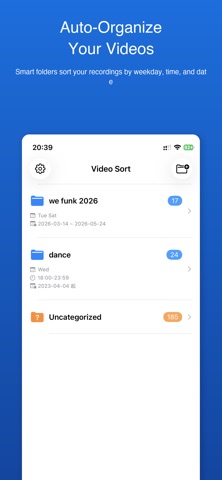
VideoSorter reads videos from your photo library and automatically sorts them into folders based on rules you define. Designed for students and teachers who record lectures on specific days and times.
SMART AUTO-SORTING
Create folders with custom rules to automatically classify your videos:
- Weekday filter — choose which days of the week
- Time range — specify the hours of the day
- Date range — set a start and end date
- Duration filter — min and max video length
- Per-weekday time ranges — different schedules for each day
MANUAL ORGANIZATION
Create directories yourself and manually pick videos to add. Every video that doesn't match a rule lands in the "Unclassified" folder so nothing is lost.
VIDEO PLAYBACK & MANAGEMENT
Browse sorted video lists per folder, play them directly in the app, pin important ones to the top, and remove videos you no longer need.
PRIVACY FIRST
VideoSorter only reads photo library metadata (creation date and duration). It does not access your camera, does not modify your photos, and does not upload any data.
Available in English, Japanese, Simplified Chinese, Traditional Chinese, Spanish, and Korean.
Terms of Use (EULA): https://www.apple.com/legal/internet-services/itunes/dev/stdeula/
SMART AUTO-SORTING
Create folders with custom rules to automatically classify your videos:
- Weekday filter — choose which days of the week
- Time range — specify the hours of the day
- Date range — set a start and end date
- Duration filter — min and max video length
- Per-weekday time ranges — different schedules for each day
MANUAL ORGANIZATION
Create directories yourself and manually pick videos to add. Every video that doesn't match a rule lands in the "Unclassified" folder so nothing is lost.
VIDEO PLAYBACK & MANAGEMENT
Browse sorted video lists per folder, play them directly in the app, pin important ones to the top, and remove videos you no longer need.
PRIVACY FIRST
VideoSorter only reads photo library metadata (creation date and duration). It does not access your camera, does not modify your photos, and does not upload any data.
Available in English, Japanese, Simplified Chinese, Traditional Chinese, Spanish, and Korean.
Terms of Use (EULA): https://www.apple.com/legal/internet-services/itunes/dev/stdeula/