

VideoSpace OCR
VideoSpace OCR is made and published by Gustavo Adolfo Pacheco Cruz. AppBrain is an independent app data site and isn't affiliated with Gustavo Adolfo Pacheco Cruz. The app name, icon, screenshots and description belong to Gustavo Adolfo Pacheco Cruz and are shown as published on the App Store.
AppBrain's verdict
- Last updated
- June 26, 2026
- Size
- 91.4 MB
User feedback
Ratings and reviews on the App StoreComments on VideoSpace OCR for iOS
We don't have enough comments to show example comments. Please check back later.
Store listing
By Gustavo Adolfo Pacheco Cruz, from the App Store
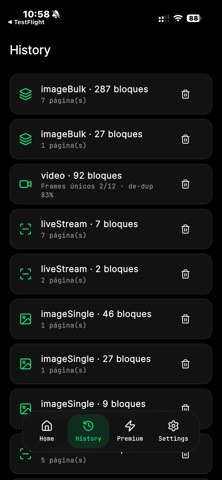

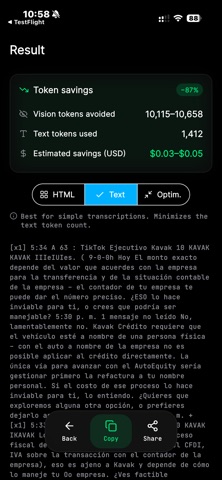

Description by Gustavo Adolfo Pacheco Cruz Written by the developer, not by AppBrain. Click to read.
Constantly hitting character limits in ChatGPT, Claude, or Copilot? Convert any screenshot, image batch, or video clip into hyper-compressed text directly on your own hardware — without sending a single byte to the cloud, ensuring absolute privacy.
Key Features:
• Advanced Video Optimization: Powered by our proprietary recursive binary bisection algorithm, the app processes video by skipping static blocks. A 10-minute video is analyzed with the efficiency of a 10-second one!
• Smart Token-Squeezer: Reduce your prompt size by up to 90% by declaring repeated phrases as reusable variables [vN]. Perfect for squeezing the most out of free AI tiers.
• Multi-Format Export: Choose seamlessly between plain text, AI-optimized text, or positional HTML structures.
• 100% Private & Offline: No intermediate servers. All computation runs strictly local on your device using advanced Dart Isolates.
Designed specifically to speed up the transcription of source code, video tutorials, database logs, or the organization of structured lists for communities and strategy games.
Try it free with integrated ads or get lifetime Premium access with a one-time payment.
Safety and technology
Found in the app by AppBrain- Price
- Free
- App size
- 91.4 MB
- Content rating
- Everyone
Technologies used by VideoSpace OCR
Releases
Updates seen on the App Store- Version
- 1.0
- Launched
- June 2026
No changelog data
Alternatives
Similar apps and more from Gustavo Adolfo Pacheco CruzAlternatives to VideoSpace OCR


Rankings
App Store top chartsApp Store Rankings for VideoSpace OCR
About the app and developer
About VideoSpace OCR
VideoSpace OCR is a productivity app developed by Gustavo Adolfo Pacheco Cruz.
What is the rating of VideoSpace OCR?
VideoSpace OCR has no ratings yet.
Is VideoSpace OCR free?
VideoSpace OCR is free. The app size is 91.41 MB. The latest version available is 1.0. The last update was on June 26, 2026.
What are the requirements for VideoSpace OCR?
The app has a content rating of Everyone. The app has been available on the App Store since June 2026.
Developer information for Gustavo Adolfo Pacheco Cruz
Address:
Frequently asked questions about VideoSpace OCR
Is VideoSpace OCR free?
Yes. VideoSpace OCR is free on the App Store.
Is VideoSpace OCR still available?
Yes. VideoSpace OCR is on the App Store, and the last update we saw was on June 26, 2026.
How large is VideoSpace OCR?
VideoSpace OCR is 91.41 MB.
Is VideoSpace OCR suitable for children?
App Store rates the content of VideoSpace OCR as suitable for everyone.
Who made VideoSpace OCR?
VideoSpace OCR was developed by Gustavo Adolfo Pacheco Cruz. It is listed in the productivity category on the App Store.
What are the best alternatives to VideoSpace OCR?
People looking at VideoSpace OCR also look at these productivity apps: NotePatch - Scan & Print Notes, Extract Text from Video – OCR, ezPDF Editor Uno, Tab Squasher-Save & Read Later, ScanMate: PDF Scanner.