

VideoX AI Video Editor Maker
VideoX AI Video Editor Maker is made and published by 1001771280 ONTARIO LTD. AppBrain is an independent app data site and isn't affiliated with 1001771280 ONTARIO LTD. The app name, icon, screenshots and description belong to 1001771280 ONTARIO LTD. and are shown as published on the App Store.
AppBrain's verdict
- Last updated
- October 23, 2026
Rankings
App Store top chartsApp Store Rankings for VideoX AI Video Editor Maker
Competitors
Similar apps and more from 1001771280 ONTARIO LTD.Alternatives to VideoX AI Video Editor Maker


Also available on Google Play

Releases
Updates seen on the App Store- Version
- 1.0.4
- Launched
- October 2026
No changelog data
User feedback
Ratings and reviews on the App StoreComments on VideoX AI Video Editor Maker for iOS
We don't have enough comments to show example comments. Please check back later.
Technology
Found in the app by AppBrain- Price
- Free
- App size
- 210.9 MB
- Content rating
- Everyone
Technologies used by VideoX AI Video Editor Maker
About the app and developer
About VideoX AI Video Editor Maker
VideoX AI Video Editor Maker is a photo & video app developed by 1001771280 ONTARIO LTD.
What is the rating of VideoX AI Video Editor Maker?
VideoX AI Video Editor Maker has no ratings yet.
Is VideoX AI Video Editor Maker free?
VideoX AI Video Editor Maker is free. The app size is 210.86 MB. The latest version available is 1.0.4. The last update was on October 23, 2026.
What are the requirements for VideoX AI Video Editor Maker?
The app has a content rating of Everyone. The app has been available on the App Store since October 2026.
Developer information for 1001771280 ONTARIO LTD.
Address:
Frequently asked questions about VideoX AI Video Editor Maker
Is VideoX AI Video Editor Maker free?
Yes. VideoX AI Video Editor Maker is free on the App Store.
Is VideoX AI Video Editor Maker still available?
Yes. VideoX AI Video Editor Maker is on the App Store, and the last update we saw was on October 23, 2026.
How large is VideoX AI Video Editor Maker?
VideoX AI Video Editor Maker is 210.86 MB.
Is VideoX AI Video Editor Maker suitable for children?
App Store rates the content of VideoX AI Video Editor Maker as suitable for everyone.
Who made VideoX AI Video Editor Maker?
VideoX AI Video Editor Maker was developed by 1001771280 ONTARIO LTD. It is listed in the photo & video category on the App Store.
What are the best alternatives to VideoX AI Video Editor Maker?
People looking at VideoX AI Video Editor Maker also look at these photo & video apps: SnapVeed: Image to Video, Filters - Find Photos by Color, CutFrame - AI Video Editor, Verva: Green Screen & Slow Mo, Watermark Batch.
Store listing
By 1001771280 ONTARIO LTD., from the App Store

Description by 1001771280 ONTARIO LTD. Written by the developer, not by AppBrain. Click to read.
Built for creators making TikToks, Reels, Shorts and YouTube videos who got tired of editors that lag, crash, or hide everything behind a subscription.
AI THAT ACTUALLY RUNS ON YOUR PHONE
• AI Background Removal — isolate people and objects instantly, no green screen
• Tap-to-Cut — touch any object and the app cuts it out for you
• Motion Tracking — lock text, stickers or effects onto a moving subject
• Depth Maps — real 3D depth from flat video for fog, focus and parallax
• Chroma Key — classic green screen when you want it
REAL EDITING TOOLS
• Keyframe animation on position, scale, rotation and opacity
• Speed ramps with custom curves — smooth slow-motion and hyperlapse
• Multi-layer picture-in-picture with blend modes and opacity
• Masks, adjustment layers and null layers for rigging complex shots
• Transitions, crop, trim, split and merge
COLOR & EFFECTS
• Color grading and filters you can stack and keyframe
• Cinematic effects — bloom, glitch, anamorphic lens flares, chromatic aberration
• Animated text with effects, fonts and full transform control
AUDIO
• Draw your own volume curves and fades, accurate to the millisecond
• Pull audio out of any clip, import your own tracks, mix them together
SPEED
• Scrub the timeline with no lag and see effects update instantly
• Hardware-accelerated 4K export
YOUR FILES STAY YOURS
Editing happens on your device. No sketchy permissions, no uploading your footage to someone's server to get a background removed.
PRO WITHOUT A SUBSCRIPTION
Pro is available as a one-time lifetime purchase — buy it once, keep it. Monthly plans exist if you prefer, but you never have to subscribe.
Ultra adds auto-captions.
WHAT PEOPLE MAKE WITH IT
Velocity edits • anime edits • gaming montages • vlogs • music videos • sports
edits • tutorials • product ads
Speed ramps and motion tracking are what most "how did they do that" edits are actually made of. Both are in here, and both are usable on day one.
THE BASICS, DONE PROPERLY
• Trim, split, merge and reorder clips on a real multi-track timeline
• Add music, sound effects and voiceovers
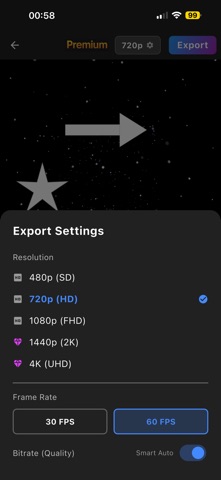
• Export settings you control — resolution and frame rate, up to 4K
• A dark workspace that stays out of your way
AVAILABLE IN
English, Français, Español, Deutsch, ةيبرعلا and हिन्दी
Most mobile editors either hide the good tools behind a monthly bill or ship your footage to a server to process it. This one does neither. Every feature listed above runs on the device in your hand, and Pro can be bought once and kept.
Make the edit you had in your head.
Terms of Use: https://sites.google.com/view/clipforgetos/accueil
Privacy Policy: https://sites.google.com/view/clipforgepp/accueil