

Vidguru - AI Effects
Vidguru - AI Effects is made and published by 颖亦 陈. AppBrain is an independent app data site and isn't affiliated with 颖亦 陈. The app name, icon, screenshots and description belong to 颖亦 陈 and are shown as published on the App Store.
AppBrain's verdict
- Last updated
- October 1, 2026
Rankings
App Store top chartsApp Store Rankings for Vidguru - AI Effects
Competitors
Similar apps and more from 颖亦 陈Alternatives to Vidguru - AI Effects


More from 颖亦 陈

Releases
Updates seen on the App Store- Version
- 1.6.0
- Launched
- December 2025
No changelog data
User feedback
Ratings and reviews on the App StoreComments on Vidguru - AI Effects for iOS
We don't have enough comments to show example comments. Please check back later.
Technology
Found in the app by AppBrain- Price
- Free
- App size
- 29.6 MB
- Content rating
- High
Technologies used by Vidguru - AI Effects
About the app and developer
About Vidguru - AI Effects
Vidguru - AI Effects is a productivity app developed by 颖亦 陈.
User Ratings
The app has no ratings yet.
App Information
Vidguru - AI Effects is freely available from the App Store. The app size is 29.61 MB. The latest version available is 1.6.0. The last update was on October 1, 2026.
Technical Requirements
The app has a content rating of High Maturity. The app has been available on the App Store since December 2025.
Developer information for 颖亦 陈
Address:
Store listing
By 颖亦 陈, from the App Store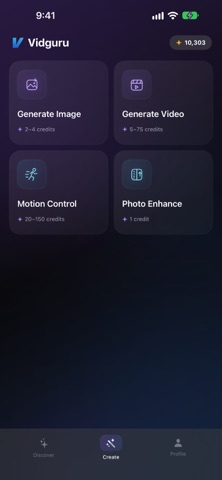



Description by 颖亦 陈 Written by the developer, not by AppBrain. Click to read.
FEATURES
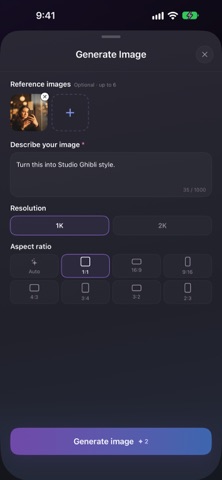
• Generate Image — Create images from a text prompt, or edit with up to 6 reference photos. Choose 1K or 2K resolution and any common aspect ratio.
• Generate Video — Turn a prompt or a photo into a 2–15 second video, in Auto or any of 8 aspect ratios.
• Motion Control — Apply the motion from a reference video to the character in your photo.
• Photo Enhance — Upscale photos 4× and sharpen details, with optional face restoration. Compare before and after with a drag slider.
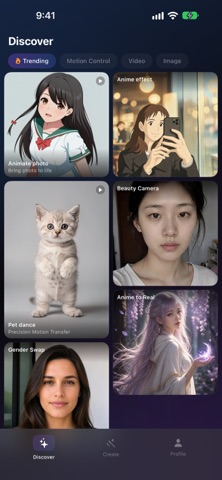
• Inspiration Gallery — Browse curated creations and remake any of them with one tap.
START INSTANTLY
Open the app and browse right away — no account needed to explore. When you're ready to create, sign in with one tap.
YOUR ACCOUNT
• Sign in with Apple or Google — your credits, subscription, and creation history follow your account across your devices
FREE CREDITS
Free credits when you create your account — no payment required!
HIGHLIGHTS
• Browse the Inspiration Gallery without an account
• Background processing — close the app anytime, results wait for you
• Save and share your creations as real photos and videos
• Clear pricing — every Generate button shows its exact credit cost before you tap
HOW IT WORKS
1. Open the app and browse the Inspiration Gallery — no sign-up needed
2. Choose a tool: Generate Image, Generate Video, Motion Control, or Photo Enhance
3. Sign in with Apple or Google (one tap) and create
4. Download and share your creation
Free to start. Upgrade for more credits. Pure creative freedom.
---
Terms of Use: https://www.apple.com/legal/internet-services/itunes/dev/stdeula/