


AppBrain's verdict
New- Rating on App Store
- 5.00
- 4 ratings
- Last updated
- October 31, 2026
- Size
- 54.7 MB
VidKeep: Video Downloader came out 54 days ago. It doesn't have enough ratings yet to judge what users think.
User feedback
Ratings and reviews on the App StoreComments on VidKeep: Video Downloader for iOS
We don't have enough comments to show example comments. Please check back later.
Store listing
By jintao LV, from the App StoreDescription by jintao LV Written by the developer, not by AppBrain. Click to read.
A saved link can stop working when the original disappears. Save eligible public videos from TikTok, YouTube, X, Facebook, Xiaohongshu, Douyin, Kuaishou and Bilibili to your phone. Completed downloads play offline while local files remain.
SAVE A LOCAL COPY
Copy a share link and tap Paste, or use the system share sheet. Keep VidKeep open during lookup and processing. For TikTok, X and Facebook, keep it open until the download finishes. Wait for completion: a saved link alone is not a local file. Import your own videos from Photos or Files too.
YouTube supports up to 1080p with on-device audio/video processing. For X posts with multiple videos, use a specific video link. Facebook requires a compatible complete file with picture and sound; some Reels lack usable audio. Availability varies by work, region and format. See Supported Sources.
PHOTO POSTS AND COLLECTIONS
Save supported public Xiaohongshu videos and photo posts without signing in. Saved Xiaohongshu and Douyin photo posts support zoom, reading progress and original-picture export.
For supported public Douyin collections, select episodes or ranges, save in order, reuse downloads, fill gaps and retry failures. Tasks resume after restart. Keep the app open during lookup. Each episode counts as a download; other platforms' playlists are unsupported.
FIND AND REVISIT
Organize saved recipe videos, workouts and lessons by category or collection. Search titles, authors and notes; resume playback, change speed and play collections in order. Use the video player with timestamped notes to return to useful moments. Recently Deleted retains removed videos and bookmarks for up to 30 days.
PRIVATE COLLECTION
Set a separate 6-digit PIN, optionally with Face ID or Touch ID. Private videos and notes stay out of ordinary browsing and search. The area locks when closed or backgrounded. Your device passcode cannot replace the private PIN. Forgetting it requires deleting local private content before setting a new PIN. This is in-app access protection, not separate file encryption; external copies and system backups remain outside it.
CHOOSE WHAT TO WATCH
Explore, Study and Kids modes play only your selected saved videos without an endless recommendation feed. Set daily viewing limits and a parent check, separate from the private PIN.
On iPad and supported Duo screens, browse categories beside your library. Keep your place when folding or unfolding. Tabletop playback separates picture and controls across the fold; iPhone and outer screens retain a single-column layout.
BACK UP ORDINARY CONTENT
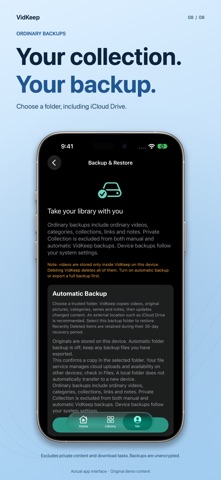
Export to Files or automatically back up to a chosen folder, such as iCloud Drive. Backups include ordinary videos, organization, progress and notes; private content and collection download state are excluded. Public episode links remain bookmarks. These backups are unencrypted; system backups follow system settings. Verify backups before deleting files, changing devices or uninstalling. Unbacked-up local files and originals removed before downloading cannot be recovered.
FREE AND PRO
Unlimited links/local imports, 5 daily video downloads, organization, playback, notes and ordinary backups are free. Monthly or annual auto-renewable Pro removes the daily limit while active; a one-time Lifetime purchase gives the same benefit without renewal. Existing content stays accessible after expiry. Apple Account billing applies. Subscriptions renew unless canceled in App Store settings; prices and plans appear before purchase. No plan provides developer cloud storage or changes source restrictions.
Save only content you own or may keep. Private, sign-in-only, paid, restricted, verification-required and live content is unsupported. VidKeep is not affiliated with source platforms.
Privacy: https://jacklv-coder.github.io/vidkeep-site/privacy/
Terms: https://www.apple.com/legal/internet-services/itunes/dev/stdeula/
Safety and technology
Found in the app by AppBrain- Price
- Free
- App size
- 54.7 MB
- Content rating
- High
Technologies used by VidKeep: Video Downloader
Releases
Updates seen on the App Store- Version
- 1.6.0
- Launched
- October 2026
No changelog data
Alternatives
Similar apps and more from jintao LVAlternatives to VidKeep: Video Downloader


More from jintao LV


Rankings
App Store top chartsApp Store Rankings for VidKeep: Video Downloader
About the app and developer
About VidKeep: Video Downloader
VidKeep: Video Downloader is a photo & video app developed by jintao LV.
User Ratings
VidKeep: Video Downloader is rated 5.00 out of 5 stars. The rating is based on 4 ratings.
App Information
VidKeep: Video Downloader is freely available from the App Store. The app size is 54.70 MB. The latest version available is 1.6.0. The last update was on October 31, 2026.
Technical Requirements
The app has a content rating of High Maturity. The app has been available on the App Store since October 2026.
VidKeep: Video Downloader is made and published by jintao LV. AppBrain is an independent app data site and isn't affiliated with jintao LV. The app name, icon, screenshots and description belong to jintao LV and are shown as published on the App Store.
Developer information for jintao LV
Address: