

VidKit - Video Editor
VidKit - Video Editor is made and published by Burak Bebek. AppBrain is an independent app data site and isn't affiliated with Burak Bebek. The app name, icon, screenshots and description belong to Burak Bebek and are shown as published on the App Store.
AppBrain's verdict
- Last updated
- August 1, 2026
- Size
- 8.02 MB
User feedback
Ratings and reviews on the App StoreComments on VidKit - Video Editor for iOS
We don't have enough comments to show example comments. Please check back later.
Store listing
By Burak Bebek, from the App Store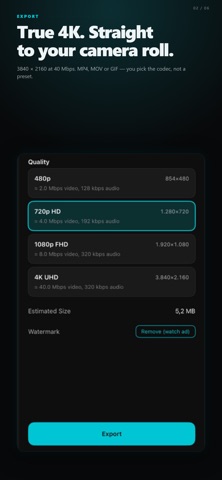



Description by Burak Bebek Written by the developer, not by AppBrain. Click to read.
EDITING
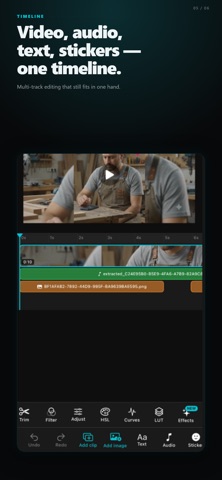
• Trim, split, and reorder clips on a multi-track timeline
• Add still images with adjustable display duration
• 24+ transitions: dissolve, fade, slide, zoom, wipe, pixelize, radial, diagonal and more
• Per-clip speed (0.1× – 4×), reverse, freeze frame
• Rotate, flip, crop, mask (circle / rectangle)
TEXT & OVERLAYS
• Customizable text with font, size, color, bold, italic, alignment
• Keyframeable position, scale, opacity, and rotation
• Image and video overlays with chroma key (green screen)
• Per-layer blend modes
COLOR & FILTERS
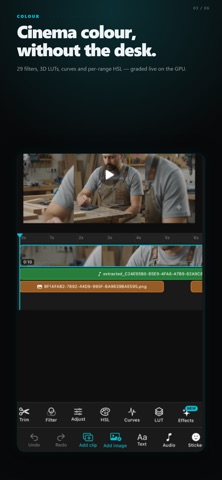
• Brightness, contrast, saturation, hue
• HSL grading per color range
• Curves with per-channel control
• Import your own .cube 3D LUTs
• Non-destructive — all adjustments are stored, never baked
AUDIO
• Multi-track audio (music, voiceover, extracted audio)
• Per-track fade in/out, EQ (bass/treble), echo, reverb
• Beat sync — auto-detect BPM and snap clips to the beat
• In-app voiceover recording
EXPORT
• MP4 / MOV
• Up to 4K at 60fps
• Real bitrate control (not just presets)
• Output saved to Photos
PRIVACY
• All processing happens on your device
• No account or sign-in required
• No analytics or tracking beyond ad requirements
• Remove watermark with one short video ad
Built for creators who want a full-featured editor without the subscription fatigue. Free with ads.
Safety and technology
Found in the app by AppBrain- Price
- Free
- App size
- 8.02 MB
- Content rating
- Everyone
Technologies used by VidKit - Video Editor
Releases
Updates seen on the App Store- Version
- 1.0.5
- Launched
- April 2026
No changelog data
Alternatives
Similar apps and more from Burak BebekMore from Burak Bebek


Also available on Google Play

Rankings
App Store top chartsApp Store Rankings for VidKit - Video Editor
About the app and developer
About VidKit - Video Editor
VidKit - Video Editor is a photo & video app developed by Burak Bebek.
What is the rating of VidKit - Video Editor?
VidKit - Video Editor has no ratings yet.
Is VidKit - Video Editor free?
VidKit - Video Editor is free. The app size is 8.02 MB. The latest version available is 1.0.5. The last update was on August 1, 2026.
What are the requirements for VidKit - Video Editor?
The app has a content rating of Everyone. The app has been available on the App Store since April 2026.
Developer information for Burak Bebek
Address: