Download Android Apps and Games
AppBrain
  • Apps
  • Apps being viewed right now Trending apps today Most popular apps All-time most downloaded apps Top rated apps
  • Intelligence ▾
    Intelligence overview → Track any Android app or your whole market
    Track & analyze
    Keyword Tracker & OptimizerTrack & improve Play rankings App Performance ReportOne-off PDF for any app StatisticsFree Android & Play market stats
    Promote your app
    Featured Apps App Links
  • Intelligence
  • Pricing
  • Dashboard
  • Sign up
  • Log in
Last updated on: 2026-08-18
App Store Apps > Photo & Video > VidSub: Video Subtitle Creator
VidSub: Video Subtitle Creator icon

VidSub: Video Subtitle Creator

25.6.1200
Thinh Truong
4.33
12 reviews
Free

VidSub: Video Subtitle Creator Screenshot 1 of 9
VidSub: Video Subtitle Creator Screenshot 2 of 9
VidSub: Video Subtitle Creator Screenshot 3 of 9
VidSub: Video Subtitle Creator Screenshot 4 of 9
VidSub: Video Subtitle Creator Screenshot 5 of 9
VidSub: Video Subtitle Creator Screenshot 6 of 9
VidSub: Video Subtitle Creator Screenshot 7 of 9
VidSub: Video Subtitle Creator Screenshot 8 of 9
VidSub: Video Subtitle Creator Screenshot 9 of 9
Download from the App Store Android version

About VidSub: Video Subtitle Creator

VidSub: Video Subtitle Creator is an overall app developed by Thinh Truong.

Download Statistics

User Ratings

VidSub: Video Subtitle Creator is rated 4.33 out of 5 stars. The rating is based on 12 ratings.

App Information

VidSub: Video Subtitle Creator is FREE to download. The APK download size is 132.13 MB. The latest version available is 25.6.1200. The last update was on June 12, 2025.

Technical Requirements

The app has a content rating of Medium Maturity. The app has been available on Google Play September 2022.

Description
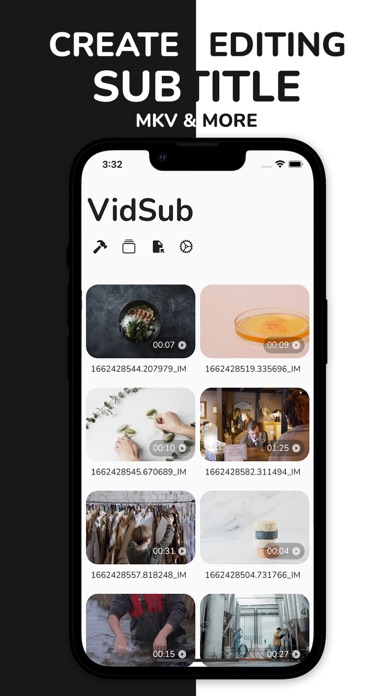
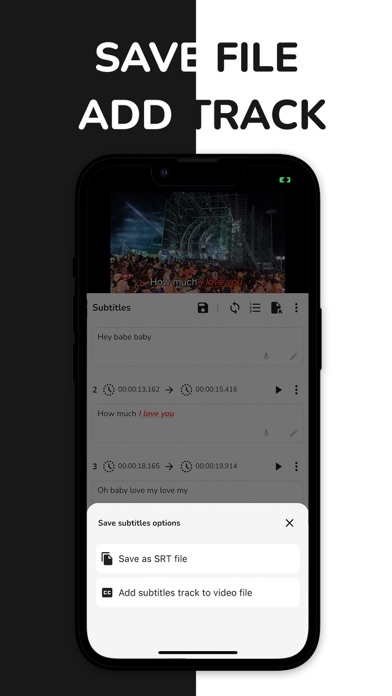
VidSub is a subtitle creator and editor that helps you create or edit subtitles then save them as SRT (SubRip) files or add them all as subtitle tracks inside the video so that every video player can display those subtitles on demand.

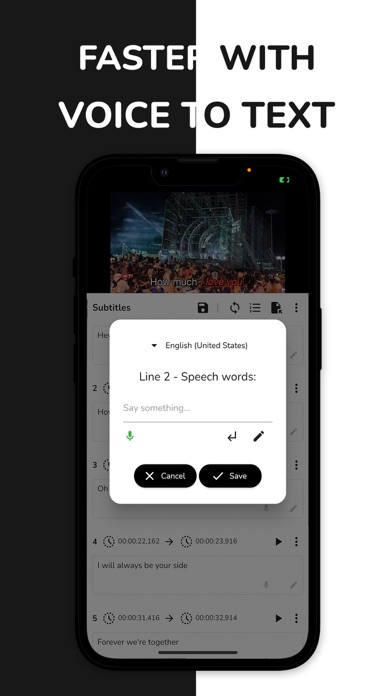
Support Voice to Text for faster input. Tired of entering characters from the keyboard? Voice to Text comes in rescue your time. Play fun adding subtitles using your speech.

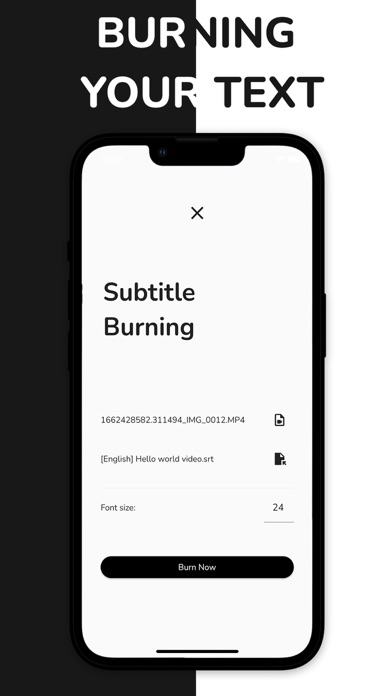
Burn subtitle or hardcode subtitle to your video is easier with VidSub. You can customize the subtitle styles using color, outline color and outline width, text shadow, alignment and background,... as you want to.
You can control the result Video Quality and Burning Speed to fit your needs.

Watermark Video with your signature or any thing you want using the Burning tool before you upload your video to Youtube, Tiktok, Facebook, Instagram Reels or any where.

Font Download Manager to help you download custom fonts from Google Fonts and import to the app to use in the Burn Video tool. This way you can use any custom font styles you want to burn your subtitle to the video, very productive.

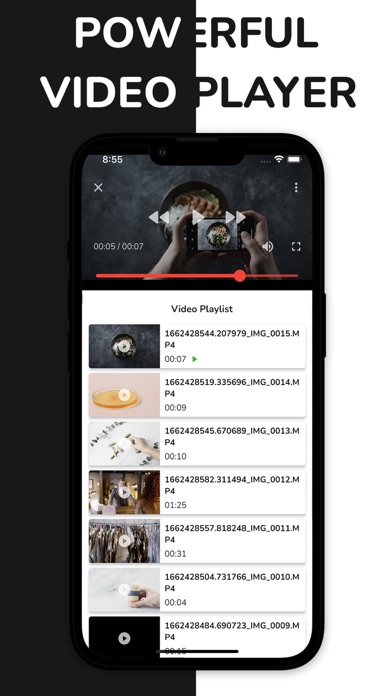
Built-in video player and subtitle editor/tools support MKV and many popular video formats.

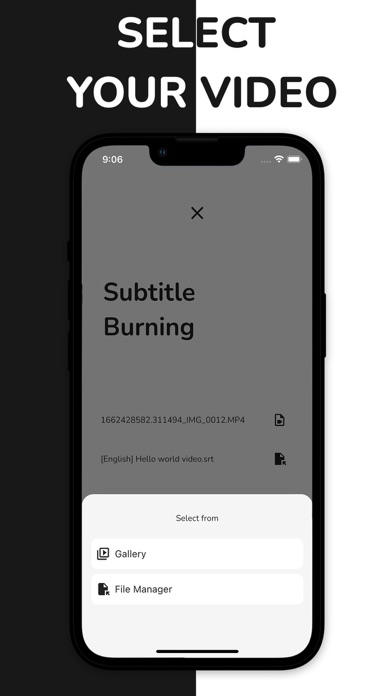
You can even browse for the video file from your File Manager app if your gallery does not contain it so that you can play or edit subtitle with.

MAIN FEATURES:

Subtitle Editor:
- An easy and intuitive tool helps you create new or edit your existing SRT file.
- Voice to Text fast input. Record your voice to make subtitle lines.
- Change font color, bold, italic and underline style.
- Capture the current timestamp from the playing video for any subtitle line.
- You can add new lines or remove unwanted lines from you subtitle file.
- Save subtitle as SRT (SubRip) file
- Add subtitle to video file as a subtitle track
- Batch edit time

Subtitle Tools:
- Convert subtitle file to other formats: SRT, VTT, ASS
- Extract subtitle tracks from the video file
- Add multiple subtitle files to the video file
- Delete unwanted subtitle tracks from the video file
- Burn subtitle to the video file. Support subtitle styles: color, outline, shadow, background, alignment, margin space. Control burning Speed and Video Quality.
- Font Manager to download font, import and manage burning font

Built-in Video Player:
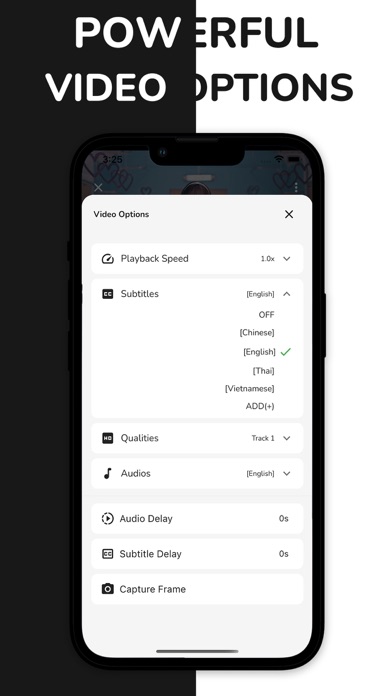
- Playback speed
- Subtitle list to select demand subtitle for the playing video
- Capture video frame
- Select video qualities or audio tracks
- Audio delay
- Subtitle delay
- Full screen mode
- Support MKV and many popular video formats
- Play video from Gallery or selected file

Focused and intuitive designed interface help you do your work faster.

Install VidSub now to create or edit your subtitle file and video.
If you like the app, please give it a good rating and review to support our development.
Thank you!
Show more Show less

More data about VidSub: Video Subtitle Creator

Price Free to download
Rating 4.33 based on 12 ratings
Ranking Not ranked
Version 25.6.1200
App download size 132.1 MB
Maturity Medium Maturity

Alternative downloads for the VidSub: Video Subtitle Creator app

Subtitles - Auto Video Caption icon Subtitles - Auto Video Caption
T.V CO., LTD
1.8
Free
5 ratings
Captionista: Video Subtitles icon Captionista: Video Subtitles
Montana Floss Co.
4.1
Free
12 ratings
Captions Video - AutoCC icon Captions Video - AutoCC
Huong Dang
0.0
Free
Captions for Video icon Captions for Video
Pictory, Inc.
4.4
Free
7 ratings
Higher rated
SubShifter - Fix subtitles SRT icon SubShifter - Fix subtitles SRT
iSolid apps
5.0
Free
20 ratings
More active
Add Subtitles to Video・RushCap icon Add Subtitles to Video・RushCap
Kemal Bakacak
2.8
Free
12 ratings
Higher rated
Captions Studio icon Captions Studio
Jose Douglas Gondim Soares
5.0
Free
6 ratings
Video Caption - Subtitle Maker icon Video Caption - Subtitle Maker
Hoang Nam Nguyen
2.6
Free
16 ratings

More from Thinh Truong

VOD Saver: Save for Twitch icon VOD Saver: Save for Twitch
Thinh Truong
4.8
Free
1.8K ratings
aiReader: AI Text to Speech icon aiReader: AI Text to Speech
Thinh Truong
3.9
Free
29 ratings
Midjo: AI Art Prompt Editor icon Midjo: AI Art Prompt Editor
Thinh Truong
2.6
Free
5 ratings
Comprezio: Video Compressor icon Comprezio: Video Compressor
Thinh Truong
0.0
Free
aiScanner: QR Code Scanner icon aiScanner: QR Code Scanner
Thinh Truong
0.0
Free
aiBotie: AI Chat Assistant icon aiBotie: AI Chat Assistant
Thinh Truong
0.0
Free
Tempie: Cloud Upload & Share icon Tempie: Cloud Upload & Share
Thinh Truong
0.0
Free
Simideo: Video Player Tube icon Simideo: Video Player Tube
Thinh Truong
0.0
Free

Changelog of VidSub: Video Subtitle Creator

No changelog data

Developer information for Thinh Truong

Thinh Truong

Address:

Share VidSub: Video Subtitle Creator

Comments on VidSub: Video Subtitle Creator for iOS

We don't have enough comments to show example comments. Please check back later.

App Store Rankings for VidSub: Video Subtitle Creator

This app is not ranked

Technologies used by VidSub: Video Subtitle Creator

Apps other people are watching Apps on sale Popular Overall Top new apps Today's trending apps
Subtitles - Auto Video Caption icon Subtitles - Auto Video Caption
Captionista: Video Subtitles icon Captionista: Video Subtitles
Captions Video - AutoCC icon Captions Video - AutoCC
Captions for Video icon Captions for Video
SubShifter - Fix subtitles SRT icon SubShifter - Fix subtitles SRT
Add Subtitles to Video・RushCap icon Add Subtitles to Video・RushCap
Captions Studio icon Captions Studio
Video Caption - Subtitle Maker icon Video Caption - Subtitle Maker

Back to top
AppBrain Intelligence premium content

Subscribe now to get full and unlimited access to AppBrain Intelligence. You'll have access to:

  • App Intelligence dashboard (performance timeline, competitor comparison, country rankings, insight cards)
  • Detailed ranking data per app
  • Full timeline per developer
  • Device market shares data per country
  • Unlimited keyword tracking
1 Month

$75/mo
(billed every month)

SAVE 0%
Subscribe
3 Months

$65/mo
($195 billed every 3 months)

SAVE 13%
Subscribe
1 Year

$57.50/mo
($690 billed every year)

SAVE 23%
Subscribe
Each subscription will automatically renew 3 days before the expiration date for the same time period. Subscriptions can be cancelled at any time before the renewal.

AppBrain is a directory focused on discovering great apps and games. We give statistics, rankings and search options that Google Play and the App Store don't have. All trademarks are owned by their respective owners. AppBrain doesn't offer APKs or binaries, and always lets users install the official version from Google Play or the App Store.

More apps

  • Top Android apps being viewed
  • KitchenPal: Pantry Inventory
  • PWI Storyteller stats
  • Gaadiya App — Ride & Delivery

Android Statistics

  • Android statistics
  • Google Play Developer stats
  • Trending Android Apps
  • Top popular Apps
  • Buy the best Android phone

About AppBrain

  • Contact
  • Privacy
  • Documentation
  • DMCA takedowns
  • Articles
  • Blog
  • Free App-Ads.Txt Validation
© 2010-2026 - AppBrain