

ViewCAD:2D/3D CAD Model Viewer
ViewCAD:2D/3D CAD Model Viewer is made and published by Sahdev Joshi. AppBrain is an independent app data site and isn't affiliated with Sahdev Joshi. The app name, icon, screenshots and description belong to Sahdev Joshi and are shown as published on the App Store.
AppBrain's verdict
- Last updated
- December 23, 2025
- Size
- 23.8 MB
User feedback
Ratings and reviews on the App StoreComments on ViewCAD:2D/3D CAD Model Viewer for iOS
We don't have enough comments to show example comments. Please check back later.
Store listing
By Sahdev Joshi, from the App Store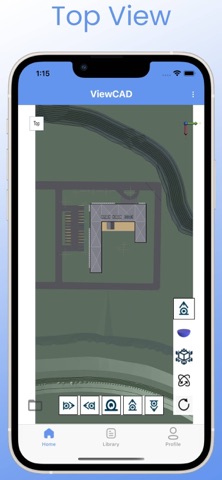


Description by Sahdev Joshi Written by the developer, not by AppBrain. Click to read.
ViewCAD by Tensile3D is a powerful CAD model viewer app that empowers engineers, architects, designers, and professionals to view, inspect, and share 2D and 3D CAD files directly from their mobile device. Whether you are on-site, traveling, or in meetings, ViewCAD makes your models accessible anytime, anywhere.
Key Features
View 40+ CAD Formats
Supports industry-standard formats including:
• AutoCAD (DWG, DXF)
• Revit (RVT, RFA)
• Navisworks (NWD)
• Inventor (IPT, IAM)
• SolidWorks (SLDPRT, SLDASM)
• CATIA V4/V5/V6 (3DXML)
• Rhino (3DM)
• STEP, STP, STPX
• IGES (IGS, IGES)
• STL, OBJ, FBX
• IFC, DGN, JT, VRML, U3D, PDF, and many more
Open files created in AutoCAD, Revit, Navisworks, Inventor, SolidWorks, CATIA, Rhino3D, Creo, Microstation, Siemens NX, Solid Edge, and other leading CAD software effortlessly on your mobile device.
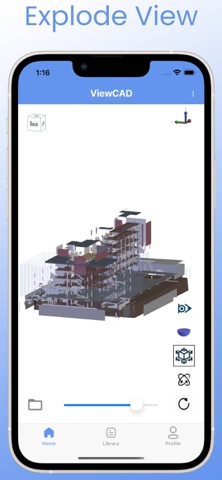
Explode View
Disassemble complex assemblies to inspect individual components. Adjust explosion distances with a smooth slider for better understanding.
Walk & Fly Mode
Experience your designs from a first-person perspective. Navigate using on-screen joysticks – ideal for walkthroughs, design reviews, and client presentations.
Cut Planes
Slice models along any axis to reveal internal geometry and hidden details for precise inspection.
Offline Access
Download processed models for reliable offline viewing – essential for field engineers, site supervisors, and traveling professionals.
Fast Cloud Processing
Large and complex files are optimized quickly on our secure cloud engine for smooth performance on your device.
How to Use ViewCAD
1 Sign In/Up: Create your free Tensile3D account.
2 Upload: Tap "Upload" in the Library tab to select your CAD file.
3 Process: Our cloud engine optimizes your file for mobile viewing.
4 Download: Save the processed model for offline access.
5 View & Inspect: Explore using Explode, Walk/Fly, Cut Planes, and more.
New users receive free credits to process files. Need additional credits? Visit our pricing page anytime.
Why Choose ViewCAD?
• Supports 40+ CAD file formats
• View 2D and 3D CAD models offline
• Optimized for large assemblies and complex models
• Immersive Walk/Fly mode for design walkthroughs
• Intuitive UI with smooth navigation controls
• Built for engineers, architects, mechanical designers, civil professionals, and product designers
Use Cases
• View AutoCAD DWG and DXF files on-site without carrying a laptop
• Inspect Revit models (RVT, RFA) during construction meetings
• Review Navisworks (NWD) coordination models for clash detection and site planning
• Examine Inventor parts and assemblies (IPT, IAM) for mechanical design validation
• Analyze SolidWorks models (SLDPRT, SLDASM) during manufacturing reviews
• Explore CATIA V4, V5, V6 designs for automotive and aerospace projects
• Open Rhino3D (3DM) files for product and architectural concept presentations
• Review STEP, IGES, STL, OBJ, FBX files across disciplines
• Inspect IFC models for BIM coordination and construction planning
• View Microstation DGN files for infrastructure projects
• Open Siemens NX and Solid Edge files for mechanical and assembly analysis
Download ViewCAD today – your CAD models, anywhere.
Subscription Information
ViewCAD offers auto-renewable subscriptions to access premium features and additional processing credits.
• Subscription duration and pricing are shown at the time of purchase
• Payment will be charged to your Apple ID account at confirmation of purchase
• Subscription automatically renews unless auto-renew is turned off at least 24 hours before the end of the current period
• You can manage or cancel your subscription in your Apple ID account settings
Terms of Use (EULA):
https://www.apple.com/legal/internet-services/itunes/dev/stdeula/
Privacy Policy:
https://tensile3d.com/privacy-policy
Safety and technology
Found in the app by AppBrain- Price
- Free
- App size
- 23.8 MB
- Content rating
- High
Technologies used by ViewCAD:2D/3D CAD Model Viewer
Releases
Updates seen on the App Store- Version
- 1.0.0
- Launched
- December 2025
No changelog data
Alternatives
Similar apps and more from Sahdev JoshiAlternatives to ViewCAD:2D/3D CAD Model Viewer




Also available on Google Play

Rankings
App Store top chartsApp Store Rankings for ViewCAD:2D/3D CAD Model Viewer
About the app and developer
About ViewCAD:2D/3D CAD Model Viewer
ViewCAD:2D/3D CAD Model Viewer is a productivity app developed by Sahdev Joshi.
User Ratings
The app has no ratings yet.
App Information
ViewCAD:2D/3D CAD Model Viewer is freely available from the App Store. The app size is 23.79 MB. The latest version available is 1.0.0. The last update was on December 23, 2025.
Technical Requirements
The app has a content rating of High Maturity. The app has been available on the App Store since December 2025.
Developer information for Sahdev Joshi
Address: