

ViewNest is made and published by Majid Akram. AppBrain is an independent app data site and isn't affiliated with Majid Akram. The app name, icon, screenshots and description belong to Majid Akram and are shown as published on the App Store.
AppBrain's verdict
- Last updated
- June 14, 2026
- Size
- 46.8 MB
User feedback
Ratings and reviews on the App StoreComments on ViewNest for iOS
We don't have enough comments to show example comments. Please check back later.
Store listing
By Majid Akram, from the App Store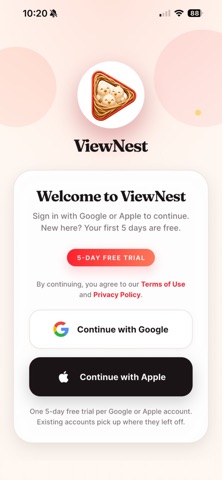


Screenshots by Majid Akram, from the the App Store listing
Description by Majid Akram Written by the developer, not by AppBrain. Click to read.
ViewNest is a parent-controlled YouTube viewer for kids. Choose exactly which videos, channels, and playlists your child can watch — and they'll never stumble across
YouTube Shorts, autoplay recommendations, or videos you didn't approve.
WHY PARENTS LOVE VIEWNEST
YouTube is full of incredible content for kids — and a lot you don't want them seeing. ViewNest gives you back the control. As a parent, you build a private library
of approved videos. Your child opens the app and only sees what you put there.
No public YouTube browsing. No "up next" autoplay surprises. No Shorts. No ad-fueled rabbit holes. Just the videos you chose.
KEY FEATURES
• PIN-locked Parent Dashboard — your settings, hidden behind a 4-digit code only you know.
• Approved-only viewing — kids see your curated library, nothing else.
• Bulk-add videos by URL, or import an entire YouTube channel or playlist in one tap.
• Built-in YouTube search with SafeSearch enabled — find new videos and add them to the library without leaving the app.
• Daily screen-time limit — set a cap your child can't override.
• Allowed-hours schedule — restrict viewing to homework-free windows.
• Minimum watch time before switching — stops endless skipping between videos.
• Inactivity-based App Lock — closes the app when your child walks away.
• Sign in with Apple or Google — no extra password to remember.
• Family-aware multi-device — your library and settings sync across up to 3 devices on one account.
HOW IT WORKS
1. Sign in with your Apple or Google account.
2. Open Parent Settings and add the videos, channels, or playlists you want.
3. Hand the device to your child — they only see what you approved.
Terms of Use (EULA): https://www.apple.com/legal/internet-services/itunes/dev/stdeula/
YouTube Shorts, autoplay recommendations, or videos you didn't approve.
WHY PARENTS LOVE VIEWNEST
YouTube is full of incredible content for kids — and a lot you don't want them seeing. ViewNest gives you back the control. As a parent, you build a private library
of approved videos. Your child opens the app and only sees what you put there.
No public YouTube browsing. No "up next" autoplay surprises. No Shorts. No ad-fueled rabbit holes. Just the videos you chose.
KEY FEATURES
• PIN-locked Parent Dashboard — your settings, hidden behind a 4-digit code only you know.
• Approved-only viewing — kids see your curated library, nothing else.
• Bulk-add videos by URL, or import an entire YouTube channel or playlist in one tap.
• Built-in YouTube search with SafeSearch enabled — find new videos and add them to the library without leaving the app.
• Daily screen-time limit — set a cap your child can't override.
• Allowed-hours schedule — restrict viewing to homework-free windows.
• Minimum watch time before switching — stops endless skipping between videos.
• Inactivity-based App Lock — closes the app when your child walks away.
• Sign in with Apple or Google — no extra password to remember.
• Family-aware multi-device — your library and settings sync across up to 3 devices on one account.
HOW IT WORKS
1. Sign in with your Apple or Google account.
2. Open Parent Settings and add the videos, channels, or playlists you want.
3. Hand the device to your child — they only see what you approved.
Terms of Use (EULA): https://www.apple.com/legal/internet-services/itunes/dev/stdeula/
Safety and technology
Found in the app by AppBrain- Price
- Free
- App size
- 46.8 MB
- Content rating
- Everyone
Technologies used by ViewNest
Releases
Updates seen on the App Store- Version
- 1.0.8
- Launched
- June 2026
No changelog data
Rankings
App Store top chartsApp Store Rankings for ViewNest
This app is not ranked
About the app and developer
About ViewNest
ViewNest is an education app developed by Majid Akram.
What is the rating of ViewNest?
ViewNest has no ratings yet.
Is ViewNest free?
ViewNest is free. The app size is 46.81 MB. The latest version available is 1.0.8. The last update was on June 14, 2026.
What are the requirements for ViewNest?
The app has a content rating of Everyone. The app has been available on the App Store since June 2026.
Developer information for Majid Akram
Address: