

Vimo: Visual Routine Planner
Vimo: Visual Routine Planner is made and published by Carlos Correa da Silva. AppBrain is an independent app data site and isn't affiliated with Carlos Correa da Silva. The app name, icon, screenshots and description belong to Carlos Correa da Silva and are shown as published on the App Store.
AppBrain's verdict
- Rating on App Store
- 1.00
- 1 ratings
- Last updated
- September 20, 2026
- Size
- 223.0 MB
It doesn't have enough ratings yet to judge what users think.
User feedback
Ratings and reviews on the App StoreComments on Vimo: Visual Routine Planner for iOS
We don't have enough comments to show example comments. Please check back later.
Store listing
By Carlos Correa da Silva, from the App Store

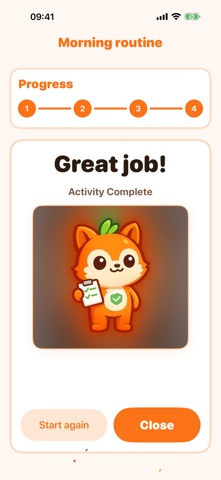

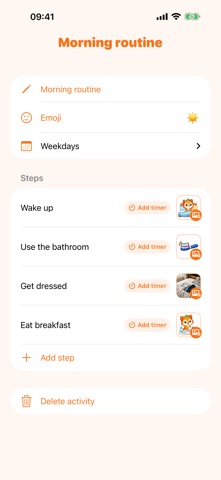


Description by Carlos Correa da Silva Written by the developer, not by AppBrain. Click to read.
Vimo is the visual routine app for families who want less chaos and more consistency. Build a routine once, then hand the screen to your child.
HOW IT WORKS
1. Build a routine — add steps with pictures, names and optional timers
2. Hand it to your child — they tap through each step independently
3. Celebrate — Vimo cheers every completed routine
THE QUICK BOARD
Some moments need a plan right now, not a routine you set up last week. Drop a few cards on the board, and your child drags each one from "To do" to "Done" — the same left-to-right structure used in visual therapy. When the last card lands, Vimo celebrates.
NEW: TALK — A VOICE FOR EVERY WORD
Some children speak with pictures. The Talk board keeps their core vocabulary in one place, sorted by topic: your child taps a card and Vimo says the word out loud. Tap a few cards in a row and Vimo reads the whole sentence back.
The suggestion row learns from how your child uses the board, so the words they reach for most are always within reach — and it stays on their device.
FEATURES
• Morning and bedtime charts, school checklists, and chore routines for toddlers and older children
• Visual step-by-step routines with large, clear imagery
• Quick Board — drag-and-drop sequences you can build in seconds
• Talk — tap-to-speak picture cards in 13 categories, with sentence building
• Today view — the right routine is always one tap away
• Child profiles with separate progress tracking
• Countdown timers for steps that need extra structure
• Use your own photos, or pick from the illustrated Vimo library
• Sounds and celebration moments to encourage completion
WHO IT'S FOR
Vimo works well for any family and is especially helpful for children who thrive with visual guidance and predictable structure — including children with autism, ADHD, sensory differences, or who simply do better with clear expectations.
FREE & PRO
Free: 2 routines with up to 5 steps each, 1 child profile, 3 cards per board, and the starter illustrations.
Pro: unlimited routines and steps, multiple child profiles, unlimited board cards, and the complete Vimo illustration library.
Download Vimo and build calmer days for your whole family.
SUBSCRIPTION DETAILS
Vimo Pro is an auto-renewing subscription, available as a monthly or a yearly plan. The exact price for your region is shown in the app before you confirm any purchase. Payment is charged to your Apple Account at confirmation. The subscription renews automatically unless auto-renew is turned off at least 24 hours before the end of the current period. You can manage or cancel it any time in your Apple Account settings.
Privacy Policy: https://atypicalapps.com/vimo/privacy_policy.html
Terms of Use (EULA): https://www.apple.com/legal/internet-services/itunes/dev/stdeula/
Safety and technology
Found in the app by AppBrain- Price
- Free
- App size
- 223.0 MB
- Content rating
- Everyone
Technologies used by Vimo: Visual Routine Planner
Releases
Updates seen on the App Store- Version
- 2.4.0
- Launched
- February 2026
No changelog data
Alternatives
Similar apps and more from Carlos Correa da SilvaAlternatives to Vimo: Visual Routine Planner




More from Carlos Correa da Silva


Rankings
App Store top chartsApp Store Rankings for Vimo: Visual Routine Planner
About the app and developer
About Vimo: Visual Routine Planner
Vimo: Visual Routine Planner is an education app developed by Carlos Correa da Silva.
What is the rating of Vimo: Visual Routine Planner?
Vimo: Visual Routine Planner is rated 1.00 out of 5 stars, based on one rating ratings.
Is Vimo: Visual Routine Planner free?
Vimo: Visual Routine Planner is free. The app size is 222.99 MB. The latest version available is 2.4.0. The last update was on September 20, 2026.
What are the requirements for Vimo: Visual Routine Planner?
The app has a content rating of Everyone. The app has been available on the App Store since February 2026.
Developer information for Carlos Correa da Silva
Address:
Frequently asked questions about Vimo: Visual Routine Planner
Is Vimo: Visual Routine Planner free?
Yes. Vimo: Visual Routine Planner is free on the App Store.
Is Vimo: Visual Routine Planner still available?
Yes. Vimo: Visual Routine Planner is on the App Store, and the last update we saw was on September 20, 2026.
How large is Vimo: Visual Routine Planner?
Vimo: Visual Routine Planner is 222.99 MB.
Is Vimo: Visual Routine Planner suitable for children?
App Store rates the content of Vimo: Visual Routine Planner as suitable for everyone.
How do people rate Vimo: Visual Routine Planner?
Vimo: Visual Routine Planner has one rating of 1.00 stars on the App Store.
Who made Vimo: Visual Routine Planner?
Vimo: Visual Routine Planner was developed by Carlos Correa da Silva. It is listed in the education category on the App Store.
What are the best alternatives to Vimo: Visual Routine Planner?
People looking at Vimo: Visual Routine Planner also look at these education apps: Kids Visual Schedule Planner, StarQuest:KidsChores & Rewards, PicSayTalk, Buddies: ADHD Routines & Timer, SkillSteps: Autism Learning.