

Violin Vista - School Edition
Violin Vista - School Edition is made and published by Vista8 Studio Ltd. AppBrain is an independent app data site and isn't affiliated with Vista8 Studio Ltd. The app name, icon, screenshots and description belong to Vista8 Studio Ltd. and are shown as published on the App Store.
AppBrain's verdict
- Last updated
- October 2, 2026
- Size
- 21.5 MB
User feedback
Ratings and reviews on the App StoreComments on Violin Vista - School Edition for iOS
We don't have enough comments to show example comments. Please check back later.
Store listing
By Vista8 Studio Ltd., from the App Store


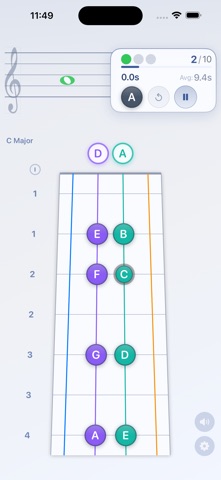


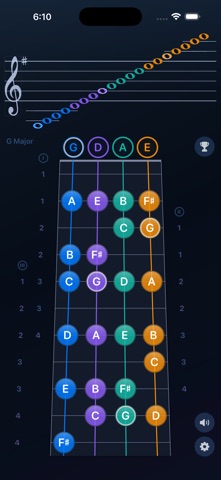
Description by Vista8 Studio Ltd. Written by the developer, not by AppBrain. Click to read.
From classrooms that need distraction-free tools, to private studios looking to make practice more engaging, and self-learners seeking real-time intonation feedback, Violin Vista serves as a powerful visual companion for violin study.
Three Core Study Modes:
1. Fingerboard Explorer
Explore the relationship between the fingerboard and the music staff.
Tap notes on either view to see the corresponding position highlighted and hear the pitch.
2. Sight Reading Trainer
Build confidence reading music by identifying notes on the fingerboard.
A note appears on the staff, and you select the correct position.
Each session includes 10 notes for focused, structured practice.
3. Live Pitch Tracker
Play your violin and receive real-time visual feedback.
The app detects your pitch, displays the note on the staff and fingerboard, and shows string-based indicators to support accurate finger placement and intonation development.
System Settings
Reset to Defaults - Reset all settings to the recommended default configuration with a single tap.
This allows quick lesson preparation before class and helps both teachers and students focus on learning and instruction rather than setup.
String Visibility Control - Quickly enable or disable individual strings.
This allows lessons and practice sessions to focus on a specific string or technique without visual distraction.
Hand Position Adjustment
Select hand positions 1–3, with up to three positions displayed at the same time.
This helps illustrate fingerboard depth and supports progressive position training.
Visual Scale Selection - Choose scales using an interactive Circle of Fifths.
Selected scales update the fingerboard and staff automatically, reinforcing key signatures and tonal relationships.
Light / Dark Theme
Switch between Light and Dark themes for comfortable use in different environments.
Additional Advanced Settings
-Scale-only or all-note display
-Sharp or flat enharmonic preference
-Microphone sensitivity control (1–10)
-Note naming systems: C D E, Do Re Mi, or 1 2 3
-Adjustable tuning reference (A = 440–445 Hz)
Violin Vista – School Edition combines interactive reference, guided practice, and real-instrument feedback in one place—making it suitable for beginners, advancing students, self-learners, and instructors alike.
---
Terms of Use (EULA): https://www.apple.com/legal/internet-services/itunes/dev/stdeula/
Privacy Policy: https://www.vista8studio.com/privacy-school.html
Safety and technology
Found in the app by AppBrain- Price
- $6.99
- App size
- 21.5 MB
- Content rating
- Everyone
Technologies used by Violin Vista - School Edition
Releases
Updates seen on the App Store- Version
- 1.07
- Launched
- February 2026
No changelog data
Alternatives
Similar apps and more from Vista8 Studio Ltd.More from Vista8 Studio Ltd.


Rankings
App Store top chartsApp Store Rankings for Violin Vista - School Edition
About the app and developer
About Violin Vista - School Edition
Violin Vista - School Edition is an education app developed by Vista8 Studio Ltd.
User Ratings
The app has no ratings yet.
App Information
Violin Vista - School Edition costs $6.99. The app size is 21.50 MB. The latest version available is 1.07. The last update was on October 2, 2026.
Technical Requirements
The app has a content rating of Everyone. The app has been available on the App Store since February 2026.
Developer information for Vista8 Studio Ltd.
Address:
Frequently asked questions about Violin Vista - School Edition
Is Violin Vista - School Edition free?
No. Violin Vista - School Edition costs $6.99 on the App Store.
Is Violin Vista - School Edition still available?
Yes. Violin Vista - School Edition is on the App Store, and the last update we saw was on October 2, 2026.
How large is Violin Vista - School Edition?
Violin Vista - School Edition is 21.50 MB.
Is Violin Vista - School Edition suitable for children?
App Store rates the content of Violin Vista - School Edition as suitable for everyone.
Who made Violin Vista - School Edition?
Violin Vista - School Edition was developed by Vista8 Studio Ltd. It is listed in the education category on the App Store.