

Viso - Projection Mapping
Viso - Projection Mapping is made and published by Merek Barrett. AppBrain is an independent app data site and isn't affiliated with Merek Barrett. The app name, icon, screenshots and description belong to Merek Barrett and are shown as published on the App Store.
AppBrain's verdict
- Rating on App Store
- 3.64
- 11 ratings
- Last updated
- September 1, 2026
- Size
- 137.3 MB
It doesn't have enough ratings yet to judge what users think.
User feedback
Ratings and reviews on the App StoreComments on Viso - Projection Mapping for iOS
We don't have enough comments to show example comments. Please check back later.
Store listing
By Merek Barrett, from the App Store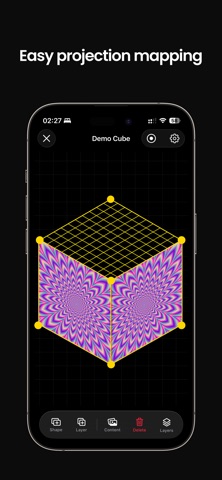



Description by Merek Barrett Written by the developer, not by AppBrain. Click to read.
Visomapper transforms your device into a complete projection mapping studio. No computer. No video editing software. No expensive hardware. Just powerful, intuitive tools that let you map visuals onto buildings, sculptures, stages, or home setups in minutes.
Connect to any projector via HDMI, USB-C, or AirPlay and start mapping immediately. Visomapper gives you the creative freedom to light up the world without the complex workflow.
WHY VISOMAPPER?
A COMPLETE VFX STUDIO IN YOUR POCKET
Stop rendering loops in external video editors. Visomapper lets you apply professional visual effects live inside the app. Transform simple images or videos using the Effects Engine—apply Fragment Effects to shatter your visuals, create pulsing Scale animations, or automate Opacity fades. Achieve complex motion graphics results in seconds, not hours.
MAP ANYTHING, ANYWHERE
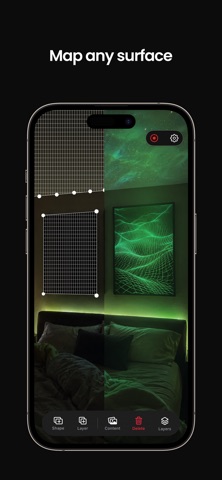
Turn any object into a dynamic canvas. Visomapper’s touch-first interface makes it effortless to project onto irregular surfaces. Use precise Masking Tools to cut out shapes and Corner Warping to align your visuals perfectly to any geometry. Drag corners, warp meshes, and snap vertices to fit your projection to reality.
DYNAMIC VISUALIZERS
Forget static images. Visomapper includes a library of Visualizers—real-time generative backgrounds that animate and evolve. Explore Kaleidoscopes, Particles, Tunnels, and fluid Gradients that render live on your device.
EXTENSIVE ASSET STORE
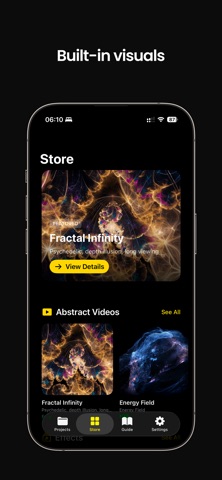
Expand your creative possibilities with the integrated Asset Store. Browse and download high-quality textures, video loops, and visualizer presets designed specifically for projection mapping. Finding the perfect content for your installation has never been easier.
SIMPLE DESIGN, PROFESSIONAL RESULTS
Project full-resolution visuals while keeping your control interface private. Built on Apple’s Metal graphics engine, Visomapper ensures buttery-smooth playback and high performance, even when stacking multiple effects and layers.
CORE FEATURES
PROJECTION MAPPING TOOLS
Precision Warping: Corner handles and mesh distortion for exact alignment.
Masking & Drawing: Create custom shapes to fit specific objects or architectural details.
Multi-Surface: Map multiple independent objects or panels simultaneously.
Live Preview: See your changes instantly on the projector.
BUILT-IN EFFECTS ENGINE
Fragment Effect: Shatter, wave, and explode your visuals in real-time.
Transform Effects: Automate scale, rotation, and position animations.
Opacity & Blending: Create professional transitions and layered looks without video editing.
Real-Time Rendering: All effects are calculated live—no waiting for renders.
CREATIVE VISUALIZERS
Library: Access real-time generative effects like Kaleidoscope, Strobe, and Noise.
Customizable Parameters: Adjust speed, density, and styles on the fly.
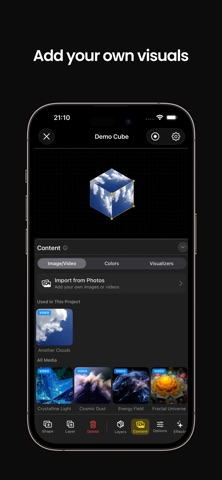
Video Import: Load your own content and enhance it with app effects.
CONNECTIVITY & CONTROL
Universal Support: Works with HDMI, USB-C, Lightning, and AirPlay projectors.
Extended Display: Projects only your canvas content while keeping editor controls hidden.
Offline Capable: No internet needed for performance.
Project Management: Save, duplicate, and organize your mapping setups.
PERFECT FOR
Artists & VJs: Create pro-level stage visuals without a laptop or After Effects.
Event Organizers: Transform weddings, venues, and exhibits with immersive light.
Home Decor: Design ambient environments or holiday displays effortlessly.
Store Displays: Create eye-catching digital signage on any surface.
Visomapper brings the power of professional desktop mapping software to a modern, mobile interface. It replaces complicated video production workflows with real-time effects and a touch-first design.
Terms of Use: https://www.apple.com/legal/internet-services/itunes/dev/stdeula
Privacy Policy: https://visomapper.com/privacy
Safety and technology
Found in the app by AppBrain- Price
- Free
- App size
- 137.3 MB
- Content rating
- Everyone
Technologies used by Viso - Projection Mapping
Releases
Updates seen on the App Store- Version
- 1.4.2
- Launched
- January 2026
No changelog data
Alternatives
Similar apps and more from Merek BarrettAlternatives to Viso - Projection Mapping


More from Merek Barrett

Rankings
App Store top chartsApp Store Rankings for Viso - Projection Mapping
About the app and developer
About Viso - Projection Mapping
Viso - Projection Mapping is a photo & video app developed by Merek Barrett.
What is the rating of Viso - Projection Mapping?
Viso - Projection Mapping is rated 3.64 out of 5 stars, based on 11 ratings.
Is Viso - Projection Mapping free?
Viso - Projection Mapping is free. The app size is 137.27 MB. The latest version available is 1.4.2. The last update was on September 1, 2026.
What are the requirements for Viso - Projection Mapping?
The app has a content rating of Everyone. The app has been available on the App Store since January 2026.
Developer information for Merek Barrett
Address:
Frequently asked questions about Viso - Projection Mapping
Is Viso - Projection Mapping free?
Yes. Viso - Projection Mapping is free on the App Store.
Is Viso - Projection Mapping still available?
Yes. Viso - Projection Mapping is on the App Store, and the last update we saw was on September 1, 2026.
How large is Viso - Projection Mapping?
Viso - Projection Mapping is 137.27 MB.
Is Viso - Projection Mapping suitable for children?
App Store rates the content of Viso - Projection Mapping as suitable for everyone.
How do people rate Viso - Projection Mapping?
Viso - Projection Mapping scores 3.64 out of 5 stars, from 11 ratings on the App Store.
Who made Viso - Projection Mapping?
Viso - Projection Mapping was developed by Merek Barrett. It is listed in the photo & video category on the App Store.
What are the best alternatives to Viso - Projection Mapping?
People looking at Viso - Projection Mapping also look at these photo & video apps: ILW Light Mapper, Heges 3D Scanner, Modelar - 3D LiDAR Scanner, Krea: AI Images and Videos, MoshUp.