

Visual Day is made and published by Vijay Erramilli. AppBrain is an independent app data site and isn't affiliated with Vijay Erramilli. The app name, icon, screenshots and description belong to Vijay Erramilli and are shown as published on the App Store.
AppBrain's verdict
- Rating on App Store
- 5.00
- 3 ratings
- Last updated
- October 28, 2026
It doesn't have enough ratings yet to judge what users think.
Rankings
App Store top chartsApp Store Rankings for Visual Day
Competitors
Similar apps and more from Vijay Erramilli


Releases
Updates seen on the App Store- Version
- 1.5
- Launched
- August 2026
No changelog data
User feedback
Ratings and reviews on the App StoreComments on Visual Day for iOS
We don't have enough comments to show example comments. Please check back later.
Technology
Found in the app by AppBrain- Price
- Free
- App size
- 51.9 MB
- Content rating
- Everyone
Technologies used by Visual Day
About the app and developer
About Visual Day
Visual Day is an education app developed by Vijay Erramilli.
User Ratings
Visual Day is rated 5.00 out of 5 stars. The rating is based on 3 ratings.
App Information
Visual Day is freely available from the App Store. The app size is 51.90 MB. The latest version available is 1.5. The last update was on October 28, 2026.
Technical Requirements
The app has a content rating of Everyone. The app has been available on the App Store since August 2026.
Developer information for Vijay Erramilli
Address:
Frequently asked questions about Visual Day
Is Visual Day free?
Yes. Visual Day is free on the App Store.
Is Visual Day still available?
Yes. Visual Day is on the App Store, and the last update we saw was on October 28, 2026.
How large is Visual Day?
Visual Day is 51.90 MB.
Is Visual Day suitable for children?
App Store rates the content of Visual Day as suitable for everyone.
How do people rate Visual Day?
Visual Day scores 5.00 out of 5 stars, from 3 ratings on the App Store.
Who made Visual Day?
Visual Day was developed by Vijay Erramilli. It is listed in the education category on the App Store.
What are the best alternatives to Visual Day?
People looking at Visual Day also look at these education apps: My.Day: Visual Schedule & AAC, CrushSafe™ Med & Tube Feeding, PEC Board, Visual Schedule: Daily Planner, Tinton Falls School District.
Store listing
By Vijay Erramilli, from the App Store




Description by Vijay Erramilli Written by the developer, not by AppBrain. Click to read.
THREE KINDS OF BOARDS
• Visual Schedules — lay out a full routine step by step, and check tasks off as you go.
• First-Then — the simplest way to show "first we do this, then we do that."
• Token Boards — earn tokens toward a reward to build motivation and follow-through.
DESIGNED FOR REAL FAMILIES AND CLASSROOMS
• Kid Mode — a full-screen, distraction-free view with big touch targets for little hands, while editing stays with you.
• A built-in library of clear symbols, plus your own photos — kept private on your device and never uploaded to our servers.
• Drag to reorder tasks, set optional countdown timers, and add gentle routine reminders.
• Optional voice output reads tasks and rewards aloud.
• Celebrate finishing with satisfying confetti.
SHARE WITH YOUR TEAM
• Send a view-only link to a co-parent, teacher, therapist, or babysitter. They don't need an account, and they can save their own copy. Names and personal photos are never included, and links expire after 7 days.
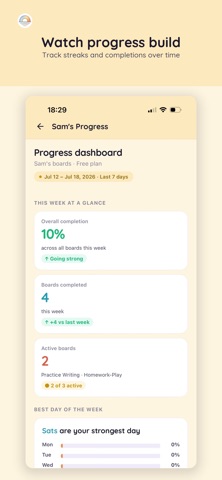
TRACK PROGRESS
• See streaks and completions over time to spot what's working.
• Manage boards for multiple children from one place.
PRINT & GO (PRO)
• Export any board as a clean PDF to cut, laminate, and reuse — for the fridge, the classroom, or on the go.
WORKS EVERYWHERE
• Universal app for iPhone and iPad, plus the web at visual-day.com. Your boards sync to your account so they're ready on every device.
Visual Day is a supportive tool for building routines and independence. It is not a medical or therapeutic device.
PRIVACY & SECURITY
Your family's data stays yours. Boards and progress are tied to your private account and synced over encrypted connections — never sold, with no third-party advertising. Photos you add stay on your device and are never uploaded. Creating a child profile requires a parent's or guardian's consent, in line with COPPA and GDPR.
SUBSCRIPTION
Visual Day is free with up to 2 boards and 3 children — including all three board types, Kid Mode, sharing, reminders, and timers. Visual Day Pro adds unlimited boards and children, PDF export and printing, and full progress history.
• Pro is available as a monthly or annual subscription, billed through your Apple ID. Current prices for your region are shown in the app before you subscribe.
• Your subscription renews automatically unless canceled at least 24 hours before the end of the current period. Manage or cancel anytime in your App Store account settings.
Terms of Use: https://visual-day.com/terms
Privacy Policy: https://visual-day.com/privacy
Questions or feedback? We'd love to hear from you at support@visual-day.com.