

Visual Intent - Schedule by AI
Visual Intent - Schedule by AI is made and published by 明 旷. AppBrain is an independent app data site and isn't affiliated with 明 旷. The app name, icon, screenshots and description belong to 明 旷 and are shown as published on the App Store.
AppBrain's verdict
- Rating on App Store
- 3.00
- 2 ratings
- Last updated
- April 24, 2025
It doesn't have enough ratings yet to judge what users think.
Rankings
App Store top chartsApp Store Rankings for Visual Intent - Schedule by AI
Competitors
Similar apps and more from 明 旷Alternatives to Visual Intent - Schedule by AI





More from 明 旷

Releases
Updates seen on the App Store- Version
- 1.0.5
- Launched
- December 2024
No changelog data
User feedback
Ratings and reviews on the App StoreComments on Visual Intent - Schedule by AI for iOS
We don't have enough comments to show example comments. Please check back later.
Technology
Found in the app by AppBrain- Price
- Free
- App size
- 13.1 MB
- Content rating
- High
Technologies used by Visual Intent - Schedule by AI
About the app and developer
About Visual Intent - Schedule by AI
Visual Intent - Schedule by AI is a productivity app developed by 明 旷.
User Ratings
Visual Intent - Schedule by AI is rated 3.00 out of 5 stars. The rating is based on 2 ratings.
App Information
Visual Intent - Schedule by AI is freely available from the App Store. The app size is 13.15 MB. The latest version available is 1.0.5. The last update was on April 24, 2025.
Technical Requirements
The app has a content rating of High Maturity. The app has been available on the App Store since December 2024.
Developer information for 明 旷
Address:
Store listing
By 明 旷, from the App Store
Description by 明 旷 Written by the developer, not by AppBrain. Click to read.
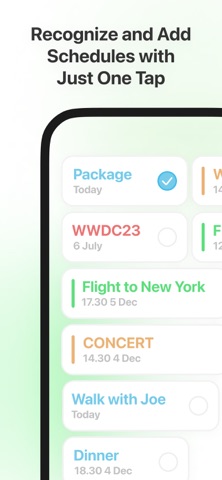
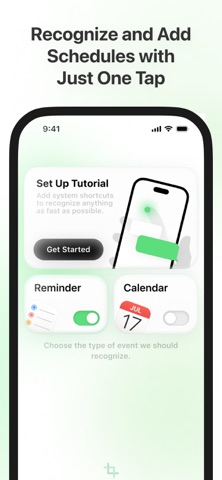
With Visual Intent, you can instantly capture and add events from your screen to your calendar without typing a single word.
How It Works:
1. Double Tap the back of your iPhone to trigger the shortcut.
2. Visual Intent takes a screenshot of your screen.
3. Our powerful AI technology scans the screenshot, identifies event details (like date, time, and location), and prepares them for your calendar.
4. One Tap to confirm, and the event is added to your calendar.
Key Features:
1. AI-Powered Event Recognition: Automatically detects dates, times, and event details from your screen. (In-app purchase required)
2. Seamless Integration: Works with your iPhone’s native calendar app.
3. Time-Saving Shortcut: No more typing or copying event details manually.
4. Privacy First: Your data stays on your device—no cloud processing required.
5. Whether it’s a meeting, a concert, or a dinner plan, Visual Intent makes scheduling fast, easy, and stress-free.
Membership service:
- Membership includes several auto-renewable subscription types.
- Your subscription will be charged to your iTunes account at confirmation of purchase and will automatically renew (at the duration selected) unless auto-renew is turned off at least 24 hours before the end of the current period.
- Current subscription may not be cancelled during the active subscription period; however, you can manage your subscription and/or turn off auto-renewal by visiting your iTunes Account Settings after purchase.
- You can choose whether to renew the subscription or not, if you want to cancel, please cancel in the AppleID settings 24 hours before the subscription expires.
Terms of Use & Privacy Policy:
- Terms of Use: https://keithbird.notion.site/END-USER-LICENSE-AGREEMENT-153b7f5df31680d1a7f1c8c4d01e607d?pvs=4
- Privacy Policy: https://keithbird.notion.site/PRIVACY-POLICY-153b7f5df31680769e56e1ad29bc84ad?pvs=4