We don't have enough comments to show example comments. Please check back later.
Store listing
By Syntrix NeuroSpatial Inc., from the App Store
Description by Syntrix NeuroSpatial Inc.Written by the developer, not by AppBrain. Click to read.
Your phone is a tool. Not a trap.
Vita Screen helps you turn distracting screen time into intentional action.
Instead of only blocking apps, Vita Screen gives you something better to do before you scroll.
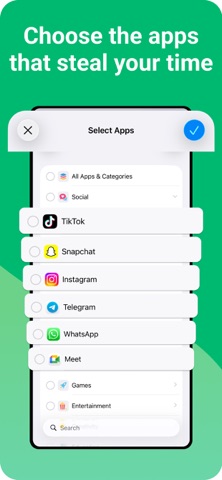
Choose the apps that pull you off track, then choose how you want Vita Screen to interrupt them:
- Study Mode: Turn your class material into something you can actually learn from. Generate flashcards, practice questions, and quizzes from your notes, PDFs, photos, and study material in seconds. Review cards, answer questions, get instant feedback, and earn your way back to distracting apps through real study.
- Focus Mode: Create a real task, start a guided focus session, and make meaningful progress before you unlock. Instead of bouncing back into the feed, Vita helps you use that moment for deep work, priorities, and follow-through.
- Bible Mode: Read the Bible before you scroll. Open today's passage, stay connected to your reading rhythm, and turn a distracted unlock into time in God's Word.
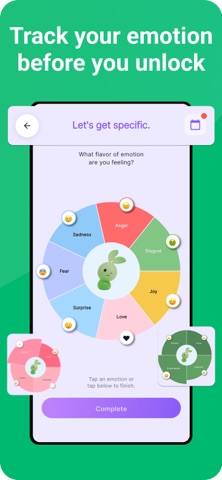
- Emotion Mode: Track your emotion before you unlock. Use the emotion wheel to name what you're feeling, build self-awareness, and interrupt the autopilot loop before it takes over.
- Movement Mode: Reset with guided movement before you scroll. Complete a short movement break and turn a phone habit into action instead of staying stuck in the feed.
- Gratitude Mode: Record a quick gratitude entry by text or voice before opening a distracting app. Replace reflexive scrolling with reflection and train your attention toward what is good.
How Vita Screen works:
1. Block the noise Choose the apps that steal your time.
2. Pick your mode Study, focus, read the Bible, track your emotion, practice gratitude, or move.
3. Unlock with intention Complete your chosen mode, then decide whether you still want the app.
Why Vita Screen is different:
Most screen time apps only tell you to stop. Vita Screen creates intentional friction and gives you something meaningful to do instead.
That means less autopilot, less doomscrolling, and more reclaimed time for what actually matters.
Built for real life:
• Native app gating • Offline-first core flows • Progress, streaks, and milestones • Personal modes for different goals and seasons • Designed for students, professionals, Christians, and anyone trying to use their phone more intentionally
If you're tired of opening your phone for one thing and losing an hour to the feed, Vita helps you take that choice back.
Private and safe:
Vita Screen uses Apple's Screen Time API to monitor and block the apps you choose. Core flows are designed to work offline-first, and your personal browsing data stays on your device.
Terms of Service: https://joinvita.app#terms-of-service Privacy Policy: https://joinvita.app#privacy-policy
Safety and technology
Found in the app by AppBrain
Price
Free
App size
113.0 MB
Content rating
Everyone
Technologies used by Vita: Screen Time Control
Releases
Updates seen on the App Store
Version
1.0.2
Launched
April 2026
No changelog data
Rankings
App Store top charts
App Store Rankings for Vita: Screen Time Control
This app is not ranked
About the app and developer
About Vita: Screen Time Control
Vita: Screen Time Control is a productivity app developed by Syntrix NeuroSpatial Inc.
User Ratings
The app has no ratings yet.
App Information
Vita: Screen Time Control is freely available from the App Store. The app size is 113.03 MB. The latest version available is 1.0.2. The last update was on May 29, 2026.
Technical Requirements
The app has a content rating of Everyone. The app has been available on the App Store since April 2026.
Vita: Screen Time Control is made and published by
Syntrix NeuroSpatial Inc.
AppBrain is an independent app data site and isn't affiliated with Syntrix NeuroSpatial Inc.
The app name, icon, screenshots and description belong to Syntrix NeuroSpatial Inc. and are shown as published on the App Store.
Developer information for Syntrix NeuroSpatial Inc.
Each subscription will automatically renew 3 days before the expiration date for
the same time period. Subscriptions can be cancelled at any time before the renewal.