

Vitreo: Audiobook Player
Vitreo: Audiobook Player is made and published by Danil Kashin. AppBrain is an independent app data site and isn't affiliated with Danil Kashin. The app name, icon, screenshots and description belong to Danil Kashin and are shown as published on the App Store.
AppBrain's verdict
- Last updated
- October 19, 2026
Rankings
App Store top chartsApp Store Rankings for Vitreo: Audiobook Player
Competitors
Similar apps and more from Danil KashinAlternatives to Vitreo: Audiobook Player


Releases
Updates seen on the App Store- Version
- 1.2
- Launched
- July 2026
No changelog data
User feedback
Ratings and reviews on the App StoreComments on Vitreo: Audiobook Player for iOS
We don't have enough comments to show example comments. Please check back later.
Technology
Found in the app by AppBrain- Price
- Free
- App size
- 76.8 MB
- Content rating
- Everyone
Technologies used by Vitreo: Audiobook Player
About the app and developer
About Vitreo: Audiobook Player
Vitreo: Audiobook Player is a books app developed by Danil Kashin.
What is the rating of Vitreo: Audiobook Player?
Vitreo: Audiobook Player has no ratings yet.
Is Vitreo: Audiobook Player free?
Vitreo: Audiobook Player is free. The app size is 76.80 MB. The latest version available is 1.2. The last update was on October 19, 2026.
What are the requirements for Vitreo: Audiobook Player?
The app has a content rating of Everyone. The app has been available on the App Store since July 2026.
Developer information for Danil Kashin
Address:
Store listing
By Danil Kashin, from the App Store


Description by Danil Kashin Written by the developer, not by AppBrain. Click to read.
Please note: Audiobook Player does not include or sell any audiobooks. It's a player for audio files you already own (MP3, M4A, and M4B).
Designed for iOS 26
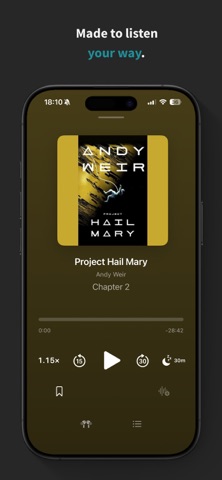
A native interface built on Apple's latest design, with cover-tinted Now Playing surfaces and a floating mini player that follows you across the app. Nothing is faked — every surface uses Apple's own materials, and it looks right in both light and dark.
Bring your own audiobooks
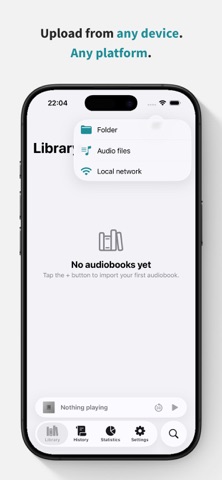
• Import from the Files app, or pick a folder or loose audio files
• Upload wirelessly over Wi-Fi from any device with a web browser — Mac, Windows, or Linux — no cable or extra software needed
• Automatic chapters, cover art, and organization from embedded tags
• Supports MP3, M4A, and M4B
Understand your listening
• Current and best streaks, plus a last-7-days strip
• Time listened by day, week, month, year, or all time
• Books finished, session lengths, and your typical session
• Habits like your peak listening hour and most-active day
• Every metric explains, in plain language, exactly how it's measured
Never lose your place
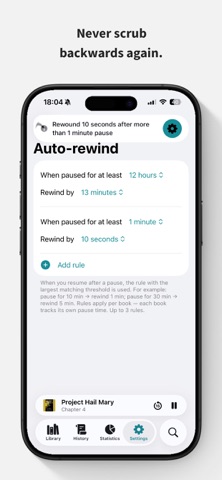
• Auto-Rewind gently steps you back after a break, so you never lose the thread
• Your position is saved continuously and restored the instant you return to a book
Fall asleep without losing your spot
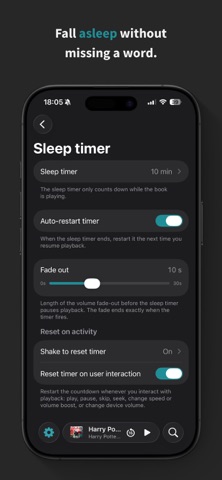
• A sleep timer that fades out smoothly at a set time or the end of the chapter
• Shake your phone to add more time — no need to unlock
Play it your way
• Adjustable speed from 0.5× to 3×, tuned to keep voices natural
• Volume boost for quiet recordings
• Bookmarks with your own notes
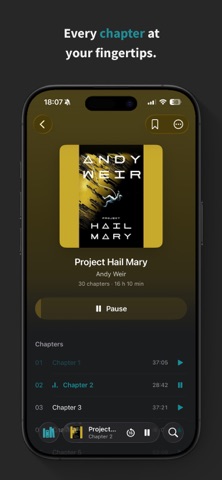
• Chapter navigation and customizable skip buttons
• Full control from the Lock Screen, Control Center, and AirPods
• AirPlay and Bluetooth support
• Background playback that keeps going with the screen locked
Make the app your own
• 12 accent colors that re-tint the whole app — and swap the Home Screen icon to match
• Follow the system appearance, or lock light or dark
• Set your own in-app language
Your history, always actionable
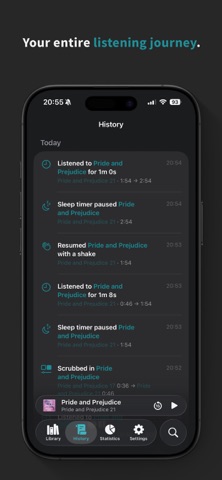
A day-by-day feed of everything you've listened to, where every row is a shortcut back into the audio. Continue where a session ended, start a book over, play from a bookmark, or undo a skip — all in a single tap.
Search every word
As a bonus, you can transcribe your books on-device and search your whole library by what's actually said. Tap any result to jump straight to that moment.
Private by design
Your library never leaves your device. No accounts, no tracking, no servers — playback, statistics, and transcription all happen on-device. The optional Wi-Fi transfer works only on your local network and is protected by a one-time passcode.
Free to start
Play up to 3 books free, forever, with basic playback.
Go Premium
Unlock your full library and every Premium feature — statistics, bookmarks, sleep timer, auto-rewind, volume boost, speed control, and transcription — with a 14-day free trial. Continue with a monthly or yearly subscription, or pay once with Lifetime.
Terms of Use (EULA): https://www.apple.com/legal/internet-services/itunes/dev/stdeula/