AppBrain
AppBrain
  • Apps
  • Apps being viewed right now Trending apps today Most popular apps All-time most installed apps Top rated apps iPhone and iPad apps
  • Intelligence ▾
    Intelligence overview → Track any Android app or your whole market
    Track & analyze
    Keyword Tracker & OptimizerTrack & improve Play rankings App Performance ReportOne-off PDF for any app StatisticsFree Android & Play market stats
    Promote your app
    Featured Apps App Links
  • Intelligence
  • Pricing
  • Dashboard
  • Sign up
  • Log in
App Store Apps > Utilities > Vivid: Screen Brightness Boost
App profile & analytics · Utilities · Data updated 2026-10-15
Vivid: Screen Brightness Boost icon

Vivid: Screen Brightness Boost

by Lumen Digital · Free · Version 2.19
Availability On the App Store since October 2022 ↗
Rating on App Store
–
Rating
–
0 reviews
Best rank
–
not in the top lists
Last updated
October 13, 2026
2.19

Vivid: Screen Brightness Boost is made and published by Lumen Digital. AppBrain is an independent app data site and isn't affiliated with Lumen Digital. The app name, icon, screenshots and description belong to Lumen Digital and are shown as published on the App Store.

About Vivid: Screen Brightness Boost

Vivid: Screen Brightness Boost is an utilities app developed by Lumen Digital.

User Ratings

The app has no ratings yet.

App Information

Vivid: Screen Brightness Boost is freely available from the App Store. The app size is 2.35 MB. The latest version available is 2.19. The last update was on October 13, 2026.

Technical Requirements

The app has a content rating of Everyone. The app has been available on the App Store since October 2022.

Description by Lumen Digital (from the App Store)
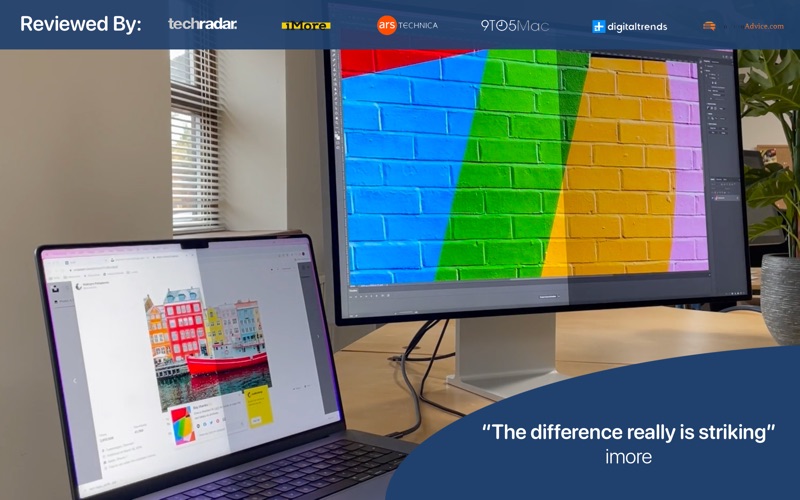
Vivid unlocks the extra brightness built into your MacBook Pro display and Apple's Pro Display XDR, so everything on screen can be more than twice as bright – in every app, not just in HDR video.

Work on a sunny terrace, beside a bright window or on a train with the sun on your screen. Press your normal brightness keys and keep going past the usual maximum.

WHY YOUR SCREEN CAN GO BRIGHTER
MacBook Pro XDR displays and Pro Display XDR can reach up to 1600 nits of peak brightness, but macOS normally keeps everyday content far below that and reserves the extra range for HDR video and photos. Vivid uses standard Apple APIs to make that range available system-wide.

FEATURES
• Same brightness keys, twice the range – no new shortcuts to learn
• Turn Vivid on or off with one click in the menu bar
• Custom keyboard shortcuts to toggle, raise and lower brightness
• Battery Automation – switch Vivid on or off based on power source and battery level
• macOS Shortcuts support
• Brighten only the active window to stay focused and save battery
• Choose where Vivid works: built-in display, external displays, or both
• Sync and control the brightness of your external monitors
• Eclipse Mode for finer control at low brightness
• Ring Light mode
• Launch at login, with or without switching Vivid on

TRY IT FREE – SPLITSCREEN MODE
Vivid starts in Splitscreen Mode: one half of your screen gets the extra brightness and the other half stays as macOS left it, so you can compare them side by side on your own Mac. Splitscreen Mode is free for as long as you like. Nothing is broken – it's the free trial.

PAY ONCE, NO SUBSCRIPTION
Unlock the whole screen with a single in-app purchase (Vivid License). It's a one-time payment that covers every feature.

SUPPORTED DISPLAYS
• Every M-series MacBook Pro (M1 to M5)
• Apple Pro Display XDR, connected to a supported Mac, including Mac mini, Mac Studio and Mac Pro

NOT SUPPORTED
• MacBook Air and Intel MacBook built-in displays
• Apple Studio Display and Studio Display XDR
• Non-Apple monitors
These displays don't have an extra brightness range Vivid can unlock, so Vivid can't make them brighter.

COMPATIBILITY
• Requires macOS 13.5 or later
• Fully supports macOS 26 Tahoe and macOS 27

IS IT SAFE?
Vivid doesn't use low-level display hacks or push your display beyond what it was designed for. It uses the same brightness range your Mac already uses when you view or edit HDR content. A brighter screen uses more battery and the display may run warmer in hot surroundings, so Battery Automation can switch Vivid off when you're unplugged or running low.

SUPPORT
Questions, or Vivid not behaving after a macOS update? Email support@getvivid.app or visit getvivid.app. We read every message.
Show more Show less

Screenshots

Vivid: Screen Brightness Boost Screenshot 1 of 3
Vivid: Screen Brightness Boost Screenshot 2 of 3
Vivid: Screen Brightness Boost Screenshot 3 of 3
Screenshots by Lumen Digital, from the the App Store listing
Official page on the App Store

More from Lumen Digital

The Wallpaper App icon The Wallpaper App
Lumen Digital
4.3
Free
2.3K ratings
Noisy Book icon Noisy Book
Lumen Digital
4.2
Free
175 ratings
Hoops Basketball icon Hoops Basketball
Lumen Digital
4.5
$1.99
169 ratings
AnyMoji - Create any Emoji icon AnyMoji - Create any Emoji
Lumen Digital
4.2
Free
44 ratings
Jungle Path icon Jungle Path
Lumen Digital
4.4
Free
22 ratings
Swap: AI Face Replace icon Swap: AI Face Replace
Lumen Digital
4.7
Free
21 ratings
Vivid Browser icon Vivid Browser
Lumen Digital
3.9
Free
17 ratings
Shout About icon Shout About
Lumen Digital
2.8
Free
4 ratings

Changelog of Vivid: Screen Brightness Boost

No changelog data

Developer information for Lumen Digital

Lumen Digital

Address:

Share Vivid: Screen Brightness Boost

Comments on Vivid: Screen Brightness Boost for iOS

We don't have enough comments to show example comments. Please check back later.

App Store Rankings for Vivid: Screen Brightness Boost

This app is not ranked

Technologies used by Vivid: Screen Brightness Boost

Frequently asked questions about Vivid: Screen Brightness Boost

Is Vivid: Screen Brightness Boost free?

Yes. Vivid: Screen Brightness Boost is free on the App Store.

Is Vivid: Screen Brightness Boost still available?

Yes. Vivid: Screen Brightness Boost is on the App Store, and the last update we saw was on October 13, 2026.

How large is Vivid: Screen Brightness Boost?

Vivid: Screen Brightness Boost is 2.35 MB.

Is Vivid: Screen Brightness Boost suitable for children?

App Store rates the content of Vivid: Screen Brightness Boost as suitable for everyone.

Who made Vivid: Screen Brightness Boost?

Vivid: Screen Brightness Boost was developed by Lumen Digital. It is listed in the utilities category on the App Store.

Top new apps Apps other people are watching Today's trending apps Popular Utilities Apps Price drops on Google Play
More hot apps 🔥
Overview Reviews Rankings Technology
AppBrain Intelligence premium content

Subscribe now to get full and unlimited access to AppBrain Intelligence. You'll have access to:

  • App Intelligence dashboard (performance timeline, competitor comparison, country rankings, insight cards)
  • Detailed ranking data per app
  • Full timeline per developer
  • Device market shares data per country
  • Unlimited keyword tracking
1 Month

$75/mo
(billed every month)

SAVE 0%
Subscribe
3 Months

$65/mo
($195 billed every 3 months)

SAVE 13%
Subscribe
1 Year

$57.50/mo
($690 billed every year)

SAVE 23%
Subscribe
Each subscription will automatically renew 3 days before the expiration date for the same time period. Subscriptions can be cancelled at any time before the renewal.

AppBrain is an app data site, we track rankings, ratings, installs for all apps and games on Google Play and the App Store. AppBrain doesn't host app files or APKs, all install links go directly to the official store. All trademarks are owned by their respective owners. As an Amazon Associate AppBrain earns from qualifying purchases.

More apps

  • Top Android apps being viewed
  • View SuperCool
  • Meowdoku: Brain Puzzle Games
  • Festival Foodie

App statistics

  • Android statistics
  • Google Play Developer stats
  • Trending Android Apps
  • Trending iOS apps
  • Top popular Apps
  • Buy the best Android phone
  • Buy & sell app businesses

About AppBrain

  • Contact
  • Privacy
  • Documentation
  • DMCA takedowns
  • Articles
  • Blog
  • The AppBrain advertising system
© 2010-2026 - AppBrain