

VLC Controller
VLC Controller is made and published by GForce Productions. AppBrain is an independent app data site and isn't affiliated with GForce Productions. The app name, icon, screenshots and description belong to GForce Productions and are shown as published on the App Store.
AppBrain's verdict
- Last updated
- September 14, 2026
Rankings
App Store top chartsApp Store Rankings for VLC Controller
Competitors
Similar apps and more from GForce ProductionsMore from GForce Productions


Releases
Updates seen on the App Store- Version
- 1.2.1
- Launched
- September 2026
No changelog data
User feedback
Ratings and reviews on the App StoreComments on VLC Controller for iOS
We don't have enough comments to show example comments. Please check back later.
Technology
Found in the app by AppBrain- Price
- $1.99
- App size
- 19.8 MB
- Content rating
- Everyone
Technologies used by VLC Controller
About the app and developer
About VLC Controller
VLC Controller is a music app developed by GForce Productions.
What is the rating of VLC Controller?
VLC Controller has no ratings yet.
Is VLC Controller free?
VLC Controller costs $1.99. The app size is 19.82 MB. The latest version available is 1.2.1. The last update was on September 14, 2026.
What are the requirements for VLC Controller?
The app has a content rating of Everyone. The app has been available on the App Store since September 2026.
Developer information for GForce Productions
Address:
Store listing
By GForce Productions, from the App Store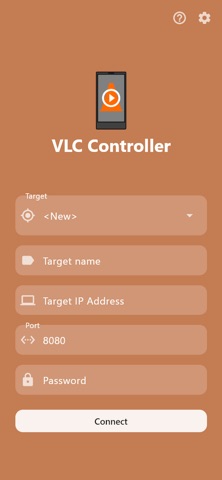


Description by GForce Productions Written by the developer, not by AppBrain. Click to read.
Featuring a clear, intuitive GUI and easy setup, using VLC Media Player as a media station has never been easier!
Details:
- Connection screen
Enter your PC’s IP, port, and VLC HTTP password. Multiple targets can be saved to quickly switch connections.
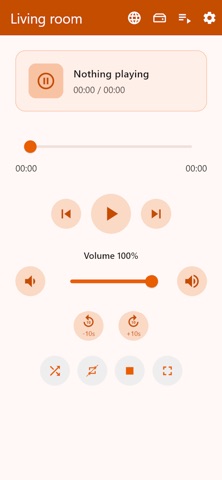
- Remote control screen
Shows the track currently playing, and allows for playback control: Play, pause, stop, next, previous, seek, volume control, and toggling shuffle, repeat and fullscreen.
From the top bar, load a URL stream, open the file browser or show the playlist.
- File browser screen
Browse through your files on the target that is running the VLC Media Player. Play/add individual files, all files from the current directory, or all files including from subdirectories.
- Playlist screen
Browse items, tap to play, rename or remove. Clear playlist, refresh playlist, or shuffle the playlist, so the items can be played in random order, and only once per cycle, as an alternative to VLC Media Player's native shuffle function.
Save the current playlist to your phone, or load a previously saved one. This allows for moving a playlist quickly from one target to another, if the tracks are accessible by both!
Alternatively, access the file browser to load items / playlists, and save the playlist to file (.xspf) on the target device*.
- Requirements
VLC must have the HTTP interface enabled (IP, port, password as you set in VLC). Your phone and computer should be on the same network (or otherwise able to reach that address).
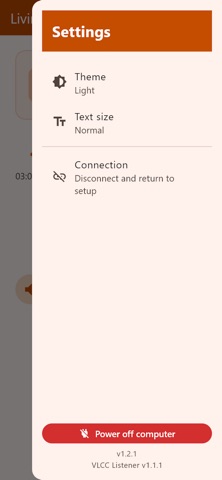
* Optional: Install the VLCC listener on the target for saving playlists to file on the target, or for shutting down the target device from the app settings sidebar.
The listener can be downloaded from https://gforceproductions.nl/VLCController
NOTE: This app is not affiliated with VLC Media Player in any way, it merely serves as a convenient tool for controlling it.