




AppBrain's verdict
- Last updated
- November 12, 2026
- Size
- 28.7 MB
User feedback
Ratings and reviews on the App StoreComments on Voice Clone Master for iOS
We don't have enough comments to show example comments. Please check back later.
Store listing
By 壮 何, from the App StoreDescription by 壮 何 Written by the developer, not by AppBrain. Click to read.
YOUR VOICE STARTS WITH A RECORDING
Record or import 3–10 seconds of clear, natural speech as a voice reference. There is no set script to read. Choose a quiet place and avoid background music, overlapping speakers, echo, and long silences. Speak naturally, with a steady volume and distance from the microphone.
Microphone permission is requested when you choose to record. You can decline and import an authorized recording instead, or change access later in iOS Settings. Importing provides a voice reference; it does not transcribe or translate the recording.
WRITE, GENERATE, AND LISTEN
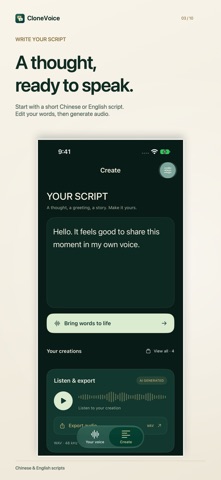
Speech synthesis supports short passages in Chinese and English only. Write one or two complete sentences, then generate audio with your reference voice. Each creation can be up to 30 seconds long. If your passage is too long, shorten it and try again.
Use punctuation to make the text clear. Write dates, numbers, and abbreviations as you want them spoken, especially where several readings are possible. Listen for pronunciation, pacing, and meaning before using a result. You can edit the script and generate again to compare versions.
For short videos, export a narration clip and combine it with your footage in another editing app. For a story or greeting, start with a short excerpt and check the tone. The app creates speech material; editing, mixing, and assembling a larger production can continue in your preferred tools.
OFFLINE PROCESSING ON YOUR DEVICE
The voice model comes with the app. Voice cloning and speech synthesis run locally, without an account or a cloud AI service. Recordings, voice features, scripts, and generated audio are not uploaded to the developer or an AI service. The app includes no advertising, tracking, or analytics services.
Core creation works offline. Importing from iCloud or another file provider may need that provider's network connection. Sharing is initiated by you through iOS, and destination apps and services have their own network and privacy practices.
KEEP YOUR WORK AND EXPORT WAV
Play generated audio in the app and export through the system share sheet. Files are 48 kHz mono PCM16 WAV, ready to save, share, or import into another audio tool.
Scripts save automatically and generated creations remain available to revisit. Delete a saved voice, remove an individual creation, or clear local data managed by the app. Deleting a voice keeps existing scripts and creations. Clearing all local data removes the app's voice, script, and generated audio. Originals and copies saved or shared elsewhere need to be managed at those destinations.
BEFORE YOU CREATE
A newer device with at least 8 GB of RAM is recommended. Keep the app in the foreground while generating. Processing may pause or stop in the background or when memory is low. Voice similarity, quality, and speed vary with the reference, text, and device; exact reproduction and real-time generation are not guaranteed.
The interface follows your device language and is available in 12 languages. Interface languages and speech synthesis languages differ: generated speech currently supports Chinese and English only.
CREATE WITH PERMISSION
Use only your own voice or a voice you have explicit permission to use. Do not impersonate others, mislead listeners, commit fraud, or bypass voice authentication. A voice-use confirmation does not verify identity or grant rights to a recording.
Exports include AI-generated metadata, without an added audible AI tone. Keep the labels when sharing and tell listeners the content is AI-generated. Metadata is not identity verification or a tamper-proof watermark.
Support: hezhuangjs@gmail.com
Safety and technology
Found in the app by AppBrain- Price
- Free
- App size
- 28.7 MB
- Content rating
- Everyone
Technologies used by Voice Clone Master
Releases
Updates seen on the App Store- Version
- 1.2.0
- Launched
- November 2026
No changelog data
Alternatives
Similar apps and more from 壮 何Alternatives to Voice Clone Master


Rankings
App Store top chartsApp Store Rankings for Voice Clone Master
About the app and developer
About Voice Clone Master
Voice Clone Master is an utilities app developed by 壮 何.
User Ratings
The app has no ratings yet.
App Information
Voice Clone Master is freely available from the App Store. The app size is 28.74 MB. The latest version available is 1.2.0. The last update was on November 12, 2026.
Technical Requirements
The app has a content rating of Everyone. The app has been available on the App Store since November 2026.
Voice Clone Master is made and published by 壮 何. AppBrain is an independent app data site and isn't affiliated with 壮 何. The app name, icon, screenshots and description belong to 壮 何 and are shown as published on the App Store.
Developer information for 壮 何
Address: