




AppBrain's verdict
New- Rating on App Store
- 5.00
- 1 ratings
- Last updated
- November 8, 2026
- Size
- 5.51 MB
Voice Notes: Local Transcribe came out 15 days ago. It doesn't have enough ratings yet to judge what users think.
User feedback
Ratings and reviews on the App StoreComments on Voice Notes: Local Transcribe for iOS
We don't have enough comments to show example comments. Please check back later.
Store listing
By Armen Ter-Oganezov, from the App StoreDescription by Armen Ter-Oganezov Written by the developer, not by AppBrain. Click to read.
RECORD WITHOUT WORRY
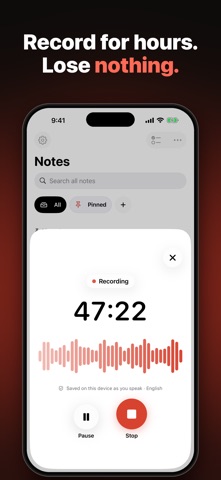
• One tap starts a recording: in the app, from the Lock Screen widget or with the Action button.
• Audio is saved while you speak. A long lecture or interview is not lost if the app is closed unexpectedly.
• Long recordings keep transcribing when you leave the app.
RECORD ON APPLE WATCH
• One tap on the watch, from a complication or from the Smart Stack starts a recording. On Apple Watch Ultra, the Action button does it too.
• It works without your iPhone. The audio is saved on the watch in short pieces, so nothing is lost if the battery runs out.
• When your iPhone is near, the recording goes over by itself and is transcribed there. The watch shows what is waiting and what has arrived.
• Read your latest notes on the watch and tick off their tasks.
TASKS FROM WHAT YOU SAY
• Tap Task and say what needs doing, with a short pause between tasks: each one lands on your list.
• In any recording, say "to do: buy bread, call the doctor" and the note gets a checklist. Tap a task to hear where you said it.
• Every open task from every note in one Tasks list, and in a widget where you tick them off on the Home Screen.
• Need a date or an alert? One tap hands a task to Apple's Reminders.
• Edit, delete or add tasks at any time.
WIDGETS AND THE DYNAMIC ISLAND
• Record or say tasks from a Home Screen widget without opening the app. The time runs on the widget, in the Dynamic Island and on the Lock Screen; Stop opens the note.
• Small, medium and large widgets, a Lock Screen button, and Record and Task in Control Center.
FOLDERS AND SUMMARIES
• Sort notes into folders with a colour and a symbol, and filter the list in one tap.
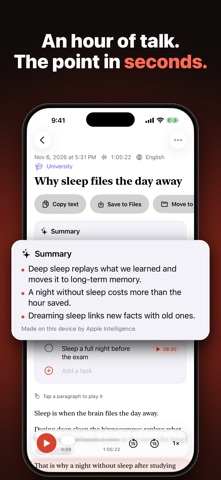
• With Apple Intelligence, Apple's on-device model writes a title and a short summary, finds the tasks and suggests a folder. Nothing moves without your yes. Without Apple Intelligence, tasks are found by keywords.
DICTATE ANYWHERE
• Press the button in Control Center or the Action button and Local Transcribe opens already listening. Speak, pause, and the text is on your clipboard, ready to paste into any message.
• Punctuation your way: automatic, only what you say ("period", "new line"), or none. Capitals on or off.
• Save a dictation as a note with one tap, or have every dictation saved. The last 50 stay in a history.
• Dictation is free, up to two minutes at a time.
VIDEOS AND SUBTITLES
• Share a video (mov, mp4, m4v) to Local Transcribe and get its text. Only the sound is kept, not the video.
• Save subtitles as an .srt file next to the text and the audio, timed to the speech.
READ, FIX AND FIND
• Transcription on your device in German, English, French, Spanish, Italian, Portuguese, Japanese, Korean, Chinese, Hindi and more.
• Notes read like a document: a title, clear paragraphs. Tap a paragraph to hear exactly that part.
• Correct a misheard word or name once, in one note or in all of them, and future recordings get it right.
• Search all notes. A result opens the note and plays from that sentence.
• Translate a note into another language with Apple's translator on your device.
VOICE MESSAGES AND AUDIO FILES
• Share a voice message or an audio file (m4a, mp3, wav, opus, ogg) and read it instead of listening.
YOUR NOTES ARE YOURS
• Copy the text or save text, subtitles and audio to Files at any time.
• Nothing is uploaded. There is no account and no tracking.
FAIR PRICING
• Your first three transcriptions are free, at any length.
• After that, one purchase unlocks unlimited transcription. Pay once. No subscription.
• Recording, dictation, playback and saving your audio stay free.
Requires iOS 26 or later, and watchOS 26 or later for Apple Watch. Apple's speech and translation models are downloaded once by the system; after that, everything works offline.
Safety and technology
Found in the app by AppBrain- Price
- Free
- App size
- 5.51 MB
- Content rating
- Everyone
Technologies used by Voice Notes: Local Transcribe
Releases
Updates seen on the App Store- Version
- 1.2
- Launched
- October 2026
No changelog data
Alternatives
Similar apps and more from Armen Ter-OganezovAlternatives to Voice Notes: Local Transcribe


More from Armen Ter-Oganezov


Rankings
App Store top chartsApp Store Rankings for Voice Notes: Local Transcribe
About the app and developer
About Voice Notes: Local Transcribe
Voice Notes: Local Transcribe is a productivity app developed by Armen Ter-Oganezov.
User Ratings
Voice Notes: Local Transcribe is rated 5.00 out of 5 stars. The rating is based on one rating ratings.
App Information
Voice Notes: Local Transcribe is freely available from the App Store. The app size is 5.51 MB. The latest version available is 1.2. The last update was on November 8, 2026.
Technical Requirements
The app has a content rating of Everyone. The app has been available on the App Store since October 2026.
Voice Notes: Local Transcribe is made and published by Armen Ter-Oganezov. AppBrain is an independent app data site and isn't affiliated with Armen Ter-Oganezov. The app name, icon, screenshots and description belong to Armen Ter-Oganezov and are shown as published on the App Store.
Developer information for Armen Ter-Oganezov
Address:
Frequently asked questions about Voice Notes: Local Transcribe
Is Voice Notes: Local Transcribe free?
Yes. Voice Notes: Local Transcribe is free on the App Store.
Is Voice Notes: Local Transcribe still available?
Yes. Voice Notes: Local Transcribe is on the App Store, and the last update we saw was on November 8, 2026.
How large is Voice Notes: Local Transcribe?
Voice Notes: Local Transcribe is 5.51 MB.
Is Voice Notes: Local Transcribe suitable for children?
App Store rates the content of Voice Notes: Local Transcribe as suitable for everyone.
How do people rate Voice Notes: Local Transcribe?
Voice Notes: Local Transcribe has one rating of 5.00 stars on the App Store.
Who made Voice Notes: Local Transcribe?
Voice Notes: Local Transcribe was developed by Armen Ter-Oganezov. It is listed in the productivity category on the App Store.
What are the best alternatives to Voice Notes: Local Transcribe?
People looking at Voice Notes: Local Transcribe also look at these productivity apps: Awaazly: AI Voice to Text, UnlimitedTranscribe, MINDhunterIQ, AI Note Taker: Mighty Notes, CARD-QARD.