

Voice Recorder: NoteCube
Voice Recorder: NoteCube is made and published by Sunwoo Kim. AppBrain is an independent app data site and isn't affiliated with Sunwoo Kim. The app name, icon, screenshots and description belong to Sunwoo Kim and are shown as published on the App Store.
AppBrain's verdict
- Rating on App Store
- 5.00
- 1 ratings
- Last updated
- October 9, 2026
It doesn't have enough ratings yet to judge what users think.
Rankings
App Store top chartsApp Store Rankings for Voice Recorder: NoteCube
Competitors
Similar apps and more from Sunwoo KimMore from Sunwoo Kim




Also available on Google Play

Releases
Updates seen on the App Store- Version
- 7.2.1
- Launched
- January 2024
No changelog data
User feedback
Ratings and reviews on the App StoreComments on Voice Recorder: NoteCube for iOS
We don't have enough comments to show example comments. Please check back later.
Technology
Found in the app by AppBrain- Price
- Free
- App size
- 72.4 MB
- Content rating
- Everyone
Technologies used by Voice Recorder: NoteCube
About the app and developer
About Voice Recorder: NoteCube
Voice Recorder: NoteCube is a productivity app developed by Sunwoo Kim.
What is the rating of Voice Recorder: NoteCube?
Voice Recorder: NoteCube is rated 5.00 out of 5 stars, based on one rating ratings.
Is Voice Recorder: NoteCube free?
Voice Recorder: NoteCube is free. The app size is 72.43 MB. The latest version available is 7.2.1. The last update was on October 9, 2026.
What are the requirements for Voice Recorder: NoteCube?
The app has a content rating of Everyone. The app has been available on the App Store since January 2024.
Developer information for Sunwoo Kim
Address:
Store listing
By Sunwoo Kim, from the App Store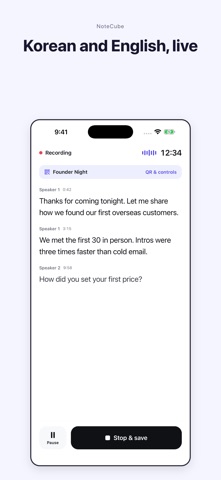


Description by Sunwoo Kim Written by the developer, not by AppBrain. Click to read.
VOICE RECORDER + SPEECH TO TEXT
• One tap to record, with live transcription on screen
• Speaker labels: see who said what, and rename speakers
• Mixed-language conversations, including Korean and English in the same sentence
• Optional live translation into the language you choose
• Import an existing audio file and transcribe audio to text
• Recording keeps going if transcription time runs low, so you never lose the audio
AI MEETING NOTES AND MINUTES
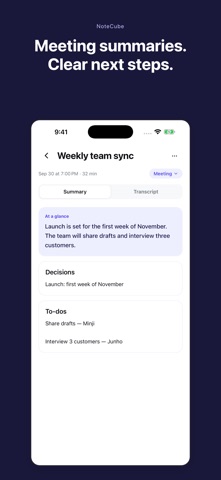
• Meeting mode: a clean summary, key decisions and next steps after every meeting
• Ask questions about the recording while it is still running
• Follow-up email and message drafts written from your meeting minutes
• Export a PDF report, or share a private link to the transcript
LECTURE RECORDER FOR CLASSES
• Record class and get lecture notes, a summary and a short quiz
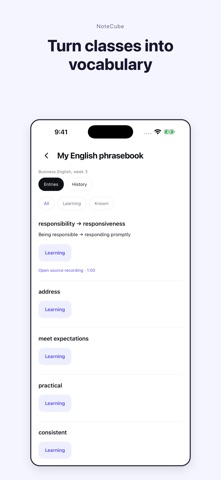
• Turn language classes into a vocabulary list you can review
• Search every transcript to find the moment you need
EVENTS, TALKS AND LIVE CAPTIONS
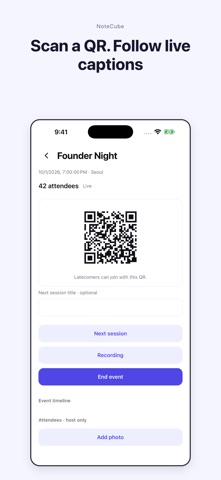
• Event mode: show a QR code and attendees follow live captions in their browser, no app needed
• Talk mode for interviews and podcasts, with speaker-separated transcripts
NOTES THAT KEEP GROWING
• Each recording builds a document you can keep editing
• Review every AI change and undo it in one tap
• Connect Claude or ChatGPT to work with your notes (availability depends on the AI service and your account)
Who uses NoteCube: students recording lectures, founders and teams taking meeting minutes, journalists transcribing interviews, and anyone who wants a voice recorder that writes things down.
Sign-in is required. Notes saved on-device in versions before 7.0 do not migrate automatically. AI output can contain errors. Obtain permission before recording others.
Optional Pro subscriptions renew automatically until cancelled. Usage limits apply. One-time credits and event passes are separate purchases. Review prices and terms before purchase; manage or cancel subscriptions in your App Store account settings.
Privacy: https://notecube.app/privacy
Terms: https://notecube.app/terms