Voice to Text - Speech Typing is made and published by
Fexo FZC LLC.
AppBrain is an independent app data site and isn't affiliated with Fexo FZC LLC.
The app name, icon, screenshots and description belong to Fexo FZC LLC and are shown as
published on the App Store.
About Voice to Text - Speech Typing
Voice to Text - Speech Typing is a productivity app developed by Fexo FZC LLC.
User Ratings
The app has no ratings yet.
App Information
Voice to Text - Speech Typing is freely available from the App Store. The app size is 59.76 MB. The latest version available is 4.0.1. The last update was on May 5, 2026.
Technical Requirements
The app has a content rating of Everyone. The app has been available on the App Store since March 2026.
Description by Fexo FZC LLC(from the App Store)
Fexo Notes – Voice to Text | Speech to Text | Audio to Text
Fexo Notes is a simple and powerful Voice to Text application designed to convert speech into written notes instantly. Using advanced Speech to Text and Audio to Text technology, the app allows users to create notes quickly by speaking instead of typing.
With Fexo Notes, you can easily capture ideas, meeting discussions, reminders, and lecture notes using accurate voice recognition. The app converts your voice into text in real time, making note-taking faster and more convenient.
Fexo Notes works as a reliable Voice to Text converter, Speech to Text transcription tool, and Audio to Text note taking solution for everyday productivity.
Key Features
Voice to Text Notes Convert your voice into written text instantly. Simply speak and the app will automatically turn your voice into clear text notes.
Speech to Text Recognition Use powerful speech recognition technology to convert spoken words into text in real time.
Audio to Text Conversion Turn spoken audio into written notes using the built-in Audio to Text functionality.
Note Editing and Organization Create, edit, and manage notes easily with a clean and simple note editor designed for productivity.
Translate Notes Translate your text notes into multiple languages directly inside the app.
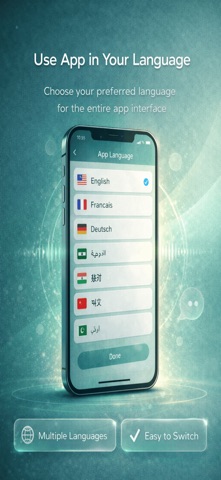
Supported translation languages include English, French, German, Arabic, Hindi, Chinese, and Urdu.
Copy Paragraph Quickly copy any paragraph from your notes and use it in other apps or documents.
Share Notes Share your Voice to Text notes instantly with friends, colleagues, or other applications.
Clean Paragraph Formatting Speech results are automatically formatted into clear and readable paragraphs.
Multi-Language App Interface Use the application in different languages by selecting your preferred interface language.
Perfect For
Students taking lecture notes using Speech to Text Professionals recording meeting notes with Voice to Text Writers capturing ideas quickly with Audio to Text Hands-free note taking Voice typing instead of keyboard typing
Why Choose Fexo Notes
Fast Voice to Text conversion Accurate Speech to Text recognition Reliable Audio to Text transcription Simple and clean note interface Easy copy and sharing options Support for multiple languages
Use Voice Instead of Typing
Typing long notes can take time. With Fexo Notes, simply speak and your voice will instantly convert into text using powerful Voice to Text, Speech to Text, and Audio to Text technology.
Terms of Use (EULA): https://www.apple.com/legal/internet-services/itunes/dev/stdeula/
Each subscription will automatically renew 3 days before the expiration date for
the same time period. Subscriptions can be cancelled at any time before the renewal.