

VoiceClaw Realtime
VoiceClaw Realtime is made and published by Benjamin Badejo. AppBrain is an independent app data site and isn't affiliated with Benjamin Badejo. The app name, icon, screenshots and description belong to Benjamin Badejo and are shown as published on the App Store.
AppBrain's verdict
- Rating on App Store
- 3.67
- 6 ratings
- Last updated
- September 5, 2026
It doesn't have enough ratings yet to judge what users think.
Rankings
App Store top chartsApp Store Rankings for VoiceClaw Realtime
Competitors
Similar apps and more from Benjamin BadejoAlternatives to VoiceClaw Realtime


Releases
Updates seen on the App Store- Version
- 1.4.83
- Launched
- May 2026
No changelog data
User feedback
Ratings and reviews on the App StoreComments on VoiceClaw Realtime for iOS
We don't have enough comments to show example comments. Please check back later.
Technology
Found in the app by AppBrain- Price
- Free
- App size
- 35.1 MB
- Content rating
- Everyone
Technologies used by VoiceClaw Realtime
About the app and developer
About VoiceClaw Realtime
VoiceClaw Realtime is a productivity app developed by Benjamin Badejo.
User Ratings
VoiceClaw Realtime is rated 3.67 out of 5 stars. The rating is based on 6 ratings.
App Information
VoiceClaw Realtime is freely available from the App Store. The app size is 35.12 MB. The latest version available is 1.4.83. The last update was on September 5, 2026.
Technical Requirements
The app has a content rating of Everyone. The app has been available on the App Store since May 2026.
Developer information for Benjamin Badejo
Address:
Store listing
By Benjamin Badejo, from the App Store




Description by Benjamin Badejo Written by the developer, not by AppBrain. Click to read.
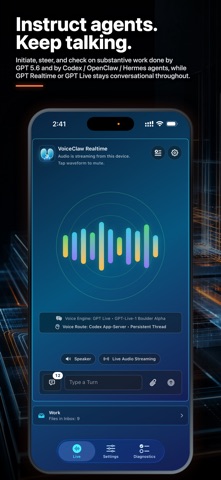
Talk naturally, interrupt at any time, and keep one continuous AI voice conversation going while you start, monitor, steer, and switch among simultaneous underlying AI agent workstreams and control your device.
QUICK START
Start by using "Voice Engine Standalone" mode for direct conversation with OpenAI’s latest natural conversational voice models — GPT Realtime and GPT Live. Then use your voice or the main screen picker to select a GPT-5.6 Direct (Sol / Terra /Luna) voice route for deeper reasoning behind the scenes.
YOUR AI AGENTS
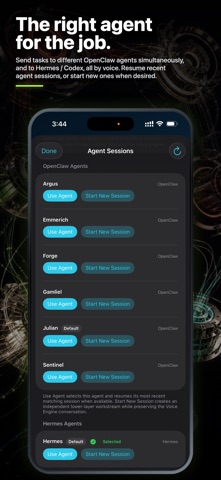
When you’re ready to control computer-side AI agents from your iPhone, iPad, or watch (including over cellular connections when you're away from your computer), install the free private desktop Companion app. Instantly pair your device using the desktop Companion app's private QR code to start controlling your Codex, OpenClaw, and Hermes AI agents on your computer without ending the live voice session. Your connection is made possible through either your free, private, device-to-device Tailscale connection or an optional free personal HTTPS tunnel.
DO REAL WORK
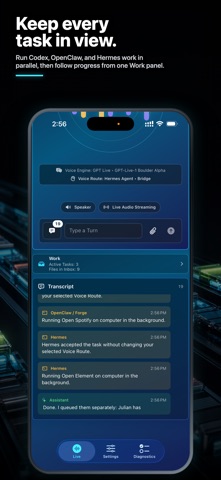
Start concurrent tasks, steer follow-ups, monitor statuses, resume recent sessions, and receive generated files in the app. Your computer-side AI agents automatically use all of their existing capabilities without any additional setup.
FILES AND MEDIA
Attach photos, files, or camera captures using your voice or the Live screen's attachment button to get instant analysis or to send them to your agents. Get files back from your Codex / OpenClaw / Hermes agents and view / download them within the app: just tell VoiceClaw Realtime to ask your agents to send the files they create (or files already on your computer) to VoiceClaw Realtime. The files stay on your Mac/PC and are sent directly to your device via your private Tailscale connection or optional personal HTTPS tunnel. View your inbox contents at any time, including from past VoiceClaw Realtime sessions.
HANDS-FREE CONTROL
Ask VoiceClaw Realtime to read your screen, draft messages and emails, navigate Maps, browse the web, read your screen, change in-app settings, switch routes, mute the mic, and more. Keep the mic on in the background to keep the conversation going, or keep the mic muted until you're ready to resume.
LIVE TRANSCRIPTS
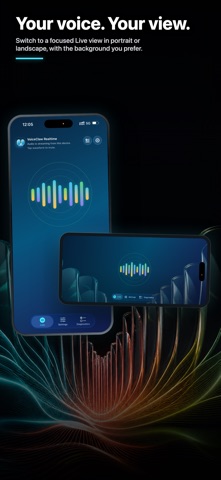
View live captions of your conversation, including in-transcript updates of AI agent handoffs, task progress, completed work, and received files.
NOTIFICATIONS, ACTION BUTTON, WIDGETS, and SMART STACK
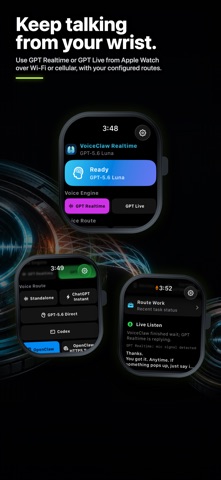
See agents' live status with iOS Live Activities and get notifications when agents finish working. Activate VoiceClaw Realtime with the Action Button. Add Home Screen widgets for quick access to your favorite voice routes and agents. Open VoiceClaw Realtime on your watch from the Smart Stack or with the double-tap gesture.
PRIVACY AND OWNERSHIP
VoiceClaw Realtime uses your own existing ChatGPT subscription (or an optional OpenAI API key) and your own computer and network setup. Credentials stay in your device Keychain or Companion configuration. The app doesn't contact any third-party servers, or even our own (we don't have any)! We can't see your conversation or credentials; they stay with your device, your computer, and your AI model provider. The app itself checks only one URL — https://www.voiceclawrealtime.com/companion — to check if a new version of the desktop Companion app is available and notify you to download it.
Privacy Policy: https://www.voiceclawrealtime.com/privacy/
Support: https://www.voiceclawrealtime.com/support/
Terms of Use: https://www.apple.com/legal/internet-services/itunes/dev/stdeula/