

VR VNC Desktop Mirror
VR VNC Desktop Mirror is made and published by Ahmed El-Bermawy. AppBrain is an independent app data site and isn't affiliated with Ahmed El-Bermawy. The app name, icon, screenshots and description belong to Ahmed El-Bermawy and are shown as published on the App Store.
AppBrain's verdict
Established- Rating on App Store
- 1.00
- 1 ratings
- Last updated
- February 3, 2026
It doesn't have enough ratings yet to judge what users think.
Rankings
App Store top chartsApp Store Rankings for VR VNC Desktop Mirror
Competitors
Similar apps and more from Ahmed El-BermawyAlternatives to VR VNC Desktop Mirror








More from Ahmed El-Bermawy


Releases
Updates seen on the App Store- Version
- 26
- Launched
- January 2021
No changelog data
User feedback
Ratings and reviews on the App StoreComments on VR VNC Desktop Mirror for iOS
We don't have enough comments to show example comments. Please check back later.
Technology
Found in the app by AppBrain- Price
- $12.99
- App size
- 13.4 MB
- Content rating
- Everyone
Technologies used by VR VNC Desktop Mirror
About the app and developer
About VR VNC Desktop Mirror
VR VNC Desktop Mirror is a games app developed by Ahmed El-Bermawy.
User Ratings
VR VNC Desktop Mirror is rated 1.00 out of 5 stars. The rating is based on one rating ratings.
App Information
VR VNC Desktop Mirror costs $12.99. The app size is 13.39 MB. The latest version available is 26. The last update was on February 3, 2026.
Technical Requirements
The app has a content rating of Everyone. The app has been available on the App Store since January 2021.
Developer information for Ahmed El-Bermawy
Address:
Store listing
By Ahmed El-Bermawy, from the App Store



Description by Ahmed El-Bermawy Written by the developer, not by AppBrain. Click to read.
Step inside into your Mac screen enjoying your desktop games in a virtual reality (VR) right in front of your eyes using your iPhone.
New Fast Views Technology With A Support Of A Server Side Mac App allow you to control Level Of Graphics Details, Resolution & FPS.
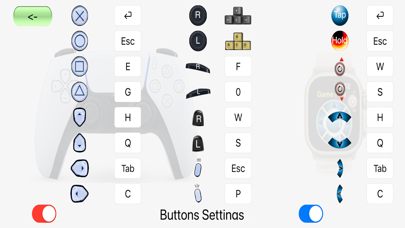
Support For Two Way Communication Not Only See In VR But Also App Control using Game Controller, Apple Watch and Head Motions
Multiple User Profile Can be Adjusted and saved for each Game/App
Up to 7 Users Can All Access The Game/App played on the main Mac
Support for Game Controllers with motion sensors to be used in iPhone/iPad in VR And non VR Mode
5x Faster than before with ultimately insignificant latency on internal Wireless Network Ad-Hook.
Game Controller Haptic Effects Added with each click on each button and for several events.
Game Controller Light Color Effects With Controller Clicks.
Game Controller Gyroscope Support allow player to Remap Your Game/App Keys for a unique experience gaming on iPhone/iPad in VR and Non VR Modes
Remap Your Game/App Keys Using Head Rotations to allow User to get a free camera view or Special Moves.
Apple Watch Companion App Allow you to Remap Your Game/App Keys On Apple Watch.
Regular supported Game Controllers can be used in Normal and VR Mode.
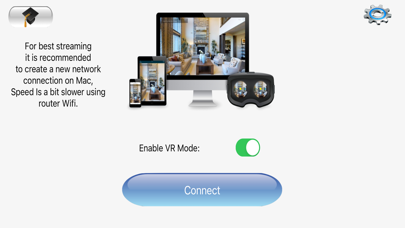
Quick tutorial screen now including more details.
Moving your head, Apple Watch Or Game Controller around controlling your directions by translating the device tilts into a configurable keyboard clicks to add the reality to your action games, it is Useful in Normal mode too for iPad/iPhone by tilting your device Left/Right like controlling a racing car direction or such (for racing games).
Multi-sharing allow several users to share same screen. allowing immersive 360-degree View, virtually share your gaming VR experience with other users in real.
You can use the Wifi for a wireless communication between your iPhone/iPad and your Mac in a VR or Normal Modes with a normal speed streaming.
It is recommended to connect the iPhone/iPad to your Mac Internal Network (Ad-Hook) for fast streaming Games, while doing so be aware to mind the Distance in respect of your head movements to eliminate undesired actions and avoid latency.