Walkie: Voice Keyboard is made and published by
B150.
AppBrain is an independent app data site and isn't affiliated with B150.
The app name, icon, screenshots and description belong to B150 and are shown as
published on the App Store.
About Walkie: Voice Keyboard
Walkie: Voice Keyboard is an utilities app developed by B150.
What is the rating of Walkie: Voice Keyboard?
Walkie: Voice Keyboard has no ratings yet.
Is Walkie: Voice Keyboard free?
Walkie: Voice Keyboard is free. The app size is 90.03 MB. The latest version available is 1.20.18. The last update was on October 17, 2026.
What are the requirements for Walkie: Voice Keyboard?
The app has a content rating of Everyone. The app has been available on the App Store since July 2026.
Description by B150(from the App Store)
Walkie is a keyboard that turns your voice into text — in any app. And now it reads to you, too.
Tap to dictate, speak naturally, and Walkie types what you said right where your cursor is: Messages, email, notes, Slack, search bars, anywhere you'd normally type. No copy-paste, no switching apps.
WHY WALKIE - Works everywhere — it's a keyboard, so it goes wherever you type - Fast, accurate transcription that keeps up with how you actually talk - Talk as long as you want; tap done when you're finished - A real keyboard for typing too, with autocorrect that learns your words - Your words, your way
READ ALOUD - Turn anything into audio: paste text, open a PDF, or share an article straight to Walkie - 950+ natural voices — search by name, language, or country - Follow along with word-by-word highlighting, or just listen - Recent reads are saved so you can pick up where you left off
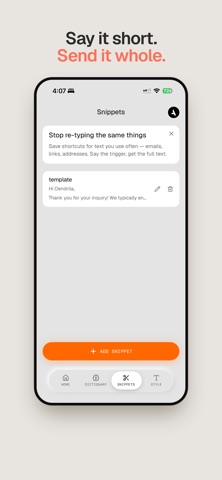
MAKE IT YOURS - Dictionary — teach Walkie names, brands, and terms so they come out right - Snippets — say a short trigger, get a full phrase (addresses, sign-offs, more) - Text styles — Formal, Casual, or Very casual (no caps, no punctuation) - Everything syncs across your devices when you sign in
PRIVATE BY DESIGN - Your audio is used to transcribe and is never stored or used to train models - Delete your account and all your data anytime, right from the app
Set up takes a minute: add the Walkie keyboard in Settings, enable Full Access (required so the keyboard can transcribe in the cloud), and start talking.
Each subscription will automatically renew 3 days before the expiration date for
the same time period. Subscriptions can be cancelled at any time before the renewal.