

WalkRecord Plus
WalkRecord Plus is made and published by Yoshinobu Ishigaki. AppBrain is an independent app data site and isn't affiliated with Yoshinobu Ishigaki. The app name, icon, screenshots and description belong to Yoshinobu Ishigaki and are shown as published on the App Store.
AppBrain's verdict
- Last updated
- December 16, 2025
Rankings
App Store top chartsApp Store Rankings for WalkRecord Plus
Competitors
Similar apps and more from Yoshinobu IshigakiAlternatives to WalkRecord Plus




More from Yoshinobu Ishigaki



Releases
Updates seen on the App Store- Version
- 9.7
- Launched
- September 2017
No changelog data
User feedback
Ratings and reviews on the App StoreComments on WalkRecord Plus for iOS
We don't have enough comments to show example comments. Please check back later.
Technology
Found in the app by AppBrain- Price
- $1.99
- App size
- 9.40 MB
- Content rating
- Medium
Technologies used by WalkRecord Plus
About the app and developer
About WalkRecord Plus
WalkRecord Plus is a health & fitness app developed by Yoshinobu Ishigaki.
User Ratings
The app has no ratings yet.
App Information
WalkRecord Plus costs $1.99. The app size is 9.40 MB. The latest version available is 9.7. The last update was on December 16, 2025.
Technical Requirements
The app has a content rating of Medium Maturity. The app has been available on the App Store since September 2017.
Developer information for Yoshinobu Ishigaki
Address:
Frequently asked questions about WalkRecord Plus
Is WalkRecord Plus free?
No. WalkRecord Plus costs $1.99 on the App Store.
Is WalkRecord Plus still available?
Yes. WalkRecord Plus is on the App Store, and the last update we saw was on December 16, 2025.
How large is WalkRecord Plus?
WalkRecord Plus is 9.40 MB.
Is WalkRecord Plus suitable for children?
App Store gives WalkRecord Plus a medium maturity rating, so it is not meant for young children.
Who made WalkRecord Plus?
WalkRecord Plus was developed by Yoshinobu Ishigaki. It is listed in the health & fitness category on the App Store.
What are the best alternatives to WalkRecord Plus?
People looking at WalkRecord Plus also look at these health & fitness apps: 足取り計iPhone, Convers. App for BNP and NT, 心房細動アプリ, Vitalbook Pro, ストレスチェックアプリ.
Store listing
By Yoshinobu Ishigaki, from the App Store

Description by Yoshinobu Ishigaki Written by the developer, not by AppBrain. Click to read.
散歩やジョギングなど移動の( 経路や距離、時間)を1日単位に記録保存し、あとで再生できます。
見知らぬ街を歩くとき歩いた経路や自分のいる地点が確認できます。
緯度と経度や標高が表示されるので正確な位置が分かります
散歩や旅行にこのアプリを連れて行ってください。
*** ご注意 ***
このアプリはiOS 11.0以上で動作します。
初めて起動した時、「位置情報サービスを利用する」を許可にしてください。
許可にしないとアプリは終了します。
また、歩数計のため「モーションとフィットネス」をONにして下さい。
WalkRecord Plus の場合はデータをiCloudに保存するためデバイスのiCloudでこのアプリをONにして下さい。
●アプリの説明
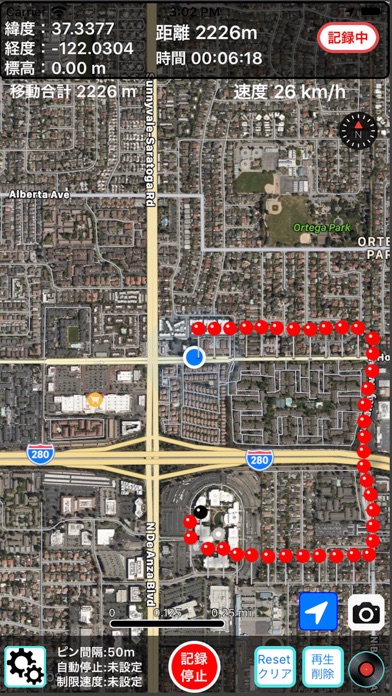
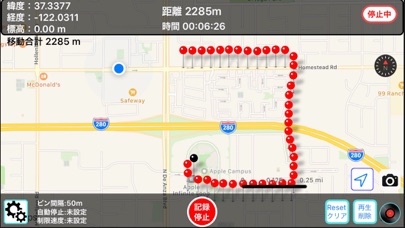
GPSを利用して移動軌跡を表示するアプリです。
歩いた、移動した経路をピンで記録して、設定距離間隔で移動各地点の記録開始点からの移動時間と移動距離、緯度・経度や標高を画面上部に表示します。
また歩行した歩数と距離を記録し画面に表示する万歩計の機能もあります
任意のピンをクリックするとピン情報として地点通過時の時刻と記録開始地点からの距離を表示します。
移動ポイント間の距離はGPS地点間の直線距離を表し、設定間隔以内での移動距離はカウントされません。
またコーナーなどは道に沿った実際に歩いた距離ではなく三角形の斜線の最短距離になるので実際よりは短めに表示されますが、距離が長くなれば誤差範囲になるかもしれません。移動が歩行の場合は移動したそのままの距離を表示します。
GPSの精度は誤差10mと言われています。また屋内やトンネル内など場所によってはGPSを検出できない場合はピンの更新ができない場合もありますが、再度GPSをキャッチしたところから距離測定が自動で再開されるので、距離は概ね正確に表示されます。
●機能と動作
主なボタンの機能と動作は以下の通りです。
・記録/停止ボタン
「記録・停止」ボタンで位置情報サービス(記録)を開始し、もう一度クリックすると位置情報サービスを停止します。
最初のスタート地点、距離ゼロは黒いピンで表示されます。
その後指定されたピン間隔ごとに指定された色のピンで移動経路を表示します
このアプリを使用していない場合はバッテリーの無駄な消耗を防ぐため停止にして下さい。
・設定ボタン
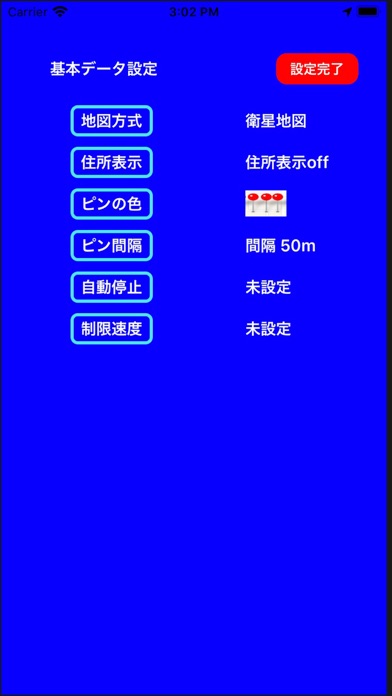
次の設定ができます
①地図の種類の設定
標準地図と衛星地図の切替ができます。
②住所表示設定
住所表示ONで地図上の任意の地点をタップするとその点の郵便番号と住所を表示します
ONの場合住所表示ラベルを左下に表示します
③ピンの色設定
必要に応じてピンの色(デフォルト:赤)を10色の中から選ぶことができます
経路を識別したいときに使うと便利です
④ピン記録間隔の設定
50m,100m,200m,500mの距離間隔でピンを表示します
またピン記録間隔を時間、30秒、1分間隔で記録することも可能です
設定されたピン間隔を下帯に表示
⑤記録自動停止設定
記録開始後記録停止ボタンの押し忘れ防止のために1H,2Hの時間を設定して記録することができます
これにより設定時間後に自動的に記録を中止してバッテリーの消耗を防ぎます
自動停止の設定値を下帯に表示
⑥制限速度設定
移動時の最大速度(km/h)を設定しこの制限速度を超えた場合チャイムでお知らせします
設定された制限速度を下帯に表示
・移動距離と記録時間クリアボタン
現在地までの距離計をクリアしてゼロにします
またその地点から新たに距離計測を始めます
記録開始地点からの記録時間もクリアしてゼロにできます
地点間の移動距離や移動時間を計測するのに役立ちます
歩数計データ(歩数と歩行距離)をクリアしてゼロにできます
地点間の歩数を計測するのに役立ちます
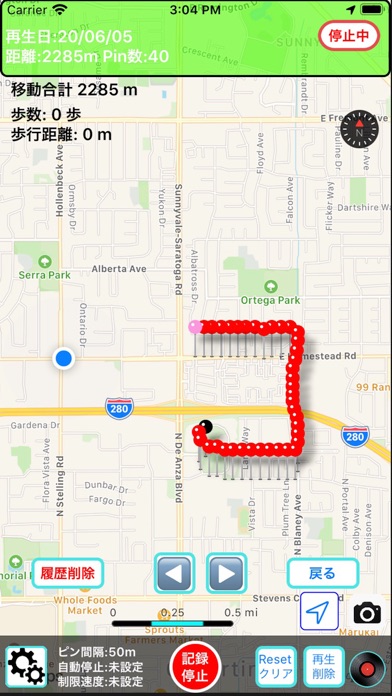
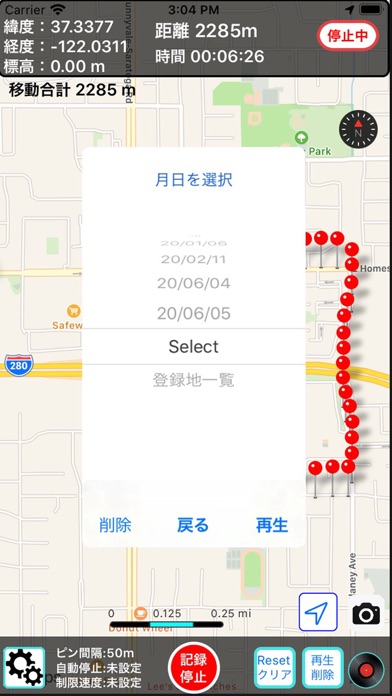
・履歴再生/削除ボタン
日を選択して日単位にこれまでの記録の再生と記録データの削除ができます
また最上部の「all」を選択して「削除」を選ぶと保存されている全データが削除されます
「登録地一覧」を選択することでこれまで登録してある登録地の一覧リストが表示されます
その中の一つの登録地を選択することで地図上にその登録地を表示します
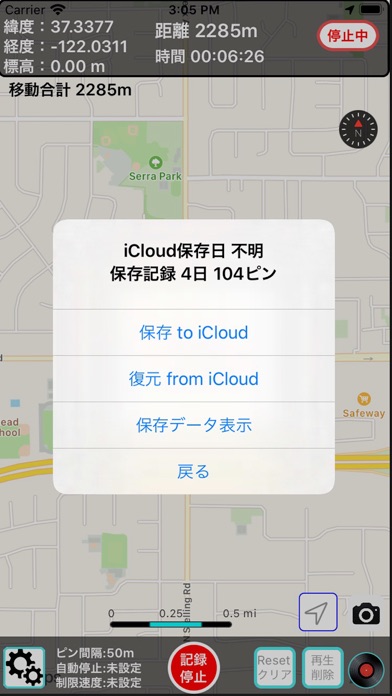
・保存データの一覧表示ボタン
タイトルに保存されている日数とピン数およびiCloudへ保存した日付を一覧表示します。
(WalkRecordの場合は保存記録日数と保存されているピンデータを日付で表示します)
・保存 to iCloud : アプリ内にある全データをiCloudにアップロードして保存します
・復元 from iCloud : iCloudにある全データをダウンロードしてアプリ内に復元します
・保存データ表示 : アプリ内に保存されている日付を表示します
これによりiCloudを通してiOSデバイス間でデータを共有やデバイスを変更したときにデータの引き継ぎが可能です
・カメラボタン(画面右下)
現在のアプリの画面の写真を撮り、写真ライブラリーに保存します
・コンパスボタン(画面右上)
北を上に地図を表示します
・現在地ボタン(青地四角に白の矢印)
現在地を地図のセンターに表示します
・目的地の登録と削除
地図上で登録したい地点を長押しするとその地点につけたい名称を入力して登録できます。ピンはブルーで表示されます
そのピンをクリックし「道順」を押すと現在地からの道順をApple Mapで案内します
現在地点からその登録地までの道順を車、徒歩、交通機関別に表示します
「戻る」ときは左上に小さく表示された<WalkRecordなどのアプリ名をクリックしてください
登録地のバナーの「削除」を押すとこのピンは削除されます。
この登録地ピンデータは他のピンのようにアプリ内に登録した日付と共に保存されいつでも呼び出すことができます
・選択地の住所表示
地図上の任意の場所をタップすると設定ボタンで住所表示がONであればその地点の住所と郵便番号を表示します
・ピン間距離測定
任意の2つのピンを選択することでその間の距離を表示します
・画面上部ラベル
現在位置(ピンの位置)の緯度・経度と標高を表示します
記録開始点からの現在地までの距離と時間を表示します
当日の移動合計距離と歩行した歩数と歩行距離を表示します
iPhoneやiPadにインストールしてアプリをオンにして実際に歩いてみて動作をご確認下さい。