

Wall Gallery Designer
Wall Gallery Designer is made and published by George Purvis III. AppBrain is an independent app data site and isn't affiliated with George Purvis III. The app name, icon, screenshots and description belong to George Purvis III and are shown as published on the App Store.
AppBrain's verdict
Established- Rating on App Store
- 3.00
- 2 ratings
- Last updated
- December 20, 2025
It doesn't have enough ratings yet to judge what users think.
Rankings
App Store top chartsApp Store Rankings for Wall Gallery Designer
Competitors
Similar apps and more from George Purvis IIIAlternatives to Wall Gallery Designer







More from George Purvis III

Releases
Updates seen on the App Store- Version
- 2026.01
- Launched
- October 2017
No changelog data
User feedback
Ratings and reviews on the App StoreComments on Wall Gallery Designer for iOS
We don't have enough comments to show example comments. Please check back later.
Technology
Found in the app by AppBrain- Price
- $24.99
- App size
- 647.6 MB
- Content rating
- Everyone
Technologies used by Wall Gallery Designer
About the app and developer
About Wall Gallery Designer
Wall Gallery Designer is a photo & video app developed by George Purvis III.
User Ratings
Wall Gallery Designer is rated 3.00 out of 5 stars. The rating is based on 2 ratings.
App Information
Wall Gallery Designer costs $24.99. The app size is 647.64 MB. The latest version available is 2026.01. The last update was on December 20, 2025.
Technical Requirements
The app has a content rating of Everyone. The app has been available on the App Store since October 2017.
Developer information for George Purvis III
Address:
Frequently asked questions about Wall Gallery Designer
Is Wall Gallery Designer free?
No. Wall Gallery Designer costs $24.99 on the App Store.
Is Wall Gallery Designer still available?
Yes. Wall Gallery Designer is on the App Store, and the last update we saw was on December 20, 2025.
How large is Wall Gallery Designer?
Wall Gallery Designer is 647.64 MB.
Is Wall Gallery Designer suitable for children?
App Store rates the content of Wall Gallery Designer as suitable for everyone.
How do people rate Wall Gallery Designer?
Wall Gallery Designer scores 3.00 out of 5 stars, from 2 ratings on the App Store.
Who made Wall Gallery Designer?
Wall Gallery Designer was developed by George Purvis III. It is listed in the photo & video category on the App Store.
What are the best alternatives to Wall Gallery Designer?
People looking at Wall Gallery Designer also look at these photo & video apps: Augmented Frames, Dracast Palette, Professional Photo Magazine, Light Leak V: Photo Filters, AR Frame - 3D photo to AR.
Store listing
By George Purvis III, from the App Store




Description by George Purvis III Written by the developer, not by AppBrain. Click to read.
Millions of mat and frame combinations are stocked in stores. Choosing sizes and colors in a store with bad lighting, instead of on the wall where the framed picture will hang, often fails because beautifully framed and matted pictures clash with the decor of the room where they were intended to hang.
Use "Wall Gallery Designer's" augmented reality to create a gallery with confidence that it works with your room decor. When you explore possibilities with “Wall Gallery Designer”, you are more likely to choose excellent print sizes, mats, and frames with less hassle, saving you time, money, and stress.
Can you answer these questions?
• How big should my photos be printed for display on my wall?
• What mat color is best for my framed photos and the colors of my room?
• Would a narrow or wide-frame face look better with my furniture?
• Where should I hang the framed pictures?
• Should the colors in my photos be adjusted to work better with my decor?
• How should I arrange my art on the wall?
• Frameless, canvas, metal, or wood framing?
• How do I organize my ideas for walls and galleries and then share them with others?
• How do I record and save designs?
With "Wall Gallery Designer", you answer these questions and more to make art displays for walls, galleries, homes, businesses, and outdoor art shows.
Each arrangement is a multi-wall scene within a gallery. Instantly switch scenes in a gallery to compare different designs for the walls. Create separate galleries for different clients or locations.
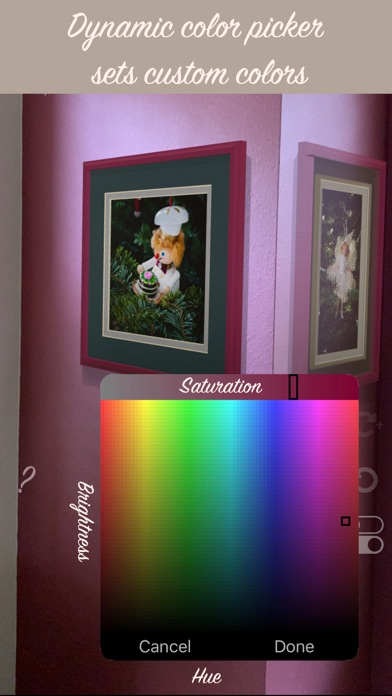
Choose the colors and sizes of the mats and frames from common ones similar to those stocked in stores in the US or custom colors. You may even pick up colors from the room or picture to use on frames, mats, and walls. Analyzing the picture, the app even suggests mat colors.
Virtually "hang" pictures without mats and/or frames to visualize how float, frameless, canvas, or glass pictures might display on your wall in standard or custom-size windows. When you are considering art already in a custom frame, add its photo to your camera roll, then choose it for a frame that has a frame face size of 'none'.
The special features of "Wall Gallery Designer" include:
• Frozen Reality™
• Viewpoint snapshots™
• Color Triage™
• Mat color recommendations are based on the colors in framed pictures
• Work quickly:
1. Changes apply to all selected framed pictures
2. Related changes such as frame, mat, and overmat colors, can be seen and changed with a single tap
• Persistent Scenes and Galleries
• Export archived Galleries and Scenes
• Double matting
• Float framing and clip frames
• 4- and 8-ply mats
• Fast single-tap color and framing changes with MultiMenu controls
• Custom mat, frame and wall colors, and sizes
• Frame and mat colors can be picked from room furnishings
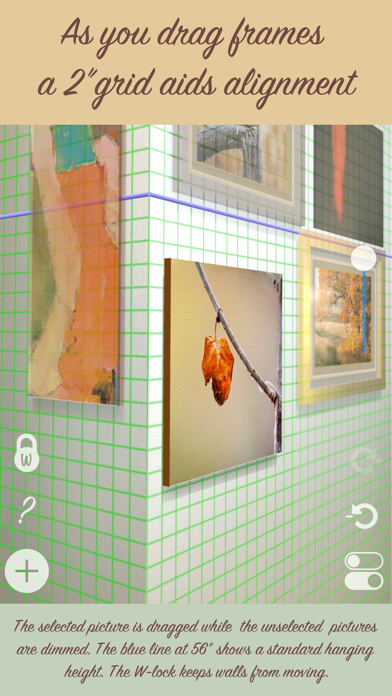
• Leveling lines
• Many walls in a scene
• Add custom frame profile patterns
• Share a single wall gallery with Quick Look AR
• and more...
"Wall Gallery Designer" is an app for iPhone 6s or newer iPads that use the A9 processor, but it is best with LiDAR.
Use the in-app help for instructions, tips, and more. Visit http://WallGalleryDesigner.com for video overviews.