AppBrain
AppBrain
  • Apps
  • Apps being viewed right now Trending apps today Most popular apps All-time most installed apps Top rated apps iPhone and iPad apps
  • Intelligence ▾
    Intelligence overview → Track any Android app or your whole market
    Track & analyze
    Keyword Tracker & OptimizerTrack & improve Play rankings App Performance ReportOne-off PDF for any app StatisticsFree Android & Play market stats
    Promote your app
    Featured Apps App Links
  • Intelligence
  • Pricing
  • Dashboard
  • Sign up
  • Log in
App Store Apps > Music > Wallbum: Album Art Wall
Wallbum: Album Art Wall icon

Wallbum: Album Art Wall

by Candan · Music · Free
On the App Store since October 2026 · Data updated 2026-10-28

Wallbum: Album Art Wall is made and published by Candan. AppBrain is an independent app data site and isn't affiliated with Candan. The app name, icon, screenshots and description belong to Candan and are shown as published on the App Store.

AppBrain's verdict

Last updated
October 14, 2026
Size
19.5 MB
Official page on the App Store

User feedback

Ratings and reviews on the App Store

Comments on Wallbum: Album Art Wall for iOS

We don't have enough comments to show example comments. Please check back later.

Store listing

By Candan, from the App Store
Wallbum: Album Art Wall Screenshot 1 of 5
Wallbum: Album Art Wall Screenshot 2 of 5
Wallbum: Album Art Wall Screenshot 3 of 5
Wallbum: Album Art Wall Screenshot 4 of 5
Wallbum: Album Art Wall Screenshot 5 of 5
Screenshots by Candan, from the the App Store listing
Description by Candan Written by the developer, not by AppBrain. Click to read.
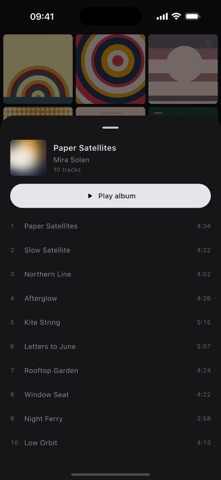
Wallbum turns your Apple Music library into a wall of album art. Tap a cover for its tracks; press and hold to play the album from its first track.

A WALL, NOT A LIST
Every album you have added to your library, edge to edge, covers only. No rows of text, no chrome, no tab bar. Pinch with two fingers to fit two, three or four across; it remembers what you chose.

TAP FOR THE TRACKS
A tap brings up the album's tracklist. Play the whole album from there, or tap any track to start from it.

HOLD FOR THE WHOLE ALBUM
Press and hold a cover and the album plays from track one — the way a record does. Hold the one already playing and it pauses instead of starting over.

TURN IT SIDEWAYS
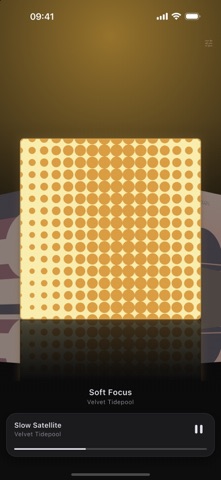
Landscape becomes Cover Flow: the centre album enlarged, the ones beside it angled back and dimmed. Wherever you were on the wall is where it opens, and turning upright puts you back in the same place.

THE ROOM CHANGES COLOUR
Behind the covers, an ambient glow takes its colour from the album that is playing, and fades to the next one over about half a second. The playing cover floats, with a slow pulse around its edge.

BUILT FOR 120Hz
Artwork is downsampled to exactly what the screen needs and cached on the device, requested before it scrolls into view and released after it leaves. Reduce Motion is respected: the pulse and the 3D rotation give way to plain cross-fades, and nothing is lost.

ONE PLAYLIST AT A TIME
Point the wall at one of your playlists and only the albums its songs come from go up — still played whole, one album at a time.

QUIET BY DESIGN
No accounts. No sign-in. No analytics. No advertising. No third-party tracking. Nothing about your library or what you played leaves your device — there is no server of ours to send it to.

FREE AND PRO
Free: 50 albums on the wall, with whole-album playback, the tracklist, pinch to zoom, Cover Flow, the ambient glow and the now-playing capsule. Settings stay at their defaults.

Pro: a one-time purchase that lifts the 50-album limit and opens up every setting — a playlist as the source, the portrait layout, the order, continuing to the next album, and hiding albums and skipping songs you have played. Not a subscription — nothing renews.

Requires iOS 16. Streaming albums from the Apple Music catalogue needs an active Apple Music subscription; albums downloaded to the device, and files you added to your library yourself, play without one.
Official page on the App Store

Safety and technology

Found in the app by AppBrain
Price
Free
App size
19.5 MB
Content rating
Everyone

Technologies used by Wallbum: Album Art Wall

Releases

Updates seen on the App Store
Version
1.1.0
Launched
October 2026

No changelog data

Alternatives

Similar apps and more from Candan

Alternatives to Wallbum: Album Art Wall

Drift: Visual Music Player icon Drift: Visual Music Player
一晟 沈
5.0
Free
1 ratings
PlayingAlbums icon PlayingAlbums
Yuki Kuroki
0.0
$0.99
Spinyl - Vinyl Music Player icon Spinyl - Vinyl Music Player
Uomagrit Oy
0.0
$6.99
TuTuneMe™ (Music Player) icon TuTuneMe™ (Music Player)
PureBlend Software
4.2
$4.99
15 ratings
Today in Music! icon Today in Music!
While Standing LLC
0.0
Free
Auranova icon Auranova
DENIS TELEVNYY
5.0
Free
3 ratings
Moonjelly - Jellyfin Player icon Moonjelly - Jellyfin Player
Mohammad Alhasson
5.0
Free
2 ratings
SwiftTune icon SwiftTune
CreationAct (Shanghai) Technology Co., Ltd.
0.0
Free

More from Candan

Whimsy Weather icon Whimsy Weather
Candan
5.0
Free
1 ratings

Rankings

App Store top charts

App Store Rankings for Wallbum: Album Art Wall

This app is not ranked

About the app and developer

About Wallbum: Album Art Wall

Wallbum: Album Art Wall is a music app developed by Candan.

What is the rating of Wallbum: Album Art Wall?

Wallbum: Album Art Wall has no ratings yet.

Is Wallbum: Album Art Wall free?

Wallbum: Album Art Wall is free. The app size is 19.48 MB. The latest version available is 1.1.0. The last update was on October 14, 2026.

What are the requirements for Wallbum: Album Art Wall?

The app has a content rating of Everyone. The app has been available on the App Store since October 2026.

Developer information for Candan

Candan

Address:

Share Wallbum: Album Art Wall

Popular Music Apps Apps other people are watching Price drops on Google Play Today's trending apps Top new apps
Drift: Visual Music Player icon Drift: Visual Music Player
PlayingAlbums icon PlayingAlbums
Spinyl - Vinyl Music Player icon Spinyl - Vinyl Music Player
TuTuneMe™ (Music Player) icon TuTuneMe™ (Music Player)
Today in Music! icon Today in Music!
Auranova icon Auranova
Moonjelly - Jellyfin Player icon Moonjelly - Jellyfin Player
SwiftTune icon SwiftTune
Overview Alternatives Reviews Rankings Technology
AppBrain Intelligence premium content

Subscribe now to get full and unlimited access to AppBrain Intelligence. You'll have access to:

  • App Intelligence dashboard (performance timeline, competitor comparison, country rankings, insight cards)
  • Detailed ranking data per app
  • Full timeline per developer
  • Device market shares data per country
  • Unlimited keyword tracking
1 Month

$75/mo
(billed every month)

SAVE 0%
Subscribe
3 Months

$65/mo
($195 billed every 3 months)

SAVE 13%
Subscribe
1 Year

$57.50/mo
($690 billed every year)

SAVE 23%
Subscribe
Each subscription will automatically renew 3 days before the expiration date for the same time period. Subscriptions can be cancelled at any time before the renewal.

AppBrain is an app data site, we track rankings, ratings, installs for all apps and games on Google Play and the App Store. AppBrain doesn't host app files or APKs, all install links go directly to the official store. All trademarks are owned by their respective owners.

More apps

  • Top Android apps being viewed
  • HypeVideoCut - AI Video&Photo
  • Muse from Meta stats
  • Stray Kids Fake Call

App statistics

  • Android statistics
  • Google Play Developer stats
  • Trending Android Apps
  • Trending iOS apps
  • Top popular Apps
  • Buy the best Android phone
  • Buy & sell app businesses

About AppBrain

  • Contact
  • Privacy
  • Documentation
  • DMCA takedowns
  • Blog
  • Monetization tips: Understanding your eCPM
© 2010-2026 - AppBrain