

WallFrameKit2025
WallFrameKit2025 is made and published by Hisanori Yamashita. AppBrain is an independent app data site and isn't affiliated with Hisanori Yamashita. The app name, icon, screenshots and description belong to Hisanori Yamashita and are shown as published on the App Store.
AppBrain's verdict
- Last updated
- February 3, 2025
Rankings
App Store top chartsApp Store Rankings for WallFrameKit2025
Competitors
Similar apps and more from Hisanori YamashitaAlternatives to WallFrameKit2025





More from Hisanori Yamashita



Releases
Updates seen on the App Store- Version
- 1.1.5
- Launched
- February 2025
No changelog data
User feedback
Ratings and reviews on the App StoreComments on WallFrameKit2025 for iOS
We don't have enough comments to show example comments. Please check back later.
Technology
Found in the app by AppBrain- Price
- Free
- App size
- 136.7 MB
- Content rating
- Everyone
Technologies used by WallFrameKit2025
About the app and developer
About WallFrameKit2025
WallFrameKit2025 is a lifestyle app developed by Hisanori Yamashita.
What is the rating of WallFrameKit2025?
WallFrameKit2025 has no ratings yet.
Is WallFrameKit2025 free?
WallFrameKit2025 is free. The app size is 136.71 MB. The latest version available is 1.1.5. The last update was on February 3, 2025.
What are the requirements for WallFrameKit2025?
The app has a content rating of Everyone. The app has been available on the App Store since February 2025.
Developer information for Hisanori Yamashita
Address:
Frequently asked questions about WallFrameKit2025
Is WallFrameKit2025 free?
Yes. WallFrameKit2025 is free on the App Store.
Is WallFrameKit2025 still available?
Yes. WallFrameKit2025 is on the App Store, and the last update we saw was on February 3, 2025.
How large is WallFrameKit2025?
WallFrameKit2025 is 136.71 MB.
Is WallFrameKit2025 suitable for children?
App Store rates the content of WallFrameKit2025 as suitable for everyone.
Who made WallFrameKit2025?
WallFrameKit2025 was developed by Hisanori Yamashita. It is listed in the lifestyle category on the App Store.
What are the best alternatives to WallFrameKit2025?
People looking at WallFrameKit2025 also look at these lifestyle apps: Phonedinate, Rainbow AI: Pet Loss Reunion, Spruce, WaterPlantly - Reminder, joie ange.
Store listing
By Hisanori Yamashita, from the App Store



Description by Hisanori Yamashita Written by the developer, not by AppBrain. Click to read.
Multifunctional anyway! Super easy to use!
[How to create]
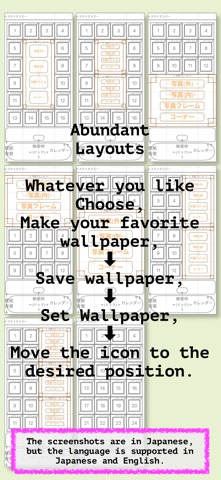
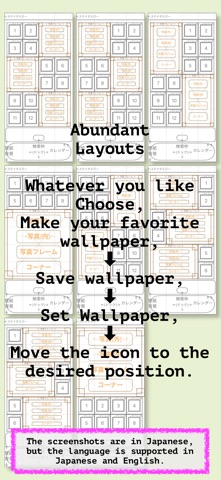
(1) Select the favorite layout.
(2) Tap the area you want to edit.
(3) Select a menu and paste an image or decorative image.
(4) The wallpaper image is completed.
(5) Save the image in your favorite way (save image or save creation history)
[Features]
(1) Anyone can create wallpaper easily.
(2) You can restart from the “Wallpaper creation history”.
(3) You can put a rounded corner image on the background where the icons are lined up, or put a frame around it.
(4) You can decorate the photo area with images.
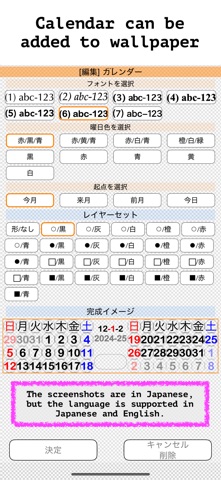
(5) A calendar can be inserted.
[Requests from the author]
Please tell people around you about this app.
If possible, please review the app.
Please share your wallpapers on social networking sites with any comments.
[How to move the position of the icons]
Move the icon as follows according to the number of shelves of the wallpaper you created and installed.
(1) Hold your finger on the icon (or press and hold the home screen).
(2) After a while, the icon will start shaking.
(3) While keeping your finger on the icon that is shaking, move it in any direction you like, such as horizontally, vertically, and diagonally (you can move the icon anywhere you like).
(4) After all the icons have been moved, press the Home button (or slide your finger from the bottom to the top of the screen).
(5) The icons will stop shaking.
---[Note]---
[About the size of the icon]
Please set the size of the icon to “Small”.
To do this, long-press the home screen > tap Edit in the upper left corner > Customize > select “Small” at the bottom of the screen.
[About sending and receiving the wallpaper you created]
When exchanging wallpapers via free email services or social networking services, the size of the wallpaper may be automatically reduced on social networking services.
When exchanging wallpapers, please make sure to send and receive the original size of the wallpaper. Please be especially careful when exchanging wallpapers of different sizes for other models.
[Turn on “Reduce parallax effect”]
Settings > Accessibility > Behavior > Reduce parallax effect > ON
[About Supporting for iPad]
The iPad wallpaper creation is not supported.
However, it is possible to create wallpaper for iPhone on iPad.
[About in-app purchases]
There are no in-app purchases at this time, but there is a possibility that some functions will be changed to a billing system in the future.