

WARBL Configuration Tool
WARBL Configuration Tool is made and published by Sonosaurus LLC. AppBrain is an independent app data site and isn't affiliated with Sonosaurus LLC. The app name, icon, screenshots and description belong to Sonosaurus LLC and are shown as published on the App Store.
AppBrain's verdict
Established- Rating on App Store
- 5.00
- 6 ratings
- Last updated
- September 19, 2024
- Size
- 722.0 KB
It doesn't have enough ratings yet to judge what users think.
User feedback
Ratings and reviews on the App StoreComments on WARBL Configuration Tool for iOS
We don't have enough comments to show example comments. Please check back later.
Store listing
By Sonosaurus LLC, from the App Store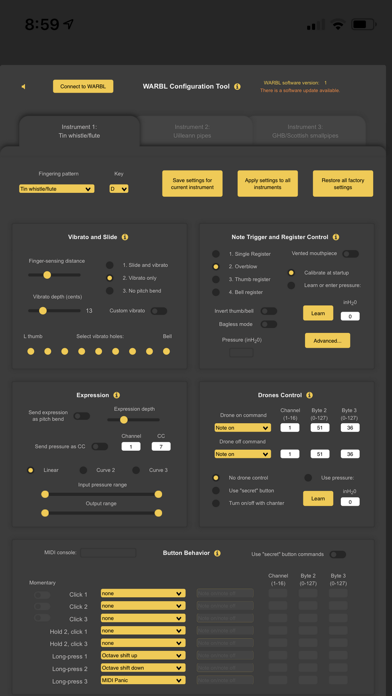
Description by Sonosaurus LLC Written by the developer, not by AppBrain. Click to read.
WARBL does not produce any sound on its own. It is designed to control hardware MIDI sound modules or MIDI sound module apps running on an iOS device, for example AppCordions "Celtic Sounds" or Roland Sound Canvas.
The WARBL Configuration Tool allows complete control over the air pressure sensitivity, vibrato/pitch bend, expression, and many other settings. You may adjust and save settings to design the instrument of your choice.
The WARBL supports saving three preset instrument configurations, for example, Whistle, Uilleann Pipes, and Great Highland Bagpipes. The buttons on the back of the WARBL may be programmed to switch between the instrument preset configurations, change the octave, send MIDI messages, and many other options.
To use, just plug in your WARBL to an Apple USB Camera Adapter connected to the Lightning port on your device, run the app, touch "Connect WARBL" at the top of the control panel and begin configuring your WARBL. Or if you have a WARBL2 with BTLE, press the BT MIDI button on the navigation bar to manage the connection to your WARBL wirelessly.
When connected, the status at the top of the page will show "WARBL Connected" and you'll see MIDI event information on the display.
Touch the yellow “info” buttons for instructions on using each section of the Configuration Tool.
Safety and technology
Found in the app by AppBrain- Price
- Free
- App size
- 722.0 KB
- Content rating
- Everyone
Technologies used by WARBL Configuration Tool
Releases
Updates seen on the App Store- Version
- 1.2
- Launched
- March 2019
No changelog data
Alternatives
Similar apps and more from Sonosaurus LLCAlternatives to WARBL Configuration Tool






More from Sonosaurus LLC




Rankings
App Store top chartsApp Store Rankings for WARBL Configuration Tool
About the app and developer
About WARBL Configuration Tool
WARBL Configuration Tool is a music app developed by Sonosaurus LLC.
User Ratings
WARBL Configuration Tool is rated 5.00 out of 5 stars. The rating is based on 6 ratings.
App Information
WARBL Configuration Tool is freely available from the App Store. The app size is 722.00 kB. The latest version available is 1.2. The last update was on September 19, 2024.
Technical Requirements
The app has a content rating of Everyone. The app has been available on the App Store since March 2019.
Developer information for Sonosaurus LLC
Address: